Honeycomb
Nev Rawlins
Watchface
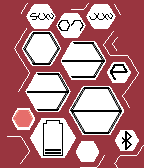
Description
A digital watchface in 12-hour or 24-hour format, depending on the watch settings.

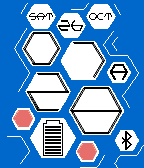
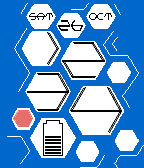
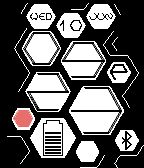
The idea for this watch was inspired by honeycomb, as the name suggests, with information displayed in the hexagonal cells.

The time is shown in the 2 pairs of large cells – top two showing hours, bottom two minutes.

Additional cells show:
- Day, day of month and month in the top 3 cells
- Battery level in the large cell bottom left
- Bluetooth connection in the bottom right cell
- In 12-hour format, 1 small cell near the hours shows A (am) or P (pm)
- Remaining small cells  randomly show as empty or full

Configuration enables choice of three background colors:
 - Black
 - Blue
 - Red

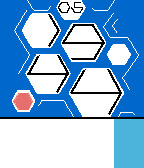
When Quick View appears, the day of the month is shown with the time.

The example screenshots show:
(1) 7:28AM Saturday 26 October, 90% battery, 12-hour
(2) 12:34 Saturday 26 October, 60% battery, 24-hour, no bluetooth
(3) 3:38PM Sunday 07 June, 20% battery, 12-hour
(4) 9:23PM Wednesday 10 June, 70% battery, 12-hour
(5) 19:44 (with Quick View)

Design created by Peter Fletcher and taken from the Tokyoflash Design Studio.  This watchface is published with the designer's permission, and sanctioned by Tokyoflash.

The original design can be found here:
http://blog.tokyoflash.com/2012/02/14/honeycomb-lcd-watch-2-ways-to-tell-the-time/
- DeveloperNev Rawlins · Is this you? Claim your app ›
- CategoryFaces
- PlatformsOG Pebble, Steel, Time/Time Steel, Time Round, 2, 2 Duo, Time 2 (scaled), Round 2 (scaled)
- Updated2016-10-05
- Version4.0