 4
4MultiCounter Decimal
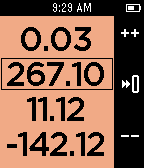
Tools & UtilitiesPeople are bad at remembering numbers. Pebble is good at always being on and displaying numbers. Use this app to count and remember up to 4 decimal numbers at a time. Don't worry about leaving to do something else with your watch, it will remember where you left off the next time you return. Use the right buttons to select which number to modify. Once you are modifying a number press the select button to switch between counting by 0.01, 0.10, 1.00, or 10.00. If you count high enough (or low enough) your number may run off the screen. Hold down the increment button or decrement button to count really fast or press and release to get a single count. Hold down the select button to reset the count to 0. Press the back button to return to selecting your number. Like all my apps, I don't want you to loose your phone so you will get a short long short vibration if your bluetooth is disconnected. An icon will show in the top left corner. Heart MultiCounter if you like it and check out Timeline and my Precisioneer watchfaces. I appreciate the hearts on those too! Counter
 26
26MultiCounter
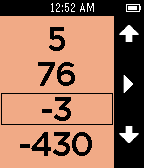
Tools & UtilitiesPeople are bad at remembering numbers. Pebble is good at always being on and displaying numbers. Use this app to count and remember up to 4 numbers at a time. Don't worry about leaving to do something else with your watch, it will remember where you left off the next time you return. Use the right buttons to select which number to modify. Once you are modifying a number press the select button to switch between counting by 1, 10, 100, or 1000. If you count high enough (or low enough) your number may run off the screen. Hold down the increment button or decrement button to count really fast or press and release to get a single count. Hold down the select button to reset the count to 0. Press the back button to return to selecting your number. Like all my apps I don't want you to loose your phone so you will get a short long short vibration if your bluetooth is disconnected. An icon will show in the top left corner. Heart MultiCounter if you like it and check out Timeline and my Precisioneer watchfaces. I appreciate the hearts on those too! Counter
 9
9Precisioneer Lite: Light
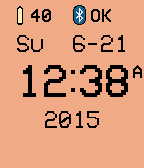
FacesLike the Precisioneer layout but are away from your charger and need to cut down on battery consumption? Use Precisioneer Lite. This is the "Light" version. Orange on Black is available in the "Dark" version. No weather or settings but still with the short long short vibration for a phone disconnect and battery monitoring. Special icon when the Battery is charging. AM/PM only shows up in 12 hour format. VCR_OSD_MONO by Riciery Leal Give it a heart of you like it!
 10
10Precisioneer Lite: Dark
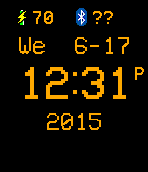
FacesLike the Precisioneer Color layout but are away from your charger and need to cut down on battery consumption? Use Precisioneer Lite. This is the "Dark" version. Black on Orange is available in the "Light" version. No weather or settings but still with the short long short vibration for a phone disconnect and battery monitoring. Special icon when the Battery is charging. Medium and Low battery icons at 40% and 20% respectively. AM/PM only shows up in 12 hour format. VCR_OSD_MONO by Riciery Leal Give it a heart of you like it!
 48
48Timestamp
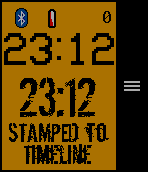
Tools & UtilitiesSave a Timestamp of the current time to the timeline just by entering the app! Set a button shortcut for one button logging. Use the microphone to label your Timestamp! (option to turn OFF) "STAMPED TO TIMELINE" will show up after the timeline pin request is sent (it might take a bit). It may take a few seconds to 15 min for the pin to actually show on the timeline, but you do not need to remain in the app. You can stay in the app for the Timestamp list and a fully functional watchface with a bluetooth disconnect warning (short long short vibration and icon) and low battery warning (icon @ 20% or below). In a BIG monospaced font you will see the current time above the Timestamp (rubber stamp font, get it?). The minutes since you stamped will show at the top. Use your pebble for other tasks, go to the past timeline or the list in the app to see your Timestamp. Why would you use this? Keep track of fuzzy timing: At bedtime you tell your child you will stay 5 more minutes. You look at your watch. Several minutes later you look at your watch but can't remember what time it was the first time. Leave a breadcrumb trail of time. Like when you take your ibuprofen, track potty training... The last 50 Timestamps are saved in a list. Use the options to manage your list. Create your own use case with this simple tool at your finger tips (literally)! Note: Past Timeline remembers 24-48 hours. App remembers last 50 timestamps. Font Dirty Ego-MisprintedType stamPete-http://www.joebob.nl VCR OSD Mono-Riciery Leal Give it a heart of you like it!
 39
39Precisioneer Color
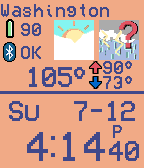
FacesData for those who need to know precisely how you want it. Now in COLOR! Configurable, because everyone is a little different and sometimes picky (see Engineer). Use Pricisioneer for black/white watches. Get a free api key to get UndergroundWeather! Instructions on settings page. Otherwise use openweathermap.org Settings must have an internet connection. Serial number is on the back of your watch. Thanks to Matt https://setpebble.com/ Background & Text Colors different for day & Night! Choose from 64 options each! Seconds-because you like to be precise (or save battery by turning off) No leading 0s for date and hours-because they are annoying. Pick Month-Day or Day-Month order. Numerical Battery level-rounded to the nearest 10 with icons for high, medium, low, and charging. Bluetooth status with custom short long short vibration for when it goes ??-So you realize you left your phone in the car or on your wireless charger Choose Forecast on Left (or right) so you can plan what to wear. Current icon and temp in the center so you know what the outside is doing when you are far away from windows (UndergroundWeather "Feels like temperature"). Updated every 20 min. Temperature C or F (setting) Current City-So you know where your phone thinks it is Extra time data-A/P, year, or none Customizable Day Abbreviation-English days not preferred? Need both letters to be capitalized? Monospaced Font - so all the text is in a predictable place. Free font is VCR_OSD_MONO by Riciery Leal Give it a heart of you like it!
 53
53Precisioneer
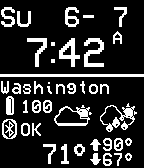
FacesData for those who need to know precisely how you want it. Configurable, because everyone is a little different and sometimes picky (see Engineer). Use Pricisioneer COLOR for Pebble Time Watches! Get a free api key to get UndergroundWeather! Instructions on settings page. Otherwise use openweathermap.org Settings must have an internet connection. Serial number is on the back of your watch. Thanks to Matt https://setpebble.com/ Seconds-because you like to be precise (or save battery by turning off) No leading 0s for date and hours-because they are annoying. Pick Month-Day or Day-Month order. Numerical Battery level-rounded to the nearest 10, and special charging icon. Bluetooth status with custom short long short vibration for when it goes ??-So you realize you left your phone in the car or on your wireless charger Choose Forecast on Left (or right) so you can plan what to wear. Current icon and temp in the center so you know what the outside is doing when you are far away from windows (UndergroundWeather "Feels like temperature"). Updated every 20 min. Temperature C or F (setting) Current City-So you know where your phone thinks it is Extra time data-A/P, year, or none Customizable Day Abbreviation-English days not preferred? Need both letters to be capitalized? Black or White Background that can invert at night Monospaced Font-so all the text is in a predictable place. VCR_OSD_MONO by Riciery Leal Give it a heart of you like it!