 8
8Phone Dialer
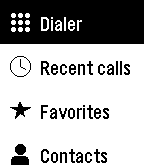
Tools & UtilitiesPhone Dialer lets you place calls from your Pebble without reaching for your phone. Call a favourite, browse your contacts, call back someone from your recent calls, or type any number on the keypad. Favorites shows your starred contacts, and Contacts is grouped from A to Z so you can find anyone in a few presses. Recent calls lists your latest 100 calls, with missed, incoming, and outgoing calls clearly marked. The keypad covers digits, *, #, and + for international numbers. Every call asks you to confirm first, so a stray press never dials anyone. On Pebble Time 2 and Pebble Round 2, tap keys, swipe through lists, and tap the green Call button, or use the buttons on any Pebble. Choose a dark or light theme, and arrange the main menu in the order you use most, either in the phone app or on the watch. Android only. Phone Dialer requires its free Android companion app, which places the calls through your phone. Allow Phone access to make calls, Contacts for Favorites and Contacts, and Call history for Recent calls; each feature works on its own. Your contacts and call history stay on your phone and watch and are never sent to a server. On dual-SIM phones, set a default calling SIM. For emergencies, use your phone directly. Created by Ark-am. Discover our work and custom software development services at https://ark-am.com/
 6
6Gnomon 2
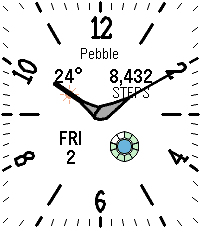
FacesGnomon 2 pairs a classic analog dial with the everyday details you want at a glance. Tapered leaf hands and a minute track that follows the screen frame your choice of turned classic or upright modern hour numbers. Four information areas show local weather, health data, the day and date, and a battery ring with phone connection and Quiet Time status. Tap the watch to cycle through steps, distance, active calories, active minutes, sleep, and heart rate where supported. Hide individual information areas for a simpler dial, or enable the option that moves them away from the hands when space allows. Make it yours with a light or dark background, a custom dial name, font choices for modern numbers and information, and an optional second hand with colour choices on colour watches. Optional phone disconnect vibrations respect Quiet Time. Settings are available in the Pebble phone app. Weather supports Celsius and Fahrenheit and needs your paired phone's location and internet access, with no weather account or API key required. Health data is unavailable on the original Pebble, and heart rate requires a supported sensor. Created by Ark-am. Discover our work and custom software development services at https://ark-am.com/
 5
5World Clock
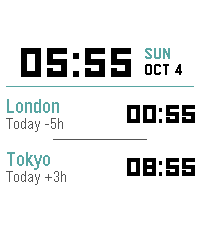
FacesKeep your world in view with World Clock, a clear digital watchface for life across time zones. Your local time takes centre stage beside the day and date, with the time in two other cities just below. Choose from 49 cities around the world and give each one your own label, whether it is home, family, or your team's office. Each city shows its time difference from yours and the day when it differs, making it easier to plan a call or follow a loved one's day. Half-hour and 45-minute time zones are supported too. Use 12-hour or 24-hour time, or follow your watch's setting. Personalize the time and text fonts, choose background, time, and accent colours on colour watches, or use a light or dark background on black-and-white models. Set everything up through the Pebble phone app. The paired phone refreshes time-zone offsets hourly, including daylight-saving adjustments for supported cities. When your phone is away, the watch continues using the last received offsets; reconnect to pick up any changes. Created by Ark-am. Discover our work and custom software development services at https://ark-am.com/
 6
6Sketchy Weather Analog
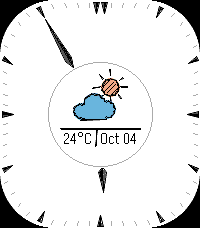
FacesSketchy Weather Analog adds a little pencil-and-paper character to your Pebble. Hand-drawn weather icons and everyday information sit inside a central ring, while the hour and minute hands stay outside it to keep the centre clear. Choose the refined Elegant dial or the playful Sketchy style, with a light Paper or dark Chalkboard background. Customize the fonts and show or hide hour numbers to finish the look. Build up to four centre screens using weather, date, battery, steps, and heart rate. Each screen can pair a main item with a second value. Tap the watch to switch screens, or let them change automatically every minute. Weather artwork changes with the conditions and includes sun and moon variations for day and night. Phone connection and Quiet Time indicators keep you informed, with optional disconnect vibrations that respect Quiet Time. Settings are available in the Pebble phone app. Weather supports Celsius and Fahrenheit and needs your paired phone's location and internet access, with no weather account or API key required. Steps require a watch with health support, and heart rate requires a supported sensor. Created by Ark-am. Discover our work and custom software development services at https://ark-am.com/
 4
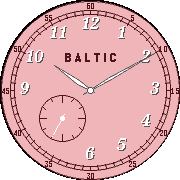
4Baltic
FacesBaltic brings the character of a classic dress watch to your Pebble, with elegant Breguet-style hour numbers, slim leaf hands, a railroad minute track, and a small seconds dial. Choose from five dial colours: Salmon, Navy blue, Silver, Black and gold, or Azure blue. Add your own name to the dial, choose your number and information fonts, and switch running seconds on or off to suit your preference and battery use. An optional second small dial puts the date, weather, battery level, or health data on your wrist. In Health mode, tap the watch to cycle through steps, distance, active calories, active minutes, sleep, and heart rate where supported. Designed for round and rectangular Pebble screens, with light or dark alternatives on black-and-white watches. Customize it through the Pebble phone app. Weather supports Celsius and Fahrenheit and needs your paired phone's location and internet access, with no weather account or API key required. Health data depends on your watch; the original Pebble shows the date instead. Created by Ark-am. Discover our work and custom software development services at https://ark-am.com/
 10
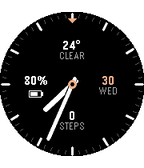
10Meridian
FacesMeridian is a clean analog watchface that keeps your daily essentials within easy view. Arrange weather, date, battery and connection alerts, or health data at four positions around the dial, or leave any position empty for a simpler look. Check the temperature and conditions, see your battery percentage, and tap the watch to cycle through steps, distance, active calories, active minutes, sleep, and heart rate where supported. Optional phone disconnect vibrations respect Quiet Time. Choose a light or dark background, accent colours on colour watches, and separate fonts for the hour numbers and information. Show or hide hour numbers, add an optional second hand, and rotate the dial to suit how you wear your watch. The layout adapts to round and rectangular screens and makes room for Timeline Quick View. Customize Meridian through the Pebble phone app. Weather supports Celsius and Fahrenheit and needs your paired phone's location and internet access, with no weather account or API key required. Health data depends on your watch; the original Pebble shows the month and year instead. Heart rate requires a supported sensor. Created by Ark-am. Discover our work and custom software development services at https://ark-am.com/
 10
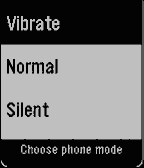
10Phone Sound Mode
Tools & UtilitiesPhone Sound Mode puts your phone's ringer one press away. Heading into a meeting, a class, or a quiet room? Switch your phone to Vibrate, Normal, or Silent straight from your Pebble, without taking your phone out of your pocket. Open the app, choose a mode, and you're done. A short vibration confirms that your phone has changed, and the app returns to your watchface a moment later. If the change can't be made, the app stays open and tells you why, so you can try again. Clear icons for each mode make it easy to pick the right one at a glance, on round and rectangular screens, in colour or black and white. Android only. Phone Sound Mode requires its free Android companion app. Open the companion once and allow Do Not Disturb access, which Android needs to switch into and out of Silent reliably. Nothing is sent to a server; the watch talks only to your phone. Created by Ark-am. Discover our work and custom software development services at https://ark-am.com/
 3
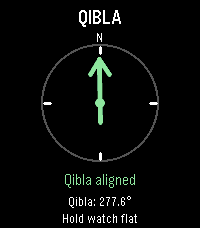
3Qibla Compass
Tools & UtilitiesQibla Compass points you toward the Kaaba in Makkah from wherever you are, right on your wrist. Raise your watch, and an arrow shows which way to turn, with simple directions such as "Turn left 12°". When you face the Qibla, the arrow turns green, the screen reads "Qibla aligned", and your watch gives a short vibration, so you can find the direction without staring at the screen. The exact Qibla bearing for your location is shown too. For accuracy, the watch corrects its compass from magnetic north to true north using the World Magnetic Model (WMM-2025) for your location and today's date. If the compass needs calibrating, the app asks you to move your watch until it is ready. If your location or compass can't be read, tap the screen or press Select to try again. Designed for Pebble Time 2. Your paired phone provides your location, so allow location access for the Pebble app; no account or internet service is needed for the calculation itself. Like any compass, readings can be affected by nearby metal, magnets, or electronics, so hold your watch flat and away from them. Created by Ark-am. Discover our work and custom software development services at https://ark-am.com/