 225
225Gemini Voice & Text
Tools & UtilitiesThis app turns your Pebble Time 2 into a fully functional conversational assistant using Google's Gemini with model and voice selection. If you enjoy what I am making don't forget to heart the app. If you want to support continued development, consider a donation: https://ko-fi.com/ericmccormick Version 1.3 and newer should support all Pebble watches with a microphone. I only have a Time 2, so please let me know if you run into issues. If your device does not have a speaker, you should only be asked for the Gemini API key. If your device has both a microphone and a speaker than you will be asked for two API keys. For help on how to get the API keys, read the the setup guide at https://tinyurl.com/PebbleGemini.
 101
101VitalGauge
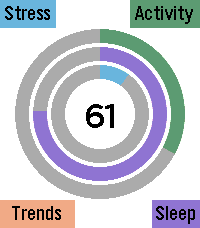
Health & FitnessVitalGauge is a fully autonomous, 100% offline biometric health suite engineered specifically for the Pebble Time 2. Designed for maximum privacy and battery efficiency, VitalGauge synthesizes your physiological data to provide real-time insights into your body's true energy levels. Comprehensive Health Tracking VitalGauge does more than just track steps; it maps your entire physiological state throughout the day: Energy Reserve: A singular, dynamic score synthesized from your sleep quality, daily exertion, and cardiac efficiency, telling you exactly how much "gas is left in the tank." Activity & Sleep Architecture: Automatically visualizes your daily movement and categorizes your sleep into Deep, Light, and Awake cycles. Historical Trends: Access a unified hub to visualize your progress across Energy, Sleep, Stress, and Activity trends over the last week. Smart Stress Management Never be caught off guard by a stress spike again: Intelligent Background Monitoring: Runs a high-efficiency background worker that monitors for heart rate anomalies while you are stationary. Hybrid Stress Algorithm: When a potential spike is detected, the app performs a high-resolution, 60-second background EKG scan to verify your stress score using a custom variance-based algorithm. Timeline Integration: Verified anomalies trigger a silent, persistent pin pushed directly to your Pebble Timeline history, allowing you to review events without intrusive alarms. Personalization & Interventions VitalGauge puts you in the driver’s seat of your own biometric data: Interactive Settings UI: Hold Select at any time to access a deep customization menu. Toggle between Light and Dark modes, adjust haptic intensity, set your preferred breathing style, and manage backlight behavior. Guided Breathing: Follow a 5-minute, audio-visual breathing routine—complete with dynamic pacing rings and hardware-optimized audio cues—designed to actively lower your heart rate. Offline Privacy: VitalGauge operates completely on-device. There are no accounts to create, no cloud servers to sync with, and your health data never leaves your watch. If you enjoy what I am making don't forget to heart the app. If you want to support continued development, consider a donation: https://ko-fi.com/ericmccormick
 65
657day ICS Calendar
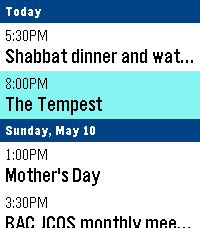
DailyLeave your phone in your pocket. 7-Day ICS Calendar brings your Google Calendar(any ICS should work) directly to your wrist, beautifully organized and always available—even when you're offline. Built from the ground up for speed, reliability, and a native Pebble feel, this app securely bridges your private Google Calendar directly to your watch, ensuring you never miss a meeting. Key Features: AppGlance Support: See your next upcoming meeting directly on your Pebble’s system launcher menu without even opening the app! (Pebble OS 4.0+) Extreme Customization: Long-press the Select button on the main menu to open the Settings. Instantly toggle between Dark/Light Mode, switch to Large Fonts for better readability, or choose to show/hide past events. True Offline Support: Going for a run without your phone? Your events are permanently saved to the watch's internal memory. Close the app, open it later, and your schedule is instantly there. Battery-Conscious Sync: The app uses a smart background caching system to prevent battery drain, waking your phone’s Bluetooth only when you need fresh data. Need an instant update? Just hit "Force Sync" in the settings menu. Scrollable Detail View: Click any event to open a dedicated detail view. Read massive event descriptions and long titles using the physical buttons to scroll, complete with a native top status bar so you never lose track of time. Universal Compatibility: Designed to support all Pebble hardware, including dynamic layout adjustments for the Pebble Time Round and high-contrast mapping for monochrome screens like the Pebble 2. Global Formatting: Fully respects your preference for 12-hour (AM/PM) or 24-hour time formats. How to Setup: 1. Go to your Google Calendar settings on a computer. 2. Find your calendar and scroll down to "Secret address in iCal format." 3. Copy that link and paste it into the App Settings page on the Pebble phone app. 4. Hit Save, and your watch will securely sync your next 7 days! If you enjoy what I am making don't forget to heart the app. If you want to support continued development, consider a donation: https://ko-fi.com/ericmccormick
 52
52Timeline WX
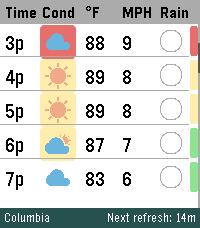
DailyYour next 48 hours, visualized. Built specifically to push the limits of the Pebble Time 2's high-resolution display. Whether you're coordinating a Scout campout, dialing in your morning commute, or tracking incoming storms, Timeline WX delivers precision meteorological data at a glance, with no squinting required. Instead of static daily summaries, smoothly scroll through a continuous 48-hour timeline. We have stripped away cluttered text and replaced it with clean, data-driven visual indicators so you can assess your environment instantly. THE ARCHITECTURE Instant Offline Resume: Your timeline is cached directly to the watch's flash memory. Launch the app and see your forecast instantly, even if your phone is disconnected. Auto-Pruning Timeline: The watch continuously syncs with the hardware clock to automatically hide past hours, ensuring your scroll always starts exactly at "Now." Ultra-Battery Optimized: Completely rewritten to run natively on the Pebble OS background clock, reducing battery drain by up to 98 percent. FREEDOM OF WEATHER DATA (NO API KEY REQUIRED) You are no longer locked into a single weather provider. Timeline WX now features an internal translation engine, allowing you to seamlessly swap between four world-class meteorological APIs directly from the settings menu. Choose the provider that works best for your specific geographic location: Open-Meteo is the default option. It is great for global use and requires no API key, though it relies on broader aggregated models. The National Weather Service (NWS) is highly accurate for US locations using regional grid data, but it is restricted to the US and lacks UV Index data. Yr.no / Met.no provides world-class precision MEPS modeling for European and Nordic locations, but also lacks UV Index data. OpenWeather OneCall 3.0 provides complete global data including the UV Index, but requires registering for a personal API key. (Note: If a selected provider does not support UV data, the UV safety bar will gracefully hide itself rather than displaying false information). SMART ENVIRONMENTAL WARNINGS Stop reading numbers and start seeing conditions. Timeline WX actively processes combinations of temperature, wind speed, UV, and humidity to color-code threats. Dynamic Hazard Badges: A colored badge sits directly behind the weather icon based on a custom algorithm. Yellow means uncomfortable (muggy, hot, or cold). Orange means a warning (high winds, severe UV, or approaching storms). Red means dangerous (extreme temperatures or severe weather). Temperature Alerts: Values turn Red when blistering hot (90F or higher) and Blue when freezing (32F and below). High Wind Warnings: Wind speeds turn Orange when gusts exceed 20 MPH, which is perfect for knowing when to tie down the tent fly. Midnight Dividers: High-contrast double lines and red timestamps explicitly mark when the forecast crosses into a new day. INTUITIVE RAIN AND UV TRACKING Rain Pie Charts: Ditch the confusing percentage text. Custom blue pie charts show you exactly how likely it is to rain, hour-by-hour. UV Safety Bar: A dynamic, color-coded safety bar runs down the right edge of the screen, letting you know exactly when you need sunscreen on a Green to Purple scale. CORE FEATURES AND CUSTOMIZATION On-Wrist Settings Menu: Long-press the Select button to toggle Dark Mode or swap units directly from your watch, and changes instantly sync back to your phone. Decoupled Measurements: Mix and match your preferred units. Supports Fahrenheit, Celsius, Kelvin, and Rankine for temperature, alongside MPH, KPH, m/s, and Knots for wind. Dark Mode: Invert the UI for a high-contrast, low-light optimized viewing experience. Live Telemetry Banner: The bottom banner dynamically displays live countdowns to the next refresh, active server connections, and current location. Precision Location: Choose between automatic Phone GPS or a manual Zip Code, with background refresh intervals adjustable from 15 minutes to 2 hours. SETUP INSTRUCTIONS Install the app, and you are immediately ready to go using Open-Meteo as the default provider! If you prefer to use OpenWeather, you will need to supply your own key to keep the app free. Sign up for a free account at OpenWeatherMap.org. Subscribe to the "One Call 3.0" API and generate a free API Key. Set your daily call limit to 1000 to ensure it remains completely free. Paste the key into the Timeline WX settings page, switch the provider dropdown to OpenWeather, and save. If you enjoy what I am making, don't forget to heart the app! If you want to support continued development, consider a donation at https://ko-fi.com/ericmccormick
 45
45KinetiCast
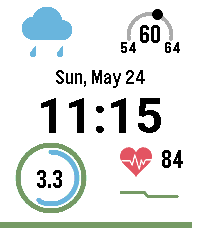
FacesKinetiCast 2.2: The Ultimate Telemetry Dashboard A high-density, data-rich dashboard built specifically for high-resolution color Pebble displays. KinetiCast delivers a complete overview of your environment and vitals at a single glance—balancing live atmospheric data with granular health metrics without sacrificing battery life. Zero setup required out of the box! Key Features Zero-Setup Weather Engine: Instant, global weather out of the box powered by Open-Meteo—no API key required! Prefer another source? Switch seamlessly between multiple weather providers in the settings: Open-Meteo: Free global forecasting with native UV Index. Yr.no / Met.no: European gold-standard forecasting from the Norwegian Meteorological Institute. National Weather Service (NWS): High-accuracy official US government forecasting. OpenWeatherMap: Advanced OneCall 3.0 integration for users with custom API keys (your key is preserved even if you temporarily switch providers). Interactive 3-Day Forecast Panel: Flick your wrist to smoothly slide away your health telemetry and reveal a clean 3-day extended forecast with daily highs, lows, and condition icons. Set your preferred default panel (Health or Forecast) in the settings! Adaptive Health Rings: Apple Watch-style concentric progress rings track your Active Minutes and Step Count. KinetiCast automatically pulls your rolling weekly averages directly from Pebble OS to set dynamic, personalized daily goals. Atmospheric Telemetry & UV Arc: Displays current temperature, daily highs/lows, and weather conditions. The custom outer gauge plots live UV Index intensity on a 200-degree vector arc. Live HR Sparkline: Displays your live BPM alongside an exaggerated 20-minute historical graph that color-codes based on your active heart rate zones (Resting, Normal, Elevated, High). Shift-Agnostic Sleep Briefing: An elegant overlay summarizes your total and deep sleep quality. It triggers automatically after a 2+ hour sleep cycle and smoothly dismisses with a simple wrist flick. Flexible Location Options: Toggle between phone GPS or enter a manual location (city name or zip code) using built-in geocoding engines. Solar-Synced Themes: Choose Light Mode, Dark Mode, or Auto to flip the UI palette based on your precise local sunrise and sunset times. Smart System Status: Features a sleek battery percentage bar across the bottom of the screen (turns red below 20%) and alerts you with a quiet-time-aware double-pulse vibration if your Bluetooth connection drops. Requirements & Setup Pebble Health: Required to track steps, distance, active minutes, and sleep. Device with built-in optical heart rate hardware required for HR features. Location Services: Phone location permissions or manual location entry required for localized weather. API Key: Completely optional! Only required if using OpenWeatherMap as your chosen provider. Customizations for update frequency, 12/24h time, and metric/imperial units are available in the settings page. If you enjoy KinetiCast, don't forget to ❤️ heart the app! If you want to support continued development, consider a donation: https://ko-fi.com/ericmccormick