Simplee
A.J
Watchface
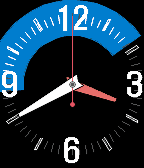
Description
This is demo version. you need a license and can can get it from http://andrwj.com/blog/?p=3564


씸쁠

- 다양한 옵션을 제공하는 간결한 와치페이스 화면입니다.
- 시계화면 업데이트를 최소화하기위해 시계화면이 몸쪽 밖으로 향하면 화면 업데이트가 멈추고, 손목을 몸쪽으로 살짝돌리기만해도 초침이 움직입니다. (각도조정옵션제공)
- 숫자, 시침/분침 마크, 애니메이션, 십자선, 다이버마크등은 모두 옵션으로 Settings를 통해 재설정가능합니다.
- 뒤집어서 평평하게 2초 유지후 진동을 느끼자마자 시계를 원래위치로 돌리면 알람을 토글합니다.
- 마찬가지 방식으로 4초를 유지하면 블루투스 경고를 토글합니다. (진동은 두번)
- 6초를 유지하면 잠자기 모드로 들어갑니다 (진동은 세번)
- 잠에서 깨우려면 흔들어주세요.
- 블루투스 끊어짐에따라 진동경고가 울릴때 시계를 뒤집는 동작으로 간단한 진동을 끌수있습니다.

Simplee

A simple and featured watchface type application.
It saves battery by observing acceleromter and update or stop by the condition where the screen looks:

- It updates only if you turn (or tilt) wrist to your face.
- Many options could be toggled in Settings.
- If flip & hold upside down 2 seconds. Flip back as soon as it gives a vibration. Then it will toggle BT warning setting,
- If flip & hold upside down 4 seconds, It will toggle BT warning setting. (you get two vibrations)
- If flip & hold upside down 6 seconds, It stop all update and sleep. (you get three vibrations)
- To wake, shake.
- When you feel BT warning vibration, just flip upside down to turn off the vibration.
- DeveloperA.J
- CategoryFaces
- PlatformsOG Pebble, Steel, Time/Time Steel, Time Round, 2, 2 Duo, Time 2 (scaled), Round 2 (scaled)
- Updated2015-12-16
- Version2.13