 6
6Signals
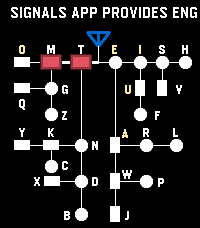
Tools & UtilitiesSignals - Touch, Hear, Learn Practice English and Korean Morse code on your Pebble Time 2. Enter code by touch, hear each mark, replay saved sentences, and clear advancing letters in Game Mode. Korean practice requires a Korean language pack. --- [Touch input] By default, the bottom half of the screen enters dots and dashes; the top half completes characters and adds spaces. A short touch makes a dot, and a longer touch makes a dash. - English: Tap the completion area to finish a letter. Tap again with no pending letter to insert a space. - Korean: Tap to finish a consonant or vowel, then tap again when the syllable is ready to commit it. Tap with no pending input to insert a space. Turn Explicit Boundary Input (EBI) off to use the whole screen for marks and let pauses finish characters and words automatically. The phone Settings page lets you change the touch areas and assign the Cancel Character and Clear All Input buttons. --- [Practice buttons] - DOWN: Switch between enabled English and Korean codes. - Double DOWN: Toggle sound temporarily. - Hold DOWN: Enter Game Mode. - BACK: Exit Signals. - Double BACK: Open MENU. - UP: Cancel the current character. - Hold UP: Clear all input. - SELECT: Replay the remembered sentence. - Double SELECT: Remember the current sentence. - Hold SELECT: Clear replay memory. Press SELECT during REPLAY to stop playback. --- [MENU and timing] Use UP and DOWN to navigate, SELECT to change an option or open a submenu, and BACK to return. MENU includes WPM, Seconds to keep Light On, Speaker Volume Level, Farnsworth Timing, Explicit Boundary Input, Morse Codes, and Game. WPM cycles through 5, 10, 15, and 20; the default is 10 WPM. Speaker volume cycles through OFF, 20%, 40%, 60%, 80%, and 100%. This saved volume setting is separate from the temporary double-DOWN sound toggle. Farnsworth Timing keeps dots and dashes at the selected WPM while making character and word gaps four times longer. REPLAY uses Farnsworth spacing whenever it is enabled, regardless of EBI. In practice and Game Mode, it affects timed character completion and spacing when those options are in use. --- [Game Mode] 1. In practice, double-click SELECT to remember a sentence. It is also sent to the phone's saved sentence list. 2. Open MENU → Game → Fetch Sentences to load saved sentences onto the watch. Set the sentence count and game speed options in the same submenu. 3. Hold DOWN to enter Game Mode, then touch the screen to start. Enter Morse code to remove the rightmost matching visible letter before it reaches your input position. 4. Clear every letter to win. View your game history and typing speed in the phone Settings page. During a game, DOWN switches enabled codes, double DOWN toggles sound, BACK or hold DOWN returns to practice, and double BACK opens MENU and pauses the game. You can also type a sentence in the phone Settings page and send it directly to the watch for REPLAY. To add that sentence to the phone's saved Game list, display it in practice and double-click SELECT
 12
12nBack
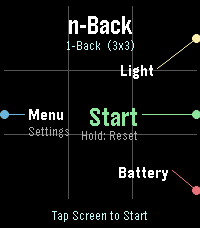
GamesnBack - Advanced Working Memory Training for Pebble Time 2 (Emery) Elevate your cognitive performance with nBack, a scientifically grounded working memory training application crafted exclusively for the Pebble Time 2 (Emery Platform). Rooted in cognitive neuroscience standards, nBack challenges your brain to retain and update dynamic sequences of information in real time, expanding your active working memory capacity and attentional control. KEY FEATURES: - Multi-Modal Stimuli: Train across multiple modalities simultaneously, including Spatial Position (3x3 grid), Color palette, 10 Geometric Shapes, Numbers (1-9), Phonetic Letters, Haptic Vibration patterns, and Audio Morse tones. - Adaptive Auto-Leveling: Automatically scales difficulty from 1-Back up to 7-Back based on your real-time performance thresholds. - Full Emery Hardware Utilization: Optimized for the 200x228 64-color Sharp MIP display, capacitive touchscreen, 4 physical buttons, and built-in raw tone generator. - Flexible Input: Respond using tactile physical buttons or intuitive touchscreen taps. - Customizable Protocols: Fine-tune exposure times, pause intervals, stimulus combinations, and performance thresholds. TRAINING STATISTICS & SETTINGS (BETA): Access the companion Settings page directly from your Pebble mobile app to inspect your cognitive progression: - Peak n-Back level, average accuracy rate, and total completed sessions. - Sandboxed local storage powered by your phone browser's Origin Private File System (OPFS). - Complete control over session logging via the in-app 'sync Data' preference toggle. Challenge your mind, track your neuroplastic progress, and master working memory on your wrist.
 7
7Slow
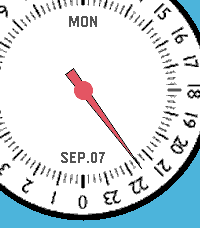
DailySlow - 24-Hour Single Hand Watchapp Experience time at a calm, natural pace with Slow, a minimal 24-hour single-hand watch application for Pebble inspired by classic 24-hour timepieces. Engineered with a custom finite state-machine architecture, Slow completely eliminates redundant screen redraws to deliver ultra-low battery consumption. KEY FEATURES • 24-Hour Single Hand Dial: Follow the full daily cycle with a single continuous hour hand across 4 distinct color styles. • 3D Angle-Aware Second Hand: Toggle a high-precision second hand on demand (Double UP). It tracks smoothly while you look directly at the watch and instantly disappears to freeze screen rendering the moment you turn your wrist away or rest it flat. • Blank (Deep Sleep) Mode: Enter a zero-power standby state with a single UP click, shutting down all timers and sensors for 100% MCU deep sleep while keeping a clean static dial. • Quick Pomodoro & Smart Alarm: Instantly launch a preset countdown timer with a long press on DOWN, or set customized alarms with auto-accelerating buttons and native system wakeup integration. • Auto-Respawn Keep-Alive: Exiting with a single BACK click automatically relaunches Slow via the Wakeup API, giving you full watchapp power with watchface-like accessibility. • Protection Alerts: Visual battery limit rings, Bluetooth disconnect vibration warnings, and flip-to-mute gesture support. BUTTON CONTROLS • UP (Long Press): Open full Settings Menu (Preferences) • UP (Double Click): Toggle angle-aware Second Hand mode • UP (Single Click): Enter Blank (Deep Sleep) Mode • SELECT (Single Click): Open interactive Alarm Setting • SELECT (Double Click): Toggle visual Battery Warning rings • SELECT (Long Press): Cancel all scheduled alarms • DOWN (Single Click): Toggle Day and Date display • DOWN (Double Click): Change dial face style (4 themes) • DOWN (Long Press): Start Quick Alarm (Pomodoro timer) • BACK (Single Click): Exit with Auto-Respawn (auto-relaunch) • BACK (Double Click): Quit application completely • Any Button (in Sleep): Wake up with smooth hand-winding animation For detailed guides, release notes, and configuration options, please visit: https://andrwj.com/pebble-slow-watchapp --- Slow watch for pebble, inspired by slow-watches.com Permission granted by Slow Watch to use design & the name 'Slow'
 86
86Glimmer
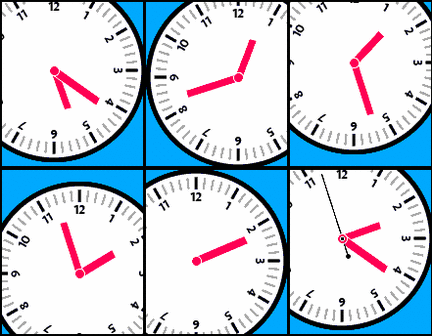
Faces§ Glimmer is an elegant, ultra-battery-efficient analog watchface crafted exclusively for Pebble Time 2, powered by the modern Pebble SDK. It is designed for those who want to enjoy the aesthetic beauty of a live ticking second hand and resonant time chimes without ever worrying about battery life. --- § Features & Visual Excellence: ❑ High-Resolution Emery Architecture: Tailored for Pebble Time 2 (200 × 228, 64 colors) featuring solid 12px hour and minute hands, high-contrast uppercase Day & Date, and a center-orbiting dial background. ❑ 4-Axis Independent Smooth Rolling: Upon startup or return, the hour hand, minute hand, second hand, and orbiting dial background wind forward simultaneously in their own domains within a single turn. The animation glides into the exact wall-clock second without skipping a single tick. ❑ Live Second Hand with Smart Battery Saving: Enjoy a live second hand anytime you want. Choose to keep the second hand running continuously, or display it for a customizable peek duration (0 to 60s) after rolling before transitioning to minute-only updates to conserve energy. --- § Resonant Time Chime: Morse Audio & Dynamic Haptics: ❑ 24H Morse Code Audio Chime: Announces the time in international Morse code (24H HHMM format, e.g. 03:30 → 0330) through the watch speaker, inheriting the pure 523Hz (C5) sine wave tone from nBack with strict standard unit timing ratios (dot, line, gap3, gap7). ❑ Dynamic Haptic Vibes: Feel the time silently on your wrist with 5 distinct vibration styles—Single Pulse, Double Pulse, Triple Pulse, Crisp Tick, and an innovative Morse Code Haptic pattern—with 5 levels of tactile intensity. ❑ Flexible Smart Scheduling: Choose between simple hourly chimes (:00) or specify custom moments using flexible expressions (e.g. `1, 2, 3` for hours on the clock, `1:15, 2, 3:34` for exact times, or `:20` for every hour at :20). Your custom schedule is persistently preserved even when toggling modes. ❑ Instant Testing Shortcut: Double-click the SELECT button anytime on the watchface to audition your configured sound and vibration immediately. --- § Scheduled Deep Sleep & Extreme Power Efficiency: ❑ Zero-Sensor, Zero-Tick Hibernation: Set your custom sleep window (00:00 ~ 23:59). When entering deep sleep, all display tick services and chime notifications are completely suppressed and all hardware sensors remain powered down—eliminating CPU wakeups and display redraws entirely. ❑ On-Demand Catch-up During Sleep: Launching the watch during sleep hours immediately plays the smooth catch-up rolling animation to reveal the current time. Once the time is confirmed, it seamlessly returns to sleep mode with dimmed dark-gray hands and a masked dial, preserving maximum battery life. ❑ Interruption-Proof Sleep Guard: System notifications or quick dialog popups will never accidentally wake the watch during sleep hours. --- § Modern Mobile Settings: ❑ Instant Sound Preview: Audition your Morse chime directly inside the settings page powered by the HTML5 Web Audio API, featuring dynamic volume response and a dual-line live visualizer. ❑ Auto-Detecting Bilingual UI (KO/EN): Automatically matches your smartphone's system language. ❑ Full Palette Customization: Choose any color from the 64-color Pebble SDK palette for the hands, center circle, and dial typography.