Phone Voice Commands
Ark-am
Watchapp
Description
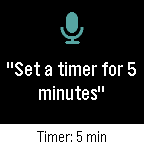
Phone Voice Commands lets you speak to your Pebble and have your Android phone do the work. Open the app, say what you need, check the words on the confirmation screen, and your phone carries it out. The answer appears on your watch, with one vibration when it worked and two when it did not.

Things you can say:

Calls and texts
- "Call Mom", "Call Sam on his mobile", "Ring Dad at work"
- "Call 555 1234", "Dial +1 555 123 4567"
- "Text Sam I'm running late", "Send a message to Mom saying happy birthday"

Directions
- "Navigate to the airport", "Take me home", "Directions to 221 Baker Street"
- "Walk to the park" for walking directions

Timers and alarms
- "Set a timer for 5 minutes", "Timer for an hour and a half"
- "Set an alarm for 7:30 am", "Wake me up at 6", "Alarm at noon"
- "Wake me up in 20 minutes"

Music and volume
- "Play", "Pause", "Next song", "Previous song"
- "Volume up", "Volume down", "Volume 50 percent", "Max volume"
- "Mute", "Unmute"

Flashlight and apps
- "Flashlight on", "Turn off the torch"
- "Open Spotify", "Launch the camera"

Say "Help" to see a few examples on your watch.

You can speak naturally: "Hey, can you turn on the flashlight please?" works as well as "Flashlight on". Numbers can be spoken as words or digits. Contacts are matched by whole names, so the app never guesses; if two people share a name, it asks which one you meant. Texts keep your words and punctuation exactly as dictated and go out on your phone's default SIM.

In Settings, choose a dark or light theme, start listening as soon as the app opens or wait for the Select button, keep or skip the confirmation screen, return to your watch-face after a command works, and switch vibrations on or off.

Works on Pebble watches with a microphone: Pebble Time, Time Steel, Time Round, Pebble 2 (not the 2 SE), Pebble 2 Duo, Pebble Time 2, and Pebble Round 2.

Android only. Phone Voice Commands requires its free Android companion app, located on our website:
https://ark-am.com/projects/pebble-apps

You can also download the companion app directly from:
https://ark-am.s3.us-east-1.amazonaws.com/App_Pebble/phone-voice-commands-1.1.0-android.apk

Once installed, open the companion app and allow Contacts, Phone, and SMS for calling and texting; each one is optional and only the commands that need it are affected. On Android 10 and newer, also link your Pebble once in the companion app so timers, alarms, directions, and opening apps can work in the background. Your speech is turned into text by the Pebble phone app's dictation; after that, commands are carried out on your phone and are never sent to our servers. Android 7.0 and newer.

Created by Ark-am LLC. Discover our work and custom software development services:
https://ark-am.com/
- DeveloperArk-am
- CategoryTools & Utilities
- PlatformsTime/Time Steel, Time Round, 2, 2 Duo, Time 2, Round 2
- Updated2026-10-12
- Version1.1.0