Pebble Maps
TomBolger
Watchapp
Description
Pebble Maps

Google Maps on your wrist. Search for places, browse what's nearby and get turn-by-turn directions by car, on foot, by bike or by transit, all from your Pebble. You don't need an extra app on your phone.

Free, using your own Google Maps key
Pebble Maps is free. It runs on your own Google Maps API key, which you create in a few minutes. Google gives each key a free monthly allowance of about 10,000 map pictures and 5,000 searches, and normal use by one person should stay well within it. You won't be charged unless you go over and have billing set up to allow it.

Why your own key? Google bills every key by how much it's used. If the app shipped with one shared key, every user's maps and searches would add up on one bill, and the free allowance would run out within days for everyone. With your own key, your allowance is yours alone. Step-by-step setup instructions are on the app's Settings page in the Pebble app.

What it does

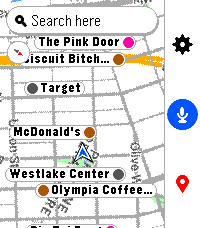
-Search by voice or keyboard, with suggestions as you type on touch watches.
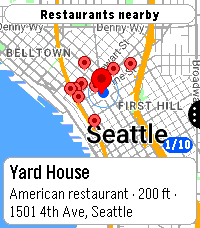
-Browse nearby places by type, such as restaurants, coffee, gas, groceries or transit, nearest first. "Open now" hides anywhere that's closed.
-Places on the map as dots or name flags, so you can get a feel for an unfamiliar neighborhood at a glance.
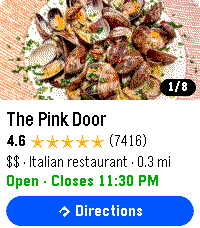
-Place pages with rating, hours, reviews, photos, phone and website.
-Directions by car, foot, bike or transit, with times side by side so you can pick the fastest.
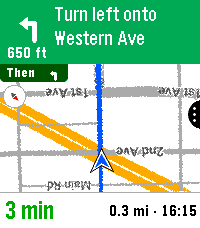
-Turn-by-turn navigation with turn cards, rerouting, and vibrate or spoken alerts.
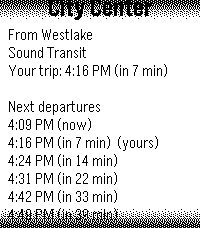
-Transit schedules: tap a ride to see the next departures, with live times where available, so you know whether to run for the train.
-Live location that follows you heading up or north up, plus a battery-saver snapshot mode.
-Favorites with their own default travel mode each, for example Home by transit and the gym by bike.
-Works on every Pebble: color and black-and-white, round and rectangular, buttons or touch, with dark map and larger text options.
- DeveloperTomBolger
- CategoryTools & Utilities
- PlatformsTime/Time Steel, Time Round, 2, 2 Duo, Time 2, Round 2
- Updated2026-10-07
- Version1.19.1