METAR Watchface
Michael duPont
Watchface
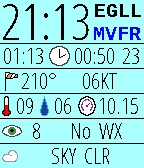
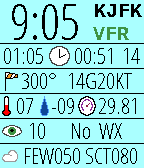
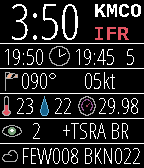
Description
At-a-glance aviation weather on your wrist made by a pilot for pilots. This open-source watchface organizes and displays the METAR report for your favorite or nearest airport. Unlike some watchfaces which only display the raw text, we make sense of the data. This allows us to better arrange your report and even determine the current Flight Rules.

Know immediately when your favorite airport is under VFR, MVFR, IFR, or LIFR.

Header: Local time (12 or 24), ICAO station ID, Flight rules
Row1:  Current Zulu time, Issue time, Minutes since issued
Row2:  Wind direction, Wind speed including gusts (KT/MPS)
Row3:  Temperature (C), Dewpoint (C), Altimeter (InHg/hPa)
Row4:  Visibility (SM/km), Other WX Codes (ex: -SN, NOSIG)
Row5:  Bottom two cloud layers (ex: OVC020)

Background behind "minutes since issue" will be red if the last fetch was not successful.

Updated 2016-10-31:
New AVWX endpoint, new menu icons

Note: METARs come in two variants: International and North American. Both variants use different units for visibility and altimeter. While the altimeter value is easy to tell apart, visibility is not. Though the unit is not displayed on screen, an altimeter around 1000 will always have vis reported by km, and an altimeter around 29.92 will always have vis reported by SM. Some stations report wind speed in MPS rather than KT, but these units will always be displayed on screen.
- DeveloperMichael duPont · Is this you? Claim your app ›
- CategoryFaces
- PlatformsOG Pebble, Steel, Time/Time Steel, Time Round, 2, 2 Duo, Time 2 (scaled), Round 2 (scaled)
- Updated2016-11-01
- Version3.7