 2
2Pynx for Lynx
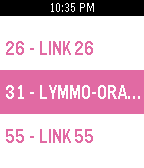
Tools & UtilitiesPynx gives you Lynx bus (Orlando, FL) arrival times on your Pebble. Simply select your route, direction, and stop location to see when the next few buses will arrive. Favorite your frequent routes to access them faster.
 19
19DSN Now
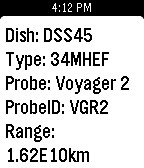
DailyThe Deep Space Network on your Pebble. Displays the dishes at various stations that are currently communicating with our deep space probes and the type of link (uplink/downlink). Cards also contain additional info about the dish and probe. Example: the second sreenshot shows dish DSS55 at Madrid, ES is currently uplinking to New Horizons.
 15
15TAFline
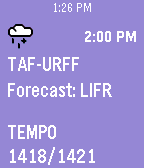
DailyGoing flying today? Put a TAF report on your wrist! TAFline pushes TAF report pins into your Pebble Timeline. Not only will you get the weather forecast, but we calculate the flight rules. Icons and background make it simple to know when your flight might become IFR. Made by a pilot for pilots. Open the settings to set a station or use the nearest one. Then launch the app. That's it! Old pins will automatically be replaced if a new report is issued or the station is changed when the app is opened again. Updated 2016-02-13: Now available on the Pebble Round Ties into avwx.rest, my METAR and TAF parsing API. Note: Flight rules are determined by the prior conditions if not all info is present in the associated report. 1: IFR - 9999 BKN009 2: IFR - TEMPO 7000 (BKN009) Pins will appear as soon as your timeline syncs.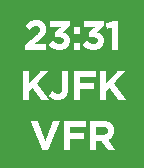 8
8METAR Minimal
FacesNeed to know the time? We got that. Need to know if your favorite airport is VFR, MVFR, IFR, or LIFR? We got that too...and that's it! At-a-glance aviation weather on your wrist made by a pilot for pilots. This is a minimal version of METAR Watchface. Using the same parser, this watchface shows only the time, station, and flight rules. Background will be black if the last fetch was not successful while continuing to show the most recent data. Updated 2016-01-20: Bug fix where data would not update
 102
102METAR Watchface
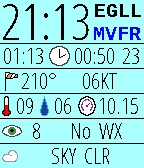
FacesAt-a-glance aviation weather on your wrist made by a pilot for pilots. This open-source watchface organizes and displays the METAR report for your favorite or nearest airport. Unlike some watchfaces which only display the raw text, we make sense of the data. This allows us to better arrange your report and even determine the current Flight Rules. Know immediately when your favorite airport is under VFR, MVFR, IFR, or LIFR. Header: Local time (12 or 24), ICAO station ID, Flight rules Row1: Current Zulu time, Issue time, Minutes since issued Row2: Wind direction, Wind speed including gusts (KT/MPS) Row3: Temperature (C), Dewpoint (C), Altimeter (InHg/hPa) Row4: Visibility (SM/km), Other WX Codes (ex: -SN, NOSIG) Row5: Bottom two cloud layers (ex: OVC020) Background behind "minutes since issue" will be red if the last fetch was not successful. Updated 2016-10-31: New AVWX endpoint, new menu icons Note: METARs come in two variants: International and North American. Both variants use different units for visibility and altimeter. While the altimeter value is easy to tell apart, visibility is not. Though the unit is not displayed on screen, an altimeter around 1000 will always have vis reported by km, and an altimeter around 29.92 will always have vis reported by SM. Some stations report wind speed in MPS rather than KT, but these units will always be displayed on screen.