Hourly Weather
Eric McCormick
Watchapp
Description
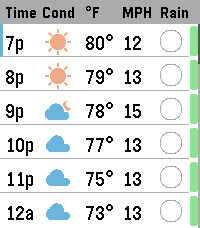
Your next 24 hours, visualized. Designed specifically for the vibrant, high-resolution screen of the Pebble Time 2. Whether you're planning a camping trip, organizing a Scouting event, or just commuting to work, this gives you the exact data you need without forcing you to read tiny text.

Instead of static daily summaries, you can smoothly scroll through a full 24-hour timeline. We replaced cluttered text with clean, at-a-glance visual indicators so you can assess your environment instantly.

🔥 Semantic Weather Warnings
Stop reading numbers and start seeing conditions. Automatically color-codes extreme weather:

Temperature Alerts: Temps turn Red when it's blistering hot (90°F+) and Blue when it's freezing (32°F and below).

High Wind Warnings: Wind speeds turn Orange when gusts exceed 20 MPH—perfect for knowing when to tie down the tent fly.

☔ Intuitive Rain & UV Tracking

Rain Pie Charts: Ditch the confusing percentage text. Our custom blue pie charts show you exactly how likely it is to rain hour-by-hour.

UV Safety Bar: A dynamic, color-coded safety bar runs alongside your timeline, letting you know exactly when you need sunscreen (Green to Purple scale).

Key Features:

Smooth 24-Hour Scrolling: Use your up and down buttons to slide through the day, complete with a visual scrollbar track.

"Now" Indicator: Instantly orient yourself with the blue highlight marking the current hour.

Dynamic Location Banner: Confirms your exact GPS location upon loading, then tucks away to maximize screen space.

Customizable: Fully supports Imperial/Metric units and 12h/24h time formats via the companion app settings.

Powered by OpenWeather: Utilizes the highly accurate OpenWeather 3.0 One Call API.

Setup Instructions:
To keep weather data free and reliable, this requires your own personal OpenWeather API key.
1) Sign up for a free account at OpenWeatherMap.org.
2) Generate an API Key (it's free!). Make sure to sign up to One Call 3.0
3) Paste the key into the settings page in the Pebble app, choose your units, and you're ready to explore!
- DeveloperEric McCormick
- CategoryDaily
- PlatformsTime 2
- Updated2026-05-28
- Version1.2