 30
30Christmas Tree
FacesCryptic watchface with time shown as decorations (lights / baubles) lighting up on a Christmas tree. large (orange) lights / baubles are the hours, medium (yellow) are 5-minutes - both appearing around the tree in rough approximations of analog watch positions. The additional single minutes are shown as small hanging decorations (light blue). When unlit (not yet reached this number), these baubles just show as gray outlines. A PM indicator appears as a star at the top of the tree. Battery level is represented by tinsel that appears on the tree: 10 - 50% in 5 sections of the bottom piece 60 - 89% in 3 sections of the middle piece 90 - 100% in 2 sections of the top piece The battery display can be configured off. Note that when Quick Views appear, the tinsel and unlit single minutes do not display. Screenshots: (1) Animation 12:54PM - 1.00PM (battery 100%) (2) 9:34AM (40% battery) (3) 12:22PM (70% battery) (4) 5:48PM (no battery display)
 12
12Pyramids
FacesWatchface inspired by Vario Nato Sky Pyramids watchstrap. Time and date shown on the sides of pyramids. The lines change color to record the passing of time. Time: Top pyramid shows the hour with 5 lines either side changing to dark blue from bottom up. At the peak of the hour is an AM/PM indicator (dark blue for PM). 10-minutes show in the same way on the left hand pyramid below this. The lines from the 2 side join to form 5 markers. Single minutes are shown on the right hand pyramid with 9 lines changing. Date: If selected, this is shown below the time in the same way. Months at top. 10-days below on left and single days on right. The are 4 display options: 1. Time and date (default) 2. Time and date, but with surrounding pyramids (harder to read) 3. Time and date, with surrounding pyramids faded (easier than 2) 4. Just time The animation cycles through these (and Quick Views) for 5:45PM, September 22.
 14
14Weather Balloons
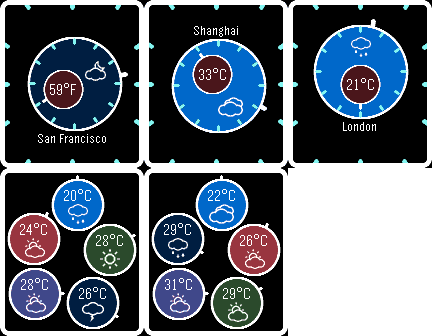
FacesCryptic weather watchface, based on my "Balloons" watchface (I couldn't resist the name "Weather Balloons"). Minute balloon floating within an hour balloon - "tails" (lines) from each pointing towards the appropriate markers telling the time. Colour of hour balloon reflects day/night (based on sunrise/sunset). Choice of weather providers: OpenWeatherMap, Forecast.io or Weather Underground. As with many other weather watchfaces, you need to get a free API key from the weather provider you want to use. All give at least 500 free calls per day (far more than needed). Until API key provided, weather icon & temperature areas are blank. To get key, register at one of these: OWM: https://home.openweathermap.org/users/sign_up Forecast.io: https://developer.forecast.io/register Weather Underground: https://www.wunderground.com/member/registration (select Columus Plan to get forecast info) All find weather for current latitude/longitude. Temperature appears in minute balloon (Farenheit or Celcius), weather icon within hour balloon. With Forecast.io & Weather Underground, option to present balloons with forecast for today & next 4 days on a shake of the wrist. The "tails" are in hour analog positions (0 for today, 1 for tomorrow etc). Balloons can be ordered: - Rising: Today highest, then tomorrow etc - Analog: Arranged around face in analog sequence For Quick Views, location name and forecast inhibited. Animation sequence: 2:40AM (San Francisco) 3:55PM (Shanghai) 12:30PM (London) 5 day forecast (rising) 5 day forecast (analog)
 9
9Inner Circle
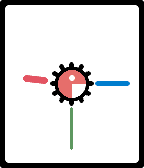
FacesFollowing on from 'Backwards' and 'Forewards', another analog watchface, this time with the hour/5-minute markers around the inner circle. 2 styles based on distance from markers: - Outer: outer edges of hands matching - Inner: inner edge of hands matching So you can choose between 'Inner Inner Circle' or 'Outer Inner Circle'! Red hour hand thickest, green second hand thinnest, blue minute hand in-between. Center orange circle shows A (AM) or P (PM). Other configurable options: - Hide second hand (reduces battery impact) - White or black background Screenshots: (1) 8:00:20AM (animated - showing all options) (2) 9:15:30PM
 45
45Hexalogue
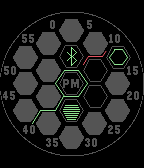
FacesHexagon-based analog watchface - clear outer hexagon (with smaller hexagon in it) showing the hour - the central hexagon shows "PM" from 12:00 - hand from the large central hexagon leads to the 5-minute value - 4 hexagons either side of the central one clear to indicate additional minutes with optional number - floating hand leads to the last 5-second value - Bluetooth indicator - Battery level indicator Some people might prefer the 5-minute hand to be thicker, so that's configurable The 5-second hand can be switched off to conserve battery Note. Requires Pebble firmware 3:14 or later Color configuration for: - Background - Highlight (5-minute, inner hour, Bluetooth & battery) - 5-second hand (if enabled) Screenshots: (1) 3:34:45PM (2) 2:42:10PM (no minute text) (3) 11:23:45AM (no minute text) (4) 6:00PM (no seconds) (5) 7:15:00PM (thick 5-min hand) Designed by Peter Fletcher, who has designed watches for Tokyoflash and a number of the faces I have published. The watchface is published with his permission.
 22
22Trifocal
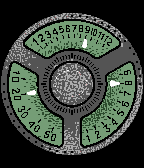
FacesWatchface using "hands" to show time movement across 3 windows in 12/5/9 format, meaning: 12 hours (top), 5 10-minutes (left) and 9 single minutes (right). The center window can optionally be used to show seconds. There is a choice of 6 background colors. Animation shows 7:47:00 in the 6 color choices. The following image shows 9:28 (no seconds). Designed by Peter Fletcher, who has designed watches for Tokyoflash and a number of the faces I have published. The watchface is published with his permission.
 74
74Forewards
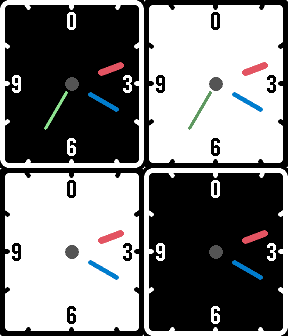
FacesAnalog watchface based on my Backwards watchface but with the hands rotating clockwise, hence the name. As with Backwards, the hands float away from the center and are identified by their width, length and color. - Hour: widest, shortest and red - Minute: middle sized and blue - Second: narrowest, longest and green The center circle is a full gray circle for AM and a ring for PM. The background can be configured to black or white and the seconds can be switched off.
 34
34Spare Time
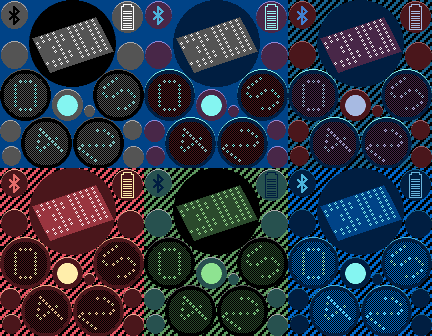
FacesThis digital watchface has been reassembled from "spare parts". Hours and minutes can be read from left to right and either seconds or day of the month shown on top. Bluetooth connection and battery level appear on the other shapes or can be switched off. In 12-hour mode, an additional PM indicator displays on the central spare shape, but can also be switched off. All colors are configurable, including the borders and border highlights, so you can definitely make this your own. As an additional option, a striped background can be selected (the light color of which is also configurable). This has been built for, and requires, Pebble firmware version 3.13 or later. Note. Until firmware version 3.14 is released, version 3.12 and earlier will attempt to load it and crash rather than state it needs a later firmware level. Designed by Gordon Lardi and originally appeared on the Tokyoflash Design Studio. The watchface is published with his permission and sanctioned by Tokyoflash. Original design can be found at https://blog.tokyoflash.com/2013/05/20/spare-time-watch-shuffles-digits-when-shaken/
 36
36Triangle
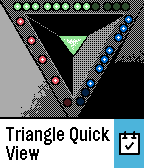
FacesWatchface with time shown by "lit" dots on the edge of a triangle. The time-telling dots are in 12/5/9 format, meaning: 12 hours (top / green), 5 10-minutes (left / red) and 9 single minutes (right / blue). The central green triangle shape lights up to indicates PM. This has been built for, and requires, Pebble firmware version 3.12 or later. Screenshots: (1) 8:47PM (2) 9:35AM (3) 12:59PM (4) 1:00AM (5) 8:47PM (with Quick View) Designed by Peter Fletcher, who has designed watches for Tokyoflash and a number of the faces I have published. The watchface is published with his permission.
 77
77Tie Fighter
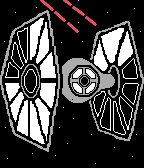
FacesAnother Star Wars image based watchface - this one using a Tie Fighter. Time is shown by "lit" areas on the spacecraft. The sections on the wing viewed on the left show the hours, the one on the right shows the single minutes and the sections of the "window" in the body shows the 10-minutes. The center of the left wing lights up to show PM. Battery level is shown by the laser beams in 10% sections (repeated for the pairs of laser beams). 10 - 40% at the top (red laser beams being fired at the Tie Fighter from behind) 50 - 100% at the bottom (green laser beams being fired by the Tie Fighter). Note. When Quick Views shown the battery indicators are not displayed. Screenshots: (1) 12:59PM (100% battery) (2) 9:43AM (30%) (3) 6:26PM (70%) (4) 1:00AM (10%) (5) 8:24AM (with Quick View) Designed by Peter Fletcher, who has designed watches for Tokyoflash and a number of the faces I have published. The watchface is published with his permission. Note. Tie Fighters are a trademark & copyright of Disney & Lucasfilm Ltd.
 10
10Sphere
FacesDigital watchface on the surface of a sphere with some of the curved lines broken to form four digits, each comprised of 5 rows of 3 dashes. These are hours (top) and minutes (bottom). Displays in 12 or 24 hour format, depending on watch settings. In 12-hour format, AM marker is bottom left (blank section), PM top right. Optional battery level is displayed vertically at center of the sphere with remaining level being lit. Configuration options: background / foreground colors and whether to show battery level. The display is cryptic, yet easy to read when you know where to look. Screenshots show: (1) 12:59PM no battery level (2) 06:24AM 90% battery (3) 17:38 100% battery (24-hour) (4) 03:25 30% battery (24-hour) This design was created by Heather Sable and originally appeared on the Tokyoflash Design Studio. It is published with the designers’ permission. The original design can be found here: http://blog.tokyoflash.com/2012/11/22/sphere-led-watch-creates-3d-illusion/
 51
51Expansion
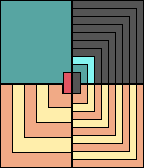
FacesTime displayed in 4 segments of expanding rectangles overlapping each other. Top left are 10-hours, top right single hours, bottom left 10-minutes and bottom right single minutes. Hours are blue, minutes yellow/orange. Can display in 12 or 24 hour mode depending on watchsettings. If in 12-hour mode, 2 red center rectangles display AM (left) and PM (right). Screenshots: 12:59AM, 18:45 (24-hour mode), 7:35AM, 23:46 (24-hour)
 14
14Balloons
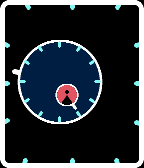
FacesContinuing the theme of cryptic analog watchfaces, following Passenger and Backwards. This one has a minute balloon floating within an hour balloon - the "tails" (lines) from each point towards the appropriate markers telling the time. An A (AM) or P (PM) appear within the minute balloon. Screenshots: 9:25 AM, 5:56 PM , 12:45 PM, 4:12PM (with Quick View)
 30
30InfinityCube
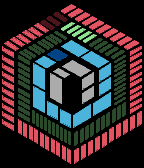
FacesAnalog watchface with time blocks appearing to sit on 3 sides of a cube that appears to be expanding. As you look at the face, the "inner" blocks form an A or P shape representing AM and PM. The next (blue) blocks represent hours, the next (green) blocks minutes and the "outer" (red) blocks seconds. Count the "lit" (brighter) time blocks. Note. Requires Pebble firmware v3.9 or later. Screenshots: (1) 11:05:56 AM (2) 5:25:09 PM (3) 8:48:27 AM Designed by Peter Fletcher, who has designed watches for Tokyoflash and a number of the faces I have published. The watchface has been produced with the designer and is published with his permission.
 71
71Backwards
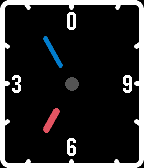
FacesAnalog watch face with a couple of differences. First, the hands float away from the center and are identified by their width, length and color. - Hour: widest, shortest and red - Minute: middle sized and blue - Second: narrowest, longest and green Second, the watch runs backwards - with the hands rotating anti-clockwise. Hence the name. The center circle is a full gray circle for AM and a ring for PM. The background can be configured to black or white and the seconds can be switched off. Screenshots: (1) 9:35:10AM (2) 1:00:45AM (3) 4:06:25PM (4) 5:05AM (no seconds) (5) 2:35:48PM (Quick View)
 17
17Edge
FacesDigital watchface, using numbers based on a diamond shape where the edge defines the time. Read the hours from left to right and the minutes from top to bottom. Displays in 12 or 24 hour mode, depending on watch settings. Includes configuration option to change the edge color: (1) Solar eclipse (yellow) (2) Go Green (green) (3) Bloodlet (red) (3) Moon shine (white) Check out the examples to make sure you know how to read all the digits. Screenshots show: (1) 08:47 (2) 12:59 (3) 23:06 (24 hour mode) (4) 09:28 This watchface design was created by Andrew Joy, from UK, and is published with his permission.
 22
22Universe
FacesAnalog watchface based on the "Observable universe logarithmic illustration" by Pablo Carlos Budassi. Pablo has given me permission to use the image. The universe image rotates around with the bright white center of the Milky Way galaxy at the normal analog hour position. The current minute is the last tick mark around the universe image. Screenshots show: 11:57, 3:15, 6:05, 9:16 Pablo's amazing image is described as a "logarithmic scale conception of the observable universe with the Solar System at the center, inner and outer planets, Kuiper belt, Oort cloud, Alpha Centauri, Perseus Arm, Milky Way galaxy, Andromeda galaxy, nearby galaxies, Cosmic Web, Cosmic microwave radiation and Big Bang's invisible plasma on the edge." Check it out by following the website link.
 27
27Binary Stars
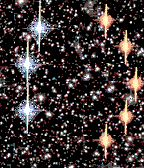
FacesBinary version of my ‘Stars’ watchface. I couldn’t resist the name, normally used for a system of two stars where one star revolves round the other or both revolve round a common center. As on ‘Stars’, larger (blue) stars are for hours and smaller (orange) for minutes. Two modes: Easy: Hours on the left and minutes on the right. Hours - 11th hour on analog=1, 10th=2, 8th=4, 7th=8 Minutes - 5th minute on analog=1, 10th=2, 15th=4, 20th=8, 25th=16, 30th=32 Hard: Hours every third hour and minutes every 10th, so mixed and therefore harder to read. Hours - 12th hour on analog=1, 3rd=2, 6th=4, 9th=8 Minutes - 0 minute on analog=1, 10th=2, 20th=4, 30th=8, 40th=16, 50th=32 On both, a central (red) supergiant is a PM indicator. Additional configuration options to display a large comet in foreground and to vibrate if bluetooth connection lost. Requires Pebble firmware 3.10 or later. Screenshots: 7:31AM (easy) 9:09PM (easy) 7:31AM (hard) 12:59PM (hard, bt connection lost) 3:59PM (easy with Quick View)
 40
40Lightsabers
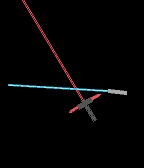
FacesAnalog watch face using lightsabers from Star Wars: The Force Awakens. Where the shorter (blue) lightsaber is closest to the edge marks the hour, in normal analog positions. The point where the larger (red) lightsaber, with crossguard blades, meets the edge of the screen, marks the minute. The lightsabers have a random movement to where the handle is shown, so do not appear in the same positions when the same time is shown. They also do not always clash. Screenshots: 1:50, 3:25, 12:00, 9:55, 8:37 Star Wars & Lightsabers are TM & © Lucasfilm Ltd. All Rights Reserved.
 38
38Renegade
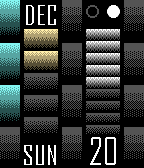
FacesThe story behind this watchface: "In a far future, the human race will be enslaved by an extraterrestrial civilization. A group of humans travel back through time, taking refuge in different historical periods unable to return to their present time. This group is known as the RENEGADES. Their mission: to provide information to prevent the enslavement of the human race in the future. RENEGADE watchface is a tribute to these defenders of freedom." 12 tall blocks are the hours, 5 medium height blocks are each 10 minutes and 9 small blocks are single minutes. The blocks "light up" for each (blue for hours, yellow for 10 minutes and white for single minutes). Just count the blocks for the time. AM/PM are represented by the lit circle top right. Month, day of week and day of month also shown. Note: requires Pebble firmware 3.8 or above to run. Screenshots: (1) 3:25PM (Sunday, December 20) (2) 12:59PM (Wednesday, December 30) (3) 1:11AM (Monday, January 11) This watchface design was created by José Manuel Otero, from Spain, and is published with his permission. You can follow him on: https://www.facebook.com/TTM-Technotimemachine-578290348850436/timeline/