Cyclops
Nev Rawlins
Watchface
Description
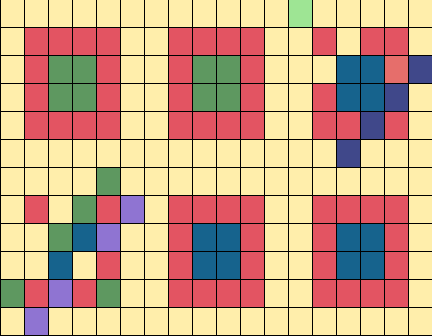
Cyclops uses colors to show the time.

3 watchfaces in one:

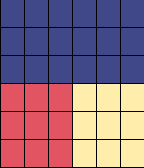
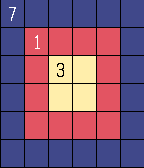
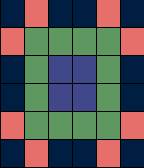
“Cyclops” mode - looking like a eye, with three areas color-coded to represent numbers.  Outer ring for hours, next ring in for 10-minutes, middle for single minutes.  The code is mostly derived from rainbow colors “Red, Orange, Yellow, Green, Blue, Indigo, Violet” (red starting at 1).  0 is light green, 8 light gray, 9 light blue and, for 10-hours, the 1 is dark blue.

“Up-down” mode - "up" for hours, "down" for minutes - left for 10-minutes, right for single minutes.  Same color code used.

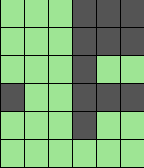
"Count" mode - count dark gray blocks in the 4 quadrants.

A cheat option is activated by shaking the watch: shows digits in text - helpful when learning.   Shake again to make it disappear.   Can be disabled in settings.

An animation every 15 minutes can also be disabled.

First screenshot animation shows the transition from 03:14 to 03:15 in "Cyclops" mode.

Other screenshots:
(2)   7:13  "Cyclops" mode (cheat display)
(3)   7:13  "Up-Down" mode
(4)   7:14  "Count" mode
(5) 12:47  "Cyclops" mode

Design created by Dietrich Faust and originally appeared on the Tokyoflash Design Studio.  It is produced with the designers' permission and sanctioned by Tokyoflash.

The original design can be found here:
http://blog.tokyoflash.com/2012/06/11/cyclops-colour-coded-watch-design/
- DeveloperNev Rawlins · Is this you? Claim your app ›
- CategoryFaces
- PlatformsTime/Time Steel, Time Round, Time 2 (scaled), Round 2 (scaled)
- Updated2016-02-04
- Version2.1