 27
27Colorful QR
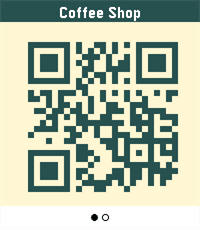
Tools & UtilitiesColorful QR turns your Pebble Time 2 into a colorful barcode & QR wallet. Store loyalty cards, passes, and codes (QR, Aztec, Data Matrix, PDF417, Code 128) — and give each one its own colors: pick the code color and the background so every card is instantly recognizable on your wrist. The title ribbon auto-contrasts so labels always stay readable, and you set each card's colors from a simple settings page in the Pebble app — no account required.
 27
27Mole
GamesThis is a joke app, but you can whack a mole. You can whack it. That's all.
 27
27Clear Timer
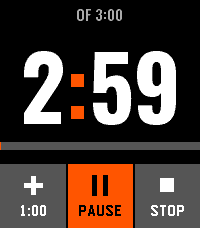
Tools & UtilitiesA touch timer for Pebble Time 2: three wheels you turn with a finger, six timers it remembers, and an alarm you silence with a palm.
 26
26Pebble Sketch
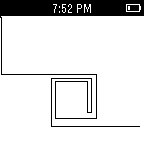
GamesA simple Etch-A-Sketch like watch app for Pebble
 26
26locater
Dailyget your location
 26
26Burn Rate
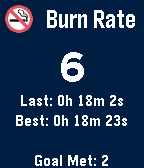
Health & FitnessYou are too smoking! Quit it. Simply press the up button every time you smoke. If you get a craving press the select button to start a delay time and hold out as long as you can. If you make it 15 mins then you meet the goal. Best - Shows longest time from the delay timer until you smoked. Last - Shows time since last smoke had. Goal Met - Count of times made it past 15 mins on delay timer. Press select to start a delay timer when a craving hits. Try to meet you goal. Hold select to stop delay timer. Press up to count one smoke. This will automatically clear the delay timer and set the timer since last smoke. Hold up to enable adding a timeline pin every time a smoke is logged. A T should appear on the screen. Press down to decrement number of smokes down by one. Hold down to clear the days smoke number to zero. Count automatically resets to zero on the next day.
 26
26EnjoyLangfang
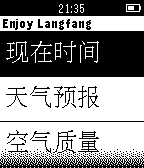
DailyEnjoyLangfang is a watchapp for life imformation of Langfang.It only supports Chinese language right now. 乐享廊坊这个手表软件现在仅可以用在已经安装中文环境Pebble智能手表上。乐享廊坊软件提供现在时间,天气预报,空气质量。希望能够为廊坊提供生活出行方便。
 26
26Minecraft Server Statistics
DailyMinecraft Server Statistics by Ethan Davis English: This app allows you to quickly monitor Minecraft servers! It shows helpful information including online players, server version, and more. You can choose which server the app shows stats for in the configuration page on your phone! Also, you can change the server that is being monitored from within the Pebble watchapp! Just use the Quick Server Selection menu!
 26
26First Aid guidance (info from Red cross
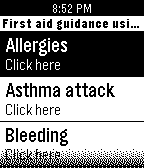
Health & FitnessThis watchapp is created as a first aid guidance to a number of problems that may occur. This guidance information is taken from the red cross app. Please read the disclaimer and use only if you agree (last title on watchapp)
 26
26Locus addon+
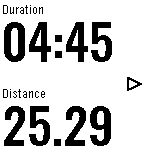
Health & FitnessYou can leave your phone in backpack or armband, and you can see and use Locus Map functions on your Pebble smartwatch. For example in geocaching, running, hiking, walking, cycling and other outdoor sports. This add-on works with Locus Map Pro and Locus Map Free. Locus - addon Pebble (v2.1+) application required for this app from Google Play. All Pebble smartwatches are supported. (including Pebble2 and Time2) Features: - 9 different pages on watch - up to 8 different data fileds in all page - NAVIGATION - point / route guidance - turn-by-turn navigation - expected time to destination/next point/turn - REAL INFROMATIONS - speed - altitude - slope - heart rate (with HR belt) - heart rate zones - compass - gps accuracy - gps alert - phone battery alert - TRACK RECORDING - control track recording (start/pause/resume) - track time - pace - distance - average speed, max. speed, - max., min. altitude - energy - average, max. heart rate - last lap informations
 26
26TZplus2
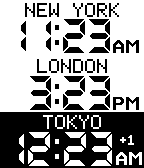
IndexTZplus2: display multiple configurable timezones
 26
26Return to by flwkt
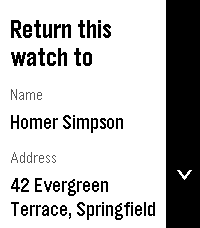
Tools & UtilitiesReturn to by flwkt Lost your Pebble? Make it easy to get back. Return to shows a clear “Return this watch to” screen with your name, address, phone, and email — so whoever finds it knows how to reach you. Set it once in settings and leave it on your app list. When it matters, the info is right there on the wrist. Fill in any combination of: - Name — Who the watch belongs to - Address — Where to return it - Phone — Number to call - Mail — Email address Empty fields are hidden so the screen stays clean. App list subtitle Choose which fields appear under the app name in the launcher (name, address, phone, and/or mail). Selected values are joined with “ / ” so you can spot your contact at a glance without opening the app. Recommendation Pin the app to the top of your app menu so anyone who finds your watch and opens the menu sees it right away: - Open the Pebble app on your phone - Go to Apps - Tap My Apps - Long-press Return to and move it to the very top Features Readable on Time 2, Round 2, Pebble 2, and Pebble 2 Duo — Layout adapts to rectangular and round screens (including B/W), with scroll hints on the action bar when there’s more to see. Configurable — Edit contact details and subtitle options from the phone settings page (Clay). Built for finding your way home — A simple ICE-style contact card for your Pebble, nothing more, nothing less.
 26
26Flash
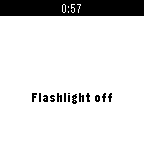
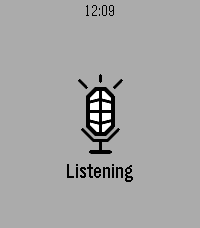
RemotesThe fastest and most easy way to turn your android flashlight on and off. Control your android phone flashlight by pressing select even while the phone is asleep, screen is off and even after phone reboots!!!
 26
26qnote
Tools & UtilitiesSpeak a note into your Pebble. It's on your phone before you lower your wrist. Opening qnote starts dictation immediately - no menu, no button to find first. Speak, confirm the transcription, and it is saved. Put qnote on a Quick Launch button and a single long press takes you from idea to recorded note. NEVER LOSES A NOTE. Every note goes out over two paths at once. When your phone is nearby it arrives instantly. When it isn't, the watch spools the note in its own storage and delivers it as soon as you are back in range - even if you closed the app hours earlier. HONEST ABOUT ITS LIMITS. The watch keeps the last 12 notes, because Pebble gives an app about 4 KB of persistent storage and a note is 256 bytes of it. Your phone is the archive. If all 12 are still waiting to reach the phone, qnote tells you rather than quietly overwriting something you said. FREE SOFTWARE. qnote is licensed under the GNU General Public License v3. Source for both the watchapp and the companion is on GitHub - read it, change it, pass it on. YOU NEED THE COMPANION APP. qnote stores its notes on your phone, so the watchapp alone will capture nothing. The companion is a free download from GitHub - it is NOT on the Google Play Store, so Android will ask you to allow installing it from your browser or file manager: https://github.com/neonfire42/qnote/releases/latest/download/qnote.apk Android only. There is no iOS companion, so qnote cannot store notes from an iPhone. Also requires a Pebble with a microphone (every model except the original Pebble and Pebble Steel) and the Pebble mobile app 1.0.7.7 or newer. On the phone you get categories, full-text search, editing, sharing and Markdown export. No account, no server, no analytics - notes move only between your watch and your phone.
 26
26Run Estimate
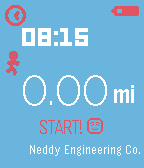
Health & FitnessRun without your phone. Run Estimate is a simple app that uses your stride length and the number of steps you've taken since opening the app to give you an estimate of how far you've run. To use it, just open the app and start running! Run Estimate remembers the furthest distance you have run and gives you a nice notification whenever you beat that distance. It also gives you a few friendly messages along the way. Both Metric and Imperial units are supported and you can customize the colors from the configuration page within the Pebble app on your phone. From the configuration page you will also need to set your stride length in order for the app to give you a good estimation.