 31
31Share a bike
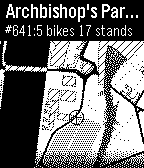
Tools & UtilitiesUse your Pebble to find the closest stations to find a bike to rent or an available stand to return your bike! "Share a bike" uses geolocation to find your gps position and public API's to get stations data. It displays a map using OSM. It works in: * Boston - Hubway * London - Barclays Cycle Hire (Boris Bike) * Lyon - Velov * Minneapolis - Nice Ride * Montreal - Bixi * Ottawa - Capital Bixi * New York City - NYC Citi Bike * Paris - Velib * San Francisco - Bay Area Bike Share * Toronto - Bixi * Washington DC - Capital Bikeshare And many other cities: http://shareabike.jayps.fr/map.php
 31
31Fun with Pebble
GamesI don't even know.
 31
31Music Assistant Control
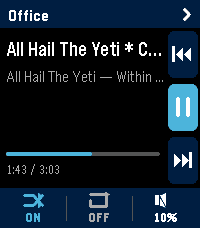
RemotesMusic Assistant Remote turns your Pebble Time 2 into a proper remote for your Music Assistant server. Transport, volume, multi-room grouping, and one-tap shortcuts to your library — all from your wrist. It's built specifically for the Time 2's touchscreen and four buttons. Music Assistant works either as a standalone server or as a Home Assistant add-on; either is fine. The now-playing screen shows the current track, artist, album, elapsed and total time, and a progress bar. The right edge of the screen has a column of three icons for previous, play-pause, and next — they're tap targets, but the watch's UP, SELECT, and DOWN buttons do the same things. Along the bottom is a strip showing whether shuffle and repeat are on, plus the current volume. Tap the shuffle bit to flip it. Tap repeat to cycle off, all, one. Tap the volume bit to jump into a full-screen volume control where UP and DOWN nudge the level and SELECT mutes. Switching players is easy. Tap the player name at the top of the screen and you get a list of every player your server knows about, sorted alphabetically, with a green/amber/grey dot showing whether each one is playing, paused, or idle. By default the watch sticks to whatever player is currently playing, but tap any row to take over a different one. Long-press any player row in that list and you get an action sheet for grouping. If the player is on its own, you'll see a list of every other player it can join. If it's already in a group, you'll see options to leave, add another player, or tear the whole group down. Members appear indented underneath their master in the list, with a chain badge on the master so you can read the setup at a glance. Quick Play is the shortcuts feature. Long-press SELECT on the now-playing screen and you get a menu of up to ten things you've pinned — albums, artists, playlists, whatever your library has. Tap one and it starts playing on whichever player you're currently controlling. You set the shortcuts up on the settings page from your phone: type into the search box, the page hits your Music Assistant server directly, you tap a result to pin it. The shortcuts live on the watch too, so the menu still works even if your phone hasn't synced yet. A few things worth knowing before you configure it. The settings page is served from GitHub Pages, so your Music Assistant server needs to accept CORS requests from that origin. If you're running MA as a Home Assistant add-on the easiest fix is a small bit of config on whatever reverse proxy you have in front of it.
 31
31Baby Watch app reborn
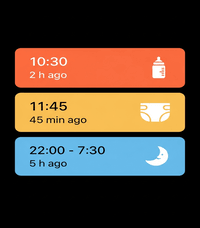
DailyA revival of the Pebby (Baby watch) app - Baby tracking for Pebble smartwatches. Track bottle feedings, diaper changes, and sleep sessions right from your wrist! Each event will also be logged on your timeline for later consultation. Colors have been added to the app to mirror the coloring option from the Huckleberry app. The original Baby watch app has been my MVP app on my pebble for the past 3 months since becoming a parent. I decided to add my twist on it as well.
 31
31Solitaire
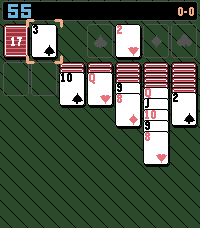
GamesA simple solitaire game with a twist
 31
31PixelTurf
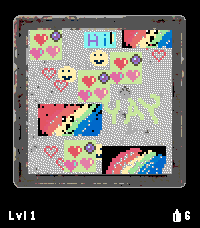
GamesPixelTurf: The World is Your Canvas 🎨🌍 Claim your neighborhood and your continent in a global, location-based pixel art turf war right from your wrist! PixelTurf divides the world into Geohash zones, starting on a massive global scale. Access your current area's shared 72x72 pixel graffiti wall to paint custom tags. Will you overwrite rivals in a fierce turf war, or collaborate with locals to build art pieces? Highly contested zones eventually "lock down" as permanent historical Monuments, shrinking the board to smaller, local levels. Will your name be etched in history? FEATURES: - Real-World Zones: The map moves with you, placing you in your exact physical Geohash square. - Pixel Art Editor: Design custom graffiti tags via the app settings - Earn More Paint Cans By Steps: Integrated with Pebble Health. Walk in the real world to earn digital paint! - Monument System: Be a top 3 contributor when a zone locks down to permanently lock your name on the leaderboard. HOW TO PLAY & CONTROLS 1. Gear Up: You get 3 FREE Spray Cans daily. Earn 1 extra can for every 1,000 steps walked (up to a 20-can max). 2. Make Your Mark: Open the phone settings to set your Username and design tags. Larger tags cost more cans. 3. Paint: In an active zone, press Select and choose "Paint tag". - Move: UP and DOWN buttons move your blinking tag. - Toggle Axis: SHORT PRESS Select to switch between Y-axis (Up/Down) and X-axis (Left/Right). - Confirm: LONG PRESS Select to spend cans and leave your mark. 4. Compete or Collaborate: Overwrite others to claim space, or team up to piece together collaborative pixel art! If a zone reaches high coverage with heavy action, it locks down permanently. The zone then subdivides into smaller Geohash grids, and the game restarts! This shrinking stops at Level 6. 🔒 PRIVACY & SECURITY Your location is used strictly on-the-fly to calculate your grid square. GPS coordinates are never stored, tracked, or shared. WHAT IS A GEOHASH? A public domain standard that divides the Earth into a grid of alphanumeric bounding boxes. - Learn the basics: Wikipedia - Geohash - Explore the map: Use Geohash Explorer (geohash.softeng.co) to visualize active zones around you! Supported Devices: Pebble Time, Pebble Time Steel, and Pebble Time 2. (support for Pebble Time Round and Pebble Round 2 coming soon!) 31
31Habit Trainer
Tools & UtilitiesNow you can easily train habits that require near-continuous attention! (ex: having good posture) It vibrates periodically. If you were doing a good job, press Up and the timer will wait longer next time. If you forgot, press Select to keep the same interval, or Down to decrease it. Soon you'll start actually remembering!
 31
31Pebble2048
GamesAn adaptation of 2048 on the Pebble Smartwatch showcasing various features of the Pebble SDK.
 31
31Mine Finder
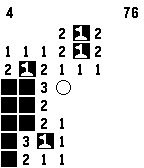
GamesThe classic Mine Sweeper Game. Test your skills by finding all of the hidden mines on the field. Controls: Up: Move cursor up Down: Move cursor down Select: Move cursor right Back: Move cursor left Up/Down Long: Flag Select Long: Uncover Back Long: Exit game An alternative control scheme is available in the menu. Instructions for that scheme provided in game instructions.
 31
31TokyoSubway
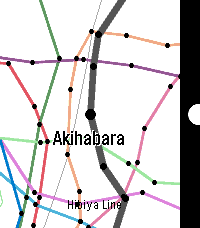
Tools & UtilitiesTokyo Subway Map. for English and Japanese. (Included JR Yamanote Line) (1) SELECT: Choose the train. (2) UP, DOWN: Go to the next station, or return to the previous station. SELECT: Change to the other line. BACK: Back to select menu.
 31
31RPG Dice Roller
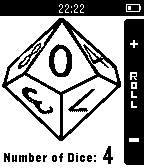
Tools & UtilitiesRPG dice-roller that allows you to roll up to 12 dice at once and displays the total, along with the number of each individual dice. Dice supported: d4, d6, d8, d10, d12, and d20. Header Photograph: bdesham - flickr
 31
31baWrista
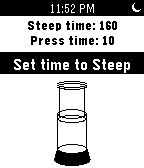
Tools & UtilitiesA timer for French press, Aeropress and plunger coffee, with animated Aeropress! Set steep time and press time with the up and down buttons, then confirm each with the select button. The Pebble's vibration feature lets you know when to start applying pressure, and when your Aeropress coffee is done.
 31
31Farwatch
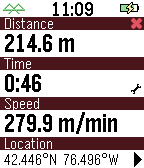
Tools & UtilitiesFarwatch is an odometer and speedometer. The smart phone GPS tracks distance and speed. The watch displays current time, elapsed time, elapsed distance, and average speed. Tap or flick your watchface to switch between average speed and current speed. Customizable settings include units, screen display, battery indicator, connection indicator, tap control, and vibration alert upon disconnect. It helps to launch this watch 20-30 seconds before you start your trip. This gives your GPS time to get an accurate starting location.
 30
30PebbleLock
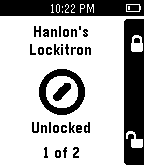
RemotesUse your Pebble to lock/unlock your Lockitron door lock. (After downloading be sure to go to Settings for PebbleLock within the Pebble app and log into Lockitron.com).
 30
30Electronics Reference
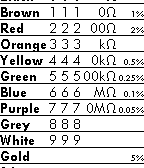
Tools & UtilitiesQuick reference tool for electronics, including resistor color code. Supports color on the new Pebble Time/Pebble Time Steel watches. Also functions on the older black-and-white models (using text rather than color). Suitable for standard 4 and 5 band resistors.