 33
33Punchy
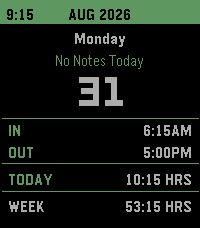
Tools & UtilitiesA versatile time card app to keep track of work hours and earnings more easily. -Track hours by punching in and out -Change data and hours at any time -Adjustable default punch times and automatic break deduction -Displays each days hours along with weekly total -Wage Dashboard to see the days, weeks, months, and years total earnings. -Adjustable tax deductions to see an estimate of your net pay -Ability to export the years data to google sheet (check Github for setup instructions) -Ability to import the data from google sheet -Automatic overtime adjustment -Adjustable colors -Voice dictation notes for each day This app was made primarily with Claude.
 33
33Flappy Pebble
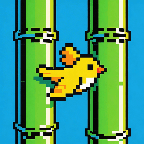
GamesFlappy Bird for your Pebble. Tap SELECT (or hold it) to flap through pipes. Gentle physics tuned for small-screen play, persistent high score.
 33
33French Press Buddy
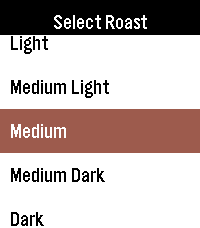
Tools & UtilitiesFrench Press Buddy is a simple, easy to use app to help you create the best French press coffee you can in 3 easy steps! 1. Select the roast of your coffee 2. Enter the amount of water you want to use. The app will automatically calculate the amount of coffee you need, based on your water amount and coffee type 3. Set the timer to how long you want to brew It's never been easier to make a cup of coffee with your pebble!
 33
33Tideline
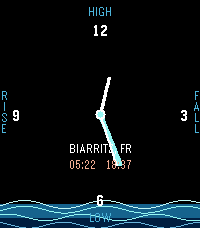
Tools & UtilitiesTideline ocean companion . A slick, minimal surf app for Pebble. Check the tide, tomorrow's swell, and where the sun sits right now — without opening your phone. • TIDE WATCH Live tide hand that sweeps the full 12h 25min lunar cycle. Water fills the dial as the tide rises, recedes as it falls. HIGH · LOW · RISE · FALL zones mark each phase of the cycle. • 3-DAY FORECAST Swell height, wave period, wind, and a 5-dot surf rating — for morning, noon and evening. Swipe UP / DOWN for today, tomorrow, or later in the week. • SUN COMPASS See exactly where the sun sits in the sky and where it rose and will set. Hold UP or DOWN to scrub through the day and watch the sun travel. Tap BACK to snap back to now. The primary cardinal (N or S depending on your hemisphere) highlights automatically. • FIVE SPOTS Configure up to three favorite surf spots in the phone companion app. Swap between them on the watch via MENU. • POWERED BY OPEN-METEO Free weather and marine data — no account, no API key. Tideline keeps working offline, using the last sync. Built for the rePebble Round 2 and Time 2 . Clean blue-and-white design, optimized for glance-ability under the sun.
 33
33Countdown timer
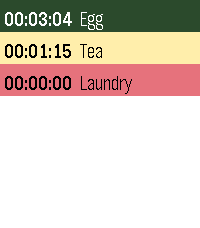
Tools & UtilitiesCountdown timer — a simple multi-timer for your Pebble. Configure any number of named countdown timers (up to 16) from your phone, each with its own duration. On the watch you see the list and can start, pause, or reset each timer. Several can run at once, and a timer vibrates when it reaches zero even if the app is closed in the background. Sort the list by most recently used, shortest remaining, or longest remaining.
 33
33Cairn
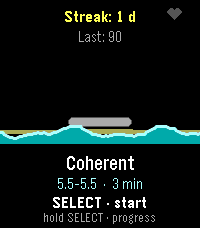
Health & FitnessBreathe with the tide. A guided breathing coach with live heart rate. Inhale and the water rises, exhale and it falls. Finish a session, lay a stone. Cairn turns a breathing exercise into a tide. Start a session and the waterline rises while you inhale and falls while you exhale, uncovering a cairn of stones on the shore — no counting, no timer to stare at, just a rhythm to follow. A pulse on your wrist marks every phase change — a nudge to breathe in, a double tick to hold, a longer pull to breathe out — so you can follow the rhythm with your eyes closed. While you breathe, the watch reads your heart rate every second. Afterwards you get a calm score out of 100 built from completion, how far your heart rate came down, how strongly it rose and fell with your breathing — real physiology, respiratory sinus arrhythmia — and, on watches that deliver it, your actual heart rate variability (RMSSD, the beat-to-beat detail behind true HRV). It is the difference between a session you were present for and one you merely sat through. Finish a session and a stone is added to your cairn. Keep it up day after day and the stack grows, badges unlock, and the progress screen shows where your calm score and resting heart rate are heading over the last week and month — with one line of coaching drawn from that history. FEATURES • Four patterns: Coherent (5.5 s in / 5.5 s out), Box, 4-7-8, and a Custom rhythm you set in half-second steps. • Sessions of 1, 2, 3, 5, 10 or 15 minutes. • Live heart rate, sampled every second, with a priming screen so the starting reading is a real baseline. • A calm score from completion, heart-rate drop, breath-linked heart-rate swing and — where the watch supports it — real heart rate variability (RMSSD), with an honest fallback when there is no reading at all. • A growing cairn, six badges, a personal best and your last 20 sessions. • 7- and 30-day trends for calm score and resting heart rate, plus a coaching line. • A distinct haptic pulse per breathing phase, and soft chimes at four volume levels; backlight, vibration and heart-rate display all switchable. • Settings on the watch or from the phone (Clay). • Made for the Pebble Time 2 (Emery) colour screen; works without the phone. • Available in English, Nederlands, Français, Deutsch and Español, following your watch's system language.
 33
33FitnessBreakTimer
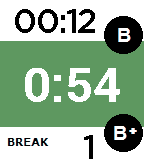
Health & FitnessThis watchapp is an easy timer for the breaks between your fitness work-out sets. After 60, 90 or 120 seconds (whichever you choose) you will be notified by a gentle vibration on your wrist that it's time to hit the weights again. Don't loose track of the number of breaks you've had on any machine ever again. Click the up button for your first break and the down button for every next break. By clicking the up button, you will reset the break counter back to 1. Change the duration of the break with the select button. Your last choice will be remembered, even after you close and re-open the app. Enjoy your work-outs and relax. This app will do the counting for you! If you like it, heart it ;-)
 33
33Digital Dice Roller
GamesDigital Dice Roller Choose your dice and roll on your wrist! A handy dice roller for tabletop gamers — right on your Pebble watch. No need to carry physical dice to your game night. Features: 6 dice types: 4-sided, 6-sided (cube), 8-sided, 10-sided, 12-sided, and 20-sided Shake your wrist or press SELECT to roll Classic d6 shows dot pips, other dice show numbers Stylish 3D isometric dice graphics Rolling animation with vibration feedback Roll history — see your last 3 results Controls: SELECT / Shake — Roll the dice UP / DOWN — Switch dice type Perfect for D&D, board games, or any time you need a quick random number.
 33
33PebbleDoist
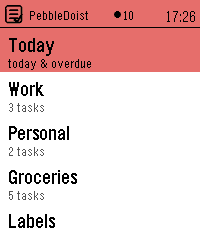
Tools & UtilitiesYour Todoist tasks on your wrist — add them by voice. Browse Todoist by list, label or Today, read details and subtasks, tick tasks off, and dictate new ones. Touch on PT2. 5 languages. PebbleDoist puts Todoist on your wrist. The overview opens on a Today row, the lists you picked (each with its open-task count) and your labels. Open a list to see its tasks with their due dates, select one to read its description, labels and subtasks, and tick things off as you go — instantly, with a short undo window before anything reaches Todoist. Adding a task takes one press and your voice: dictate it, and natural-language dates like "friday" land as a real due date. FEATURES • Today — everything due today or overdue, each row prefixed with the list it belongs to and its due date underneath. • Labels — browse your Todoist labels and see every task carrying one, across all your lists. • Details — a task's full title, deadline, description and labels as coloured badges, with its open subtasks listed underneath, each with a checkbox. • Add by voice — dictate a new task, or a new subtask straight into the task you are looking at. Bound to Quick Launch, one press starts the dictation. • Complete or delete — a task's menu completes it in Todoist right away, or deletes it after a confirmation. Optional quick-complete turns a single press into a tick, with an undo window. • Touchscreen on Pebble Time 2: tap a row to open it or tick it off, drag to scroll, swipe right to go back. One tap is enough everywhere. The buttons keep working exactly as they did. • Timeline pins (optional) — tasks due in the next few days appear on the Pebble timeline with a reminder that buzzes at the deadline, and completing or rescheduling a task clears or moves its pin. • Text size — small, medium or large task rows, set from the phone. • Available in English, Nederlands, Français, Deutsch and Español — on the watch and in the settings — following your watch language or set manually. • Privacy: your Todoist API token stays on the phone and is never sent to the watch. SETUP 1. In Todoist, copy your API token (Settings → Integrations → Developer). 2. On the phone, open PebbleDoist's settings, paste the token and save. Reopen the settings to tick the lists you want on the watch, choose the start screen, and optionally turn on timeline pins. 3. Optional: bind PebbleDoist to Quick Launch for a one-press "speak a task". Requires a Pebble Time 2. Touch needs firmware 4.33.2 or newer; on older firmware the buttons do everything the touchscreen does.
 33
33PebblePoint
RemotesControl Microsoft PowerPoint on Mac OS X from your Pebble! Use the buttons to go to next/previous slides, or press and hold for last/first. Requires: - Mac OS X - Microsoft PowerPoint Download and run PebblePointServer.app. https://db.tt/nvHQZmPg Or, if you're more technical you can install the Node.js package, pebblepoint_server, which is much slimmer.
 33
33PulseCalc
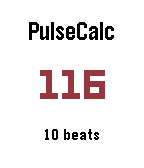
Health & FitnessBy detecting when you’ve lifted your watch hand to your neck, PulseCalc lets you intuitively calculate heart rates! After raising your hand, you have a brief moment to get ready. Your Pebble will then vibrate and turn the background red, indicating that the timer has started. All you have to do now is count 10 heart beats, lowering your arm on the last one! Pressing the Up Button will open the settings menu. Currently, this only lets you toggle the accelerometer usage, but more settings are on the way. These are also saved for the next time you open PulseCalc! If you are trying to measure a patient’s heart rate, you can use the select button to manually start or stop the timer. The Down Button allows you to toggle how many beats you have to count. If you want accuracy or you have a high heart rate, 10 beats is recommended. If you would like a faster result, there is a 5 beat option. PLEASE NOTE: Automatic detection assumes your body is upright, and that your watch is on your left hand. Lefties will be accommodated for in the next update, sorry! Sorry if there are any issues on Time or Time Steel. I only have a Time Round for testing the accelerometer.
 33
33PathFinder
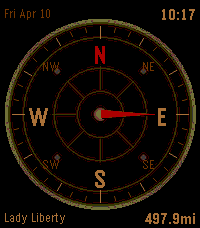
Tools & UtilitiesCompass/directions app with date, time and 3 different faces. Add up to 6 locations to track in the settings. Use Up & Down to cycle between locations and see distance and heading. Watches step tracker approximates distance updates in between Phone GPS polling (customizable interval in settings). Press Select to manually refresh location/distance data.
 33
33Pomotime
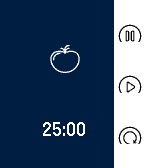
Tools & UtilitiesPomoTime - Tomato-based productivity timer Sleek, simple, and intuitive pomodoro timer for use with Pebble. Spend less time figuring out how to use the app and more time getting things done. Features three modes: pomodoro (25 min), short break (5 min), and long break (15 min). Each mode allows one to pause, play, or reset timer. A vibration notification tells the user that time is up. The pomodoro (Italian for “tomato”) technique is a productivity technique involving a 25 minute segment of concentrated work, followed by some short or long break. See http://pomodorotechnique.com/ for more details on the technique. Tested and developed with the Pebble Time family in mind. Ever free and open source (MIT license). Developer is always welcoming comments/suggestions/patches for future versions. Tags: pomodoro, pomodori, productivity, time management, timer
 33
33Breathing Meditation
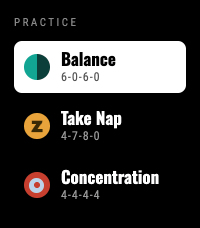
Health & Fitness3 Breathing Patterns: Balance (6-0-6-0), Take Nap (4-7-8-0), and Concentration (4-4-4-4). Now supports touch Press Heart ❤️ if you like it Features: Flexible Timers: Choose session length from 1 to 30 minutes. Fluid Visuals: Water level gently rises and falls with your natural breath. Haptic Feedback: Short vibrations guide your inhale and exhale so you can practice with closed eyes. Select a practice, set your minutes, and follow the flow to start breathing.
 33
33ThemePark Queues
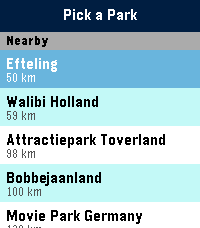
Tools & UtilitiesSkip the guesswork. ThemePark Queues brings live theme-park data straight to your Pebble — covering dozens of parks across four continents. No phone-fumbling, no app-switching, no squinting at a tiny map. Pick a destination: - Walt Disney World, Disneyland Paris, Tokyo Disneyland, Hong Kong Disneyland, Shanghai Disneyland. - Universal Orlando, Universal Studios Hollywood, Universal Studios Japan. - Plus Six Flags, Cedar Fair, Merlin parks, and more — anywhere ThemeParks.wiki covers. What you get: - Live wait times for every attraction in the parks we cover. - Show schedules with the next start time highlighted. - Opening and closing hours for each park, shown right on the park picker so you know at a glance where's still open. - Favourites — pin your must-do rides and shows to the top of the list, kept in sync across park switches. - Sort by wait (ascending or descending) or alphabetically. Built for the watch: - Readable at a glance. Traffic-light colour coding (green / amber / red) means you don't need to read numbers to know if it's a walk-on or a two-hour queue. - Works on both Pebble Time 2 (rectangular) and Pebble Round 2 (circular) — with native layouts for each. - Auto-refreshes every five minutes while open; pull the latest on-demand by switching parks. Location-aware: ThemePark Queues uses your phone's GPS to nudge nearby destinations to the top of the list, so you're one tap from live waits the moment you walk through the gate. Powered by ThemeParks.wiki — the community-maintained open API for theme-park wait times.