 34
34mcbroken
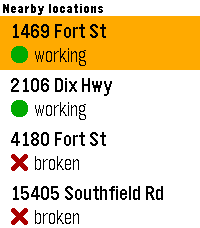
DailyA mcbroken client for Pebble smartwatches. Now you can check if the ice cream machine is down on your wrist! Nearby shows up to 5 McDonald's locations within a 5-mile (8.04 km) radius from your current location, sorted from closest to farthest, and Saved shows all of your saved locations (duh) that you've added in the app settings. You can save up to 5 locations.
 34
34EasyWake
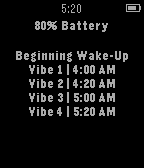
DailyEasyWake makes waking up in the morning much less stressful. Instead of almost having a heart attack every morning from your alarm, you can use EasyWake to wake up peacefully. EasyWake tries to slowly wake you up by sending short vibrations in a repeated pattern. It sends vibrations at 4:00, 4:20, 5:00, 5:20, 5:40, and 6:00 AM. All you have to do is leave EasyWake open on your Pebble Watch while you sleep. The app is set to fully wake you up at 6:00 AM, so you do not need to set an alarm on your watch. Wake up easy with EasyWake. *If popular request, I will add a way to set what time you want to wake up :)
 34
34child time
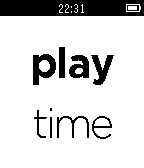
DailyIntroducing the new pinnacle in practical Pebble parenting functionality! Tired of your little ones disagreeing on how late is 'late' at bed time? Or arguing whether the displayed time of day has anything to do with getting out of bed? Solve all disagreement and SHOW them what 'time' it is! This handy app enables Pebble parents to display common daily events - on demand - instead of the time of day: whether that be 'bed time', 'play time', 'bath time', 'lunch time' or many more. Now with enhanced readability for encouraging little readers! v1.6: minor technical update. Check out the link to 'more from this developer' below for the original 'bed time' watchface. And a special thanks to Pebble Forum user LaFauve for helping me fix some of the code!
 34
34Stepper
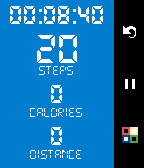
Health & FitnessA step-counting app for the Pebble. Made for Rebble Hackathon #1 Independent of your phone, so you can go for a run and just wear the Pebble. Works as a background process, so you can still have your favourite watchface on. Shows Time elapsed, Steps, Calories and Distance. Long press UP to Reset. Short press SELECT to Start/Pause Short press DOWN for Theme Long press DOWN for km/miles
 34
34Pemostat
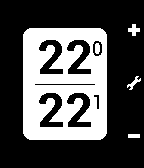
RemotesControl your Netatmo® Thermostat(s) from your Pebble®! First time, you have to enter your Netatmo® credentials on the app's configuration page. Features: - Supports multiple thermostats - Change setpoint temperature - Change active mode (Away, Frost-Guard, Max, Off) Displays - the setpoint temperature on the top - the current measured temperature on the bottom - the currently active mode (Program, Away mode, Frost-Guard) You can change the setpoint temperature with the up/down buttons. The middle buttons shows a menu with the available modes that you can activate and you can change the active Thermostat if you have more than one. Pemostat not developed by Netatmo® or Pebble®. I only made it to control my loved Thermostat. If you find it useful, please donate under the website link.
 34
34Joust!
GamesA local multiplayer game! Eliminate your opponents by making them trigger the Pebble accelerometer. Who says you have to play nice?
 34
34GyroMaze
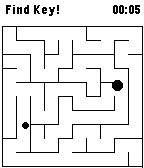
GamesUse build in gyroscope to move ball in maze. Game is divided into two phases. In first one you need to find the key, then you can navigate to exit. Finish game in best time possible. Game uses perfect maze generation algorithm written by Reza Adhitya Saputra (full article here: http://azerdark.wordpress.com/2009/03/29/588/)
 34
34Chebble
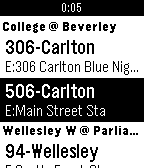
DailyChebble is Chatter for Pebble. Keep up with your Salesforce Chatter feed from your wrist. Chebble is a free, open source app for checking your Salesforce Chatter feed on your Pebble Smartwatch. Chebble allows you to view the last 10 posts from your Chatter feed, grouped by date. You can view the full details of any post, including files, links and polls. Chebble uses OAuth to connect to Salesforce so that your login details are kept safe and secure. You can follow Chebble on Twitter (@chebbleapp) for details of the latest releases and planned features. Please visit the Settings page for the app before using it so that you can grant the app permission to access your Salesforce org.
 34
34Toronto Transit Time
DailyGet realtime arrival predicitons and service messages for bus and streetcar routes at the nearest stops directly on your Pebble - no extra app required.
 34
34JP'Tris
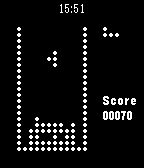
GamesThis is a Tetris clone for pebble smart watch, with extra pieces if you exceed 300 points. Instructions : - up button : move left - down button : move right - middle button : rotate - have fun !! If you appreciate it, please donate : http://goo.gl/hzCtIm
 34
34Project Kraepelin
Health & FitnessA simple app for recording daily activity, sleep, and mood for use in clinical studies. NOTE : Use of this app implies your agreement to share your information as outlined in the privacy policy on the APP WEBSITE link below. We collect de-identified motion, mood, and sleep quality data for clinical research purposes. Features - Daily tracking of step count and calories - Daily mood and sleep quality prompts - 7 day mood and step count history
 34
34EMS Timer
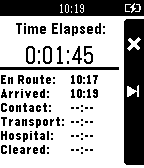
Tools & UtilitiesThis app records times of "En Route", "On Scene", "Pt. Contact" and etc. It also shows elapsed time of the calls. You hit the center button to mark your time and move to the next phase of the call. No more relying on dispatch for times.
 34
34Roku Launcher
RemotesChannel launcher and eyes-free remote control for Roku and NOW TV. Launch NOW TV Movies and Entertainment, BBC iPlayer, and YouTube directly from your Pebble. Search by voice (supported models only) or by using Tertiary Text on older models (http://http://pebble.rickyayoub.com/). Use the Remote mode to play/pause etc directly from your watch. Using single press, double press, and long press for each button means there's no need to scroll through menus or switch modes to access remote functions, allowing for simple eyes-free control. Love Roku Launcher? Give it a heart! (Roku Launcher was previously known as NOW TV for Pebble)
 34
34Today Is
DailyCurrent date at a glance and in the app. Configurable formats.
 34
34Instant Gram
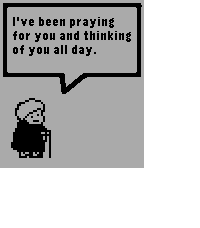
DailyInstant Gram provides you with a small dose of heartwarming encouragement every time you open it!