# Wyze Control for Pebble - Application Description

## A complete Wyze control center, built for Pebble

**Wyze Control for Pebble** turns your smartwatch into a practical control surface for your Wyze smart home. Instead of treating the watch like a passive notification display, this app is designed for direct action: check device state, trigger automations, control lights, and view key information without pulling out your phone.

It is optimized for the moments when a fast response matters. If you are leaving home and want to close the garage, in bed and notice a light is still on, or checking whether a camera recently captured motion, the app keeps the interaction short and focused. The experience is built around the Pebble philosophy of quick, glanceable, button-driven use.

The app connects through the Wyze cloud via PebbleKit JS, so it can operate as a remote companion to your phone while still feeling lightweight on the watch itself. That makes it useful both for everyday convenience and for quick status checks when you are away from home.

---

## What the app is for

Wyze Control for Pebble is intended for users who want the most useful parts of their Wyze setup available on their wrist. The app is focused on:

- Turning devices on and off quickly.
- Checking whether a device is online and what state it is in.
- Triggering recurring automations and shortcuts.
- Viewing important device information in a compact format.
- Keeping the most common smart home actions available with minimal friction.

The goal is not to mirror every phone-app function. The goal is to make the high-value actions faster and more convenient in a smartwatch-friendly workflow.

---

## Supported device categories

### Lighting

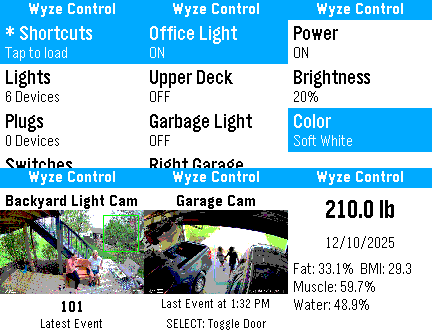
Wyze lights are one of the best fits for wrist-based control, and the app gives them full attention. For compatible bulbs and light strips, you can:

- Toggle power instantly.
- Adjust brightness using simple preset steps.
- Switch between common color or color-temperature options.

This is ideal for the everyday tasks people actually do most often: dimming a room, setting a clean white light, or changing the mood of a space without navigating a larger mobile interface.

### Plugs and switches

Plugs and switches are handled as straightforward on/off devices. That makes them quick to use for lamps, fans, appliances, and other simple loads where the only action that matters is whether the device should be powered or not.

### Cameras

For Wyze cameras, the app goes beyond a simple name-and-status listing. It can display a thumbnail from the most recent motion event so you can get a quick visual clue about what happened at home.

That makes the watch useful as a fast awareness tool. Instead of loading a full live view on your phone, you can check the most recent activity with a glance.

### Wyze Scale

The Wyze Scale view is presented as a read-only summary of the latest available measurement data. Depending on what the cloud API provides, the app can show:

- Weight.
- Body fat percentage.
- BMI.
- Muscle mass.
- Body water.
- Measurement date and time.

This turns the Pebble into a compact health dashboard for quick reference, without forcing you into a more complex mobile health app.

### Shortcuts and automations

The app exposes Wyze shortcuts and rules so you can launch your existing automations from the watch. That is especially useful for recurring routines like "Goodnight," "Away," or any custom action sequence you already use in Wyze.

Rather than recreating logic on the watch, the app acts as a fast trigger for the automations you already rely on.

### Garage door controller

Garage control is treated as a special case because it is a high-value action where clear state matters. The app shows garage status in a way that is easy to interpret and provides large, deliberate controls for open and close actions.

That makes it practical in real situations where you need to operate the garage while moving, carrying things, or simply not wanting to reach for your phone.

### Device visibility and state

Even when a device is not actively being controlled, the app still tries to surface meaningful state. Device type, online status, current power state, and special flags are included so the menu itself is informative rather than decorative.

The result is a watch interface that answers the most important question quickly: what is this device doing right now?

---

## How the experience is organized

The interface is built to feel native to Pebble rather than like a shrunken phone app.

### Device-first navigation

The app organizes devices into a list that is easy to scan and select. Once the list is loaded, you can move directly to the relevant device and then into the control screen that matches its type.

This keeps the interaction model simple. You do not have to hunt through dense categories or repeatedly switch contexts just to perform one action.

### Contextual action screens

Selecting a device opens a window that matches that device’s purpose. Lights expose lighting controls, cameras expose preview behavior, the scale shows health data, and garage devices expose garage actions.

This matters on a watch because every extra layer of irrelevant UI adds friction. The app reduces that friction by showing only the controls that make sense for the selected device.

### A consistent title bar

Every screen uses a persistent app title, "Wyze Control," so the watch always has clear context. On a small display, that kind of consistency improves readability and makes the app feel cohesive as you move between screens.

### Glanceable by design

The UI emphasizes readable labels, current state, and direct actions. It is intentionally not a dense dashboard. It is a quick-answer interface for moments when you want to know something or change something immediately.

---

## Real-world use cases

The app is especially effective in ordinary day-to-day moments:

- You are leaving home and need to close or check the garage.
- You are in bed and realize the kitchen or living room lights are still on.
- You want to verify whether a camera recently detected motion.
- You want to launch a home automation routine instantly.
- You want to check recent scale data without opening another app.

These are all small interactions, but that is exactly where a Pebble shines. The app embraces that strength by keeping each action brief and purposeful.

---

## Platform support

Wyze Control for Pebble is built for the Pebble hardware targets included in the project:

- Pebble Classic and Pebble 2 for high-contrast monochrome layouts.
- Pebble Time and Pebble Time 2 for color-capable layouts.
- Pebble Time Round for the circular display.
- 2026 supported Pebble platforms defined in the project configuration!

The app is designed to adapt to the strengths and constraints of each display type, rather than assuming a single screen shape or color capability.

---

## Security and data handling

The app uses token-based authentication rather than depending on your raw password every time it communicates with the Wyze service. Your credentials are used to obtain a token, and the app then works from that token for subsequent access.

That approach is more appropriate for a companion watch app because it reduces repeated credential handling and keeps the smartwatch side of the experience lightweight.

The control flow also uses the phone as the network bridge, which is consistent with Pebble’s companion-app model and allows the watch to remain focused on display and input rather than heavy networking logic.

Your password is handled only long enough to complete the login exchange, then it is immediately removed from storage and kept only in memory during that process. In other words, the password is not persisted by the app after authentication.
This code is open source.  You can see for yourself!


---

## Known limitations

There are a few practical limitations to be aware of:

- Bluetooth-only locks cannot be controlled through the cloud API path used by the app, so they may be visible but not actionable.
- Some features depend on the availability and behavior of Wyze cloud endpoints.
- Multi-factor authentication is not part of the initial login flow.

These limitations come from the underlying Wyze ecosystem and its cloud-access model, not just from the watch app itself.

---

## Why this app exists

The core idea behind Wyze Control for Pebble is simple: a smartwatch should make the most common and important actions faster. It should not force you to wait, scroll, or switch to your phone for things that can be handled in a few seconds.

Wyze Control for Pebble is built around that philosophy. It gives Wyze users a compact, always-available control layer that is especially useful for quick status checks and immediate actions.

---

## Getting started

1. Install the app on your Pebble.
2. Open the configuration page on your phone.
3. Enter your Wyze credentials and the required API keys.
4. Save the settings and allow the app to sync your device list.
5. Start using your watch to control lights, plugs, cameras, scale data, shortcuts, and garage devices.

*Note: Wyze Control for Pebble requires a Wyze account and the appropriate API keys. Cloud control is not available for Bluetooth-only locks.*
 45
45 45
45 45
45 45
45 45
45 45
45 45
45 45
45 45
45 45
45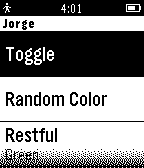 45
45 45
45 45
45 45
45 45
45