 113
113Wachatpebble
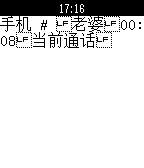
NotificationsThis pebble-app is rewritten by Yang Tsao according to the source code by Tiago R. Espinha , compatible with pebble2.0. Because of using same UUID, you can continue using pebble-notifier-international (app for Android to display unicode character notify on pebble) just install this app on your pebble. Now it can display Chinese characters! 如果你的pebble在安裝app的情況下無法現實中文,請聯繫[email protected]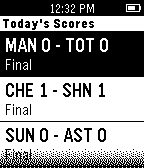 112
112Premier League Scores
NotificationsThis is a pebble.js watchapp for displaying today's English Premier League scores. Get up to the minute scores on the soccer/football matches happening today. Do you enjoy this app? Why help fund support of this app with a donation. Bitcoin 19AjVvdXwX6AdtPXepLytGQuFLxFWxgNN1 Dogecoin D9g27McqAU4xm2DM2rD6XgKYsMupt6YNQL
 112
112Alvin
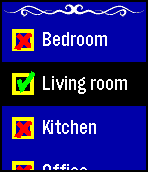
Remotes1.3: Fixed issue with key being lost on Android Alvin is intended to be the easist and quickest to use way to control IFTTT recipies using the Maker channel. * Voice recognition * Reorderable menu items * Menus can be simple actions or toggle actions * High speed start up * Clear action indication * Easy to use without glasses Alvin is not affliated with, nor endorsed by, IFTTT.
 112
112Authenticator
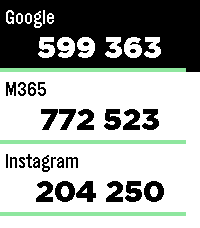
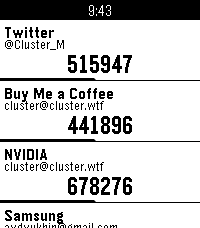
Tools & UtilitiesPebble Authenticator brings your two-factor authentication (2FA/TOTP) codes directly to your Pebble smartwatch. No need to reach for your phone to unlock your accounts, just glance at your wrist. Key Features: • Easy Setup: Import several accounts at once with otpauth:// links, or add them manually in the app settings. • Backup & Restore: Save all your accounts as a backup, optionally protected with a password (AES-256). Unencrypted backups use standard otpauth:// links, so you can also move your accounts to or from other authenticator apps. • Works on Every Pebble: Supports all Pebble watches, including the new Pebble Time 2 and Pebble Round 2 with touch scrolling. • High Capacity: Store up to 100 accounts. Watches with the original Pebble firmware have room for about 50. • Flexible Codes: 6- and 8-digit codes, custom time periods and secret keys of up to 256 characters. • Privacy First: Works completely offline. Your secret keys stay on your phone and your watch. No account, no tracking, no cloud and no external servers. • Easy Management: View and delete accounts in the settings page. The watch confirms when your accounts have been saved. Disclaimer: This app was developed with the help of Anthropic's Claude, which helped bridge the gap between modern JavaScript configuration tools (Clay) and the Pebble C SDK. If you find a bug, have an idea for a new feature or want to suggest an improvement, feel free to send me a message. I'm always happy to get feedback and make the app even better!
 112
112TOPTer
Tools & UtilitiesA powerful, standalone Time-based One-Time Password (TOTP) authenticator for Pebble smartwatches that doesn't require a companion app on your phone. Features: - No Companion App Required: TOTPer uses a local HTML page for settings - Fast Loading: Optimized for quick startup and instant code generation - QR Code Parsing: Paste QR code URLs in the phone configuration page (Pebble app has no camera access) - Google Authenticator Import: Import all accounts at once from Google Authenticator export - Supports Many Accounts: Up to ~20 accounts on original Pebble, up to 100 accounts on newer models - Multiple Hash Algorithms: SHA1, SHA256, and SHA512 support - PIN Code Protection: Optional 3-digit PIN code (000-999) to prevent unauthorized access - Standalone Operation: No Internet access required at all, neither for the settings page nor during usage - Clean Design: Simple, intuitive interface focused on readability - Visual Time Indicator: Progress bar shows remaining time for current code - Drag to Reorder: Easily organize your accounts
 112
112Navigation / Geocaching for Pebble
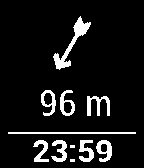
Tools & UtilitiesThis app shows you distance and direction to the navigation point or geocache on your pebble! You must also install Android app on your phone, then you can use C:Geo / Geocaching / Locus app to select the location or geocache you want! It supports Pebble compass!
 111
111MiniLOTR
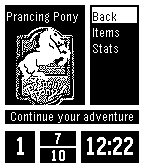
GamesTraverse Middle-Earth fighting your way through random encounters with all of your favorite creatures from Tolkiens universe! Stay alive, use your magic sparingly, and prepare yourself for your battle with the Dark Lord... Sauron must be defeated! You must save Middle-Earth! Based off code of Torivons "MiniDungeon."
 111
111Tebbletris
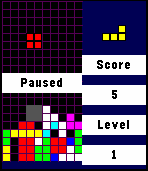
GamesTetris for the Pebble Time! I loved the original Pebble's Tetris app, so I decided to make one in color for the Pebble Time. Controls: Back: Pause / Quit. Progress is saved automatically when you quit from within a game. Up: Move block left. Down: Move block right. Select: Rotate block / Resume. Up (hold): Snap block left. Down (hold): Snap block right. Select (hold): Quick drop. This project is open source under the MIT license! I think that I've tested it well, but I wrote it quickly in my free time so please report any bugs you run into. Github: https://github.com/WRansohoff/Tetris-PebbleTime Credits: Thanks to kamotswolf for adding an option to toggle the drop shadows.
 110
110Pebblegotchi
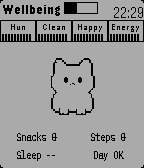
GamesFeed, clean, play, and meditate with a tiny wrist pet. A daily ritual that revives pixel‑era nostalgia and turns small habits into a warm, retro moment. The gameplay is intentionally simple. To obtain food, players must walk in real life: every 250 steps earned translates into one food item. In addition, getting enough sleep provides an energy bonus. Meditation also restores energy, but it can only be used three times per day. Aside from that, feeding and cleaning are simple one-tap actions, as there wasn’t enough time to implement mini-games. The source code will likely be open-sourced after the contest ends, if time permits and nothing gets overlooked.
 110
110HalfLife - Smart Caffeine Tracker
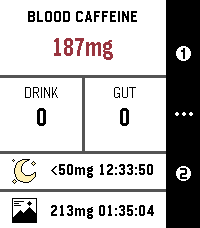
Health & FitnessTrack your caffeine like your body actually processes it. HalfLife is a real-time caffeine tracker for Pebble that simulates how caffeine is absorbed, peaks, and wears off — so you can stay energized, avoid crashes, and sleep better. Note: This is a mathematical model, not medical advice. > Why It’s Different Most apps just estimate. HalfLife simulates using a pharmacokinetic model, it tracks your caffeine levels continuously — so you always know where you stand, not just what you drank. > What You Get - Real-time caffeine levels: updates every second — no static estimates. - Peak prediction: see when your caffeine will hit hardest — and how strong it’ll be. - Smart sleep guidance: know when your levels are low enough for quality sleep. - 6 Custom drink presets: save your go-to coffee, tea, or energy drinks. - Flexible drinking durations: 3 presets of 5 to 120 minutes - Preferred caffeine range: Stay in your ideal focus zone at a glance. - Free-form logging: enter any caffeine amount anytime. > Built Around You Everyone processes caffeine differently. HalfLife lets you adjust: - Caffeine half-life (how fast it leaves your body) - Absorption speed (how fast it gets absorbed into your bloodstream) - Your personal sleep threshold - Your preferred caffeine range (color display watches only) - Or just use the built-in defaults and go. > Real-World Uses - Time your morning coffee for peak focus - Avoid the afternoon crash - Don’t ruin your sleep with late caffeine - Plan pre-workout energy boosts - Understand how multiple drinks stack over time > Private & Efficient - 100% on-device – your data never leaves your watch - No background drain – zero battery impact when closed - Open source – transparent and customizable > Coming Soon The core model is solid, but I still have some exciting plans for the future: - Redesigned UI: A visual "glow-up" is the top priority, including support for round Pebble watches. (Already making minor progress, but I'm a bioinformatician, not a designer — so bear with me.). - Edit active drinks: In case you set the wrong amount or duration, this feature will allow you to edit and delete your current drinks. - Shake For Help: Shake the watch on any screen of the app for a guide on the controls and meaning of values. (With an option to disable this if you already know what's what). - On-watch configuration: Configure most settings without needing to grab your phone. - “Preview before you drink” feature: See how a drink will affect your levels before you log it. - Drink planning: Plan you day's caffeine for workouts, productivity or to regulate your levels in advance. Get notifications for the drinks you scheduled when viewing the caffeine graph across 12-72 hours. - Closed-Loop Model: When the new Pebble hardware arrives, the plan is to use advanced heart rate (specifically HRV) data to create a self-tuning model that adapts to your body's unique response. This allows for a broad array of additional features. Note: Values in screenshots have been tampered with to show off the features. Have a feature idea or found a bug? The code is open and contributions are always welcome! (Also some extra details on the model coming soon for the science nerds) https://github.com/FPuzeras/HalfLife 110
110Bridge WA
NotificationsConnected watchapp that allows you to retrieve remotely your emails and SMS, control your music and take short notes using voice dictation technology. ** This watchapp will only works with the BlackBerry 10 companion app Bridge. **
 109
109G bus
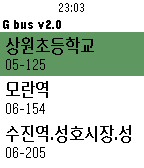
Daily이 앱은 현재 내가 이용하는 버스의 도착 시간을 열람할 수 있는 앱입니다. 앱 설치 후 먼저 설정에서 버스를 추가하시고 앱을 사용하세요. 인터넷 연결이 반드시 필요합니다. 새로고침은 가운데(Select)버튼입니다. 전국 지역 대부분을 지원합니다.
 109
109PebbleNTN - Maps Nav Notification To Nav
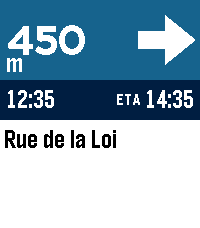
Tools & UtilitiesTurn-by-turn directions from your phone's nav app, on your pebble. PebbleNTN reads your navigation app's notifications and shows the next turn, distance, road, and ETA on your Pebble. No need to reach for your phone! - Google Maps supported now, more coming soon - Accent colours, light/dark, and three arrow styles - Backlight (with RGB support) and vibration options - Metric/imperial, left- or right-hand arrow - Write your own rules, or share logs to help add new apps Requires the companion Android app with notification access. Something not working or have a feature request? Use the 'Contact Developer' option from the Pebble app or create an issue at https://github.com/optio/PebbleNTN/issues
 109
109Beeline
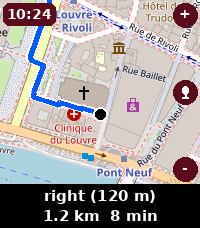
Tools & UtilitiesTurn-by-turn navigation on your wrist. Beeline shows OpenStreetMap maps with walking, cycling and driving routes, plus voice destination search - just long-press to speak where you want to go. Keyless and private: no account, no sign-up, no telemetry.
 108
108Home Assistant Shortcuts
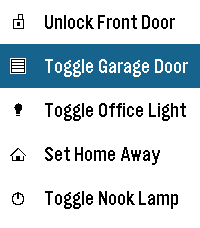
RemotesThis application is a very simple home-assistant script-caller. The goal of the application is to be as simple as possible. It won't autodetect everything that you have configured or won't check the current statuses of entities, but it loads extremely fast and responds just as fast as well. Internally, it just does a POST request to your home-assistant endpoint and triggers a script. Instructions: * Go to your home-assistant UI and create one or many scripts (Settings -> Automations & scenes -> Scripts) * Go to "Settings" for each script and take note of the entity_id (the part after "script.") * Go to your Profile -> Security and Create a new Long-lived access token (make sure to save it somewhere safe, you won't be able to retrieve it again) * Take note of how you access your home assistant URL, if it's just an IP, the shortcuts might only work when connected to your WiFi * Install the app on your watch :) * Go to the app settings through the Pebble app and fill in: - The Base URL (make sure to match http or https accordingly). It's highly recommended you leave the /api/services/script/ section alone unless you know what you're doing - The Bearer Token with the one you got on the previous steps - The information for each shortcut, each one has a display name, a script id (the entity id) and the icon Note: this application has been created with the help of AI, it has been reviewed by a human and fully tested in emulators and real hardware.