 4
4Cineworld Dublin
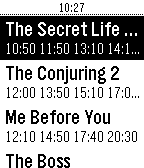
DailyCineworld Dublin film times, with daily schedule, including editorial reviews and viewer comments.
 4
4CityHook
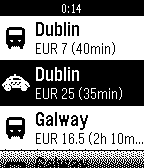
NotificationsUse the CityHook WatchApp to find the best way between airport and city. We've found out everything there is to know about all the options - Taxis, Trains, Bus and Sedan - to help you find the best way for you to connect your flight with your destination.
 4
44 Digit numeric keyboard demo
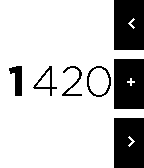
Tools & UtilitiesNumeric Keyboard demo, pebble.js source available at my GitHub: iAbadia
 4
4The Calorie Counter - Black Edition
Health & FitnessA simple calorie counter. - Press the up button to add calories. - Press the down button to correct your entry before you will save. - Press the middle button briefly to save your input. - Press the middle button long to clear your inputs. Ein einfacher Kalorienzähler. - Drücke den oberen Knopf um Kalorien hinzuzufügen. - Drücke den unteren Knopf um deine Eingabe zu korrigieren bevor du sie speicherst. - Drücke den mittleren Knopf kurz um deine Eingabe zu speichern. - Drücke den mittleren Knopf lang um deine Eingaben zu löschen.
 4
4welink
Tools & Utilitieswelink
 4
4Fuel Radar
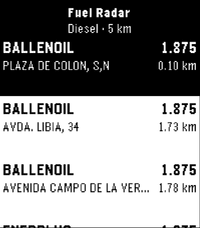
Tools & UtilitiesA lightweight nearby fuel station finder for Pebble with real-time price checks, powered by official government data. 🗺️ Countries: ES (coming soon – PT) Features: ⛽ Instant overview: Nearby fuel stations sorted by price or distance right on your wrist ⛽ Fuel selection: Choose your preferred fuel type (Gasoline 95, Diesel, etc.) via settings ⛽ Station details: View brand, updated pricing, distance, and full address on select ⛽ Glanceable UI: High-contrast, clean layout tailored specifically for Pebble e-paper screens ⛽ Low battery impact: Fast API queries routed via your phone's GPS connection 📍 Location provided by your phone's companion connection Feedback and suggestions are always welcome.
 4
4Classic Snake
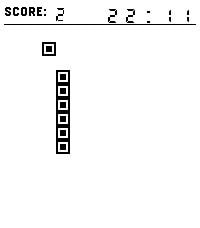
GamesEnjoy a nostalgic Snake experience with a visual style inspired by classic Tetris blocks. Guide the pixel-style snake, collect square food, grow longer, and beat your highest score. Features: Two control methods: buttons or swiping. Time display — so you can keep track of the time while playing (after all, it is a watch). Visuals inspired by Tetris Picking up an apple is accompanied by a sound (this can be disabled). Enjoy the game!
 4
4benzaiflow
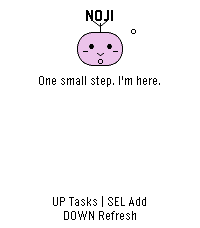
Dailybenzaiflow brings Noji, your quiet companion, to your wrist. See your tasks, catch a new thought, and put the phone away. • Browse active tasks, with pinned tasks first, and open a task for its details and estimated minutes. • Add a task by dictation on supported watches, write with the watch buttons, or choose a small essential. Review before saving. • Capture while your phone is out of reach: once paired, the app keeps up to three unsent tasks on the watch for retry when you reconnect. • Bring your Noji’s shape, color and expression with you. SETUP A benzaiflow account is required. After installing, open the app’s settings in the Pebble phone app, sign in, and choose “Connect my Pebble.” The Pebble phone app provides the internet connection for syncing. Learn more: https://benzaiflow.com LANGUAGES & LIMITS The watch interface is English; pairing is available in English and French. Task text supports UTF-8; button entry uses a Latin ASCII alphabet. Dictation requires a compatible watch and an available phone transcription service. This first release supports browsing and adding tasks; completion, deletion and reminders are not available on the watch. Support: [email protected] Privacy: https://benzaiflow.com/privacy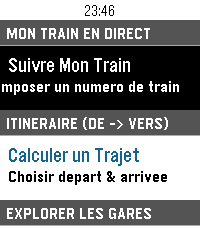 4
4Trains France
DailyApplication non officielle pour suivre vos trains sur le réseau ferré français. Fonctionnalités : Suivi de train en direct avec itinéraire complet, arrêts intermédiaires et retards en temps réel (TGV INOUI, OUIGO, TER, Intercités, Transilien, RER) Calculateur d'itinéraire entre deux gares avec sélection rapide du départ (immédiat, plus tard, le lendemain) Recherche rapide de gare via clavier intégré sans défilement Gares à proximité par localisation GPS avec distance affichée Info Trafic en direct (détection des perturbations et alertes sur la ligne) Interface optimisée pour Pebble Time 2 (Emery) : écran couleur 200×228, support tactile et boutons Prêt à l'emploi : fonctionne immédiatement sans configuration mobile préalable Mentions légales : Données fournies par SNCF Open Data. Projet open-source indépendant développé par 3DTero, non affilié, approuvé ni associé à SNCF Voyageurs, SNCF Réseau ou au groupe SNCF.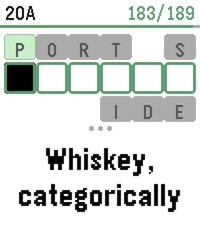 4
4DownTime: Voice Crosswords
GamesDownTime is an offline collection of 200 new crossword puzzles (9,000+ clues), supporting dictation for speech-to-text, or bespoke on-watch typing. It uses a custom crossword engine which displays one clue at a time to maximize legibility, and a tuned voice interpreter to increase dictation accuracy. Includes two crossword sizes: Mini (7x7) Regular (15x15) And two difficulties: Peaceful Challenging For maximum accuracy, it's recommended to use the Cloud provider for Pebble speech recognition (available in the Pebble app settings). However, we also support spelling out individual letters via voice dictation, which is easier for local models to parse. Or, use the on-screen swiping to type text! Special thanks to Nicole Feng (nzfeng on Github) for providing the "MsFit Crossword Dataset"!
 4
4Notesview for Nextcloud
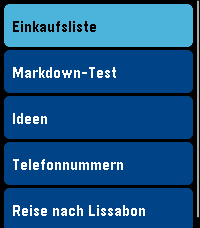
Tools & UtilitiesNotesview shows selected notes of your own Nextcloud on the watch via the phone app. The whole screen is a list of your notes, select one (touch enabled or buttons as you like) and it opens as a second screen with its Markdown rendered. BACK returns to the list, BACK in the list leaves the app. - Your own Nextcloud, no other service: the notes come from the Notes app of your Nextcloud server over HTTPS. There is nothing in between that stores them - Notes are read only (use f.e. 'Nextcloud Notes' on your (I)phone to edit the notes on the go - Sign in with an app password: create one in your Nextcloud (Settings > Security > "Create new app password"), then enter the server address, your user name and that app password in the app settings on the phone. The connection is checked before it is saved. The password stays on your phone, and you can delete it in the Nextcloud at any time. Your normal password is never needed. - Typing "demo" as the address shows a few sample notes without any server. - Pick what is shown: the list shows the notes of one category of the Nextcloud Notes app (default "Pebble", you can choose any name) and up to 12 notes (to keep it fast and with regards to limited memory on Pebble), favorites first, then the newest - Markdown rendered on the watch: headings, bold, italic, code, code blocks, links (shown as colored text), bullet, numbered and task lists with check boxes, quotes, horizontal rules. Tables are shown as plain text. Very long notes are cut after about 3 KB with a "(gekuerzt)" note - Buttons: UP / DOWN select a note, SELECT opens it, hold SELECT refreshes the list. In a note UP / DOWN scroll, SELECT scrolls a page, hold SELECT jumps to the top, BACK returns - Touch: drag the list or a note to scroll, tap a note to open it, tap the top or bottom third of a note to scroll a page, tap the title bar or swipe right to go back - The last list is kept on the watch, so it is there immediately when you start the app; the notes themselves are fetched when you open them - Colors for the list, the selected row and the note (text, headings, quotes, code, links) can be changed in the app settings. - German and English messages, following the language of your watch For Pebble Time 2 and Pebble Round 2. Nothing leaves your phone except the requests to your own Nextcloud server. Development supported by Claude and the skill for it.
 4
4Cheetah's Wordle
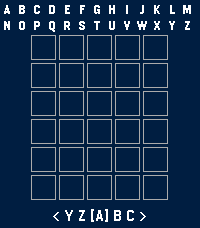
GamesFurchee's Wordle A fully working Wordle Game for the pebble smart watch! I made a better one because I like wordle. Tested the round screen versions using the emulator. Let me know if it doesn't display properly! If you want something added or something breaks, please contact me on git on any IM of your choice under @furchee. Features so far: -Compiled list of guessable words (2350) -Completely redone word lookup to fit the massive 15,000 allowed wordlist. -6 rows to guess from -Game logs progress (Total Games, Wins, Losses, Streak, Best Streak, Win Percentage as well as which row you solved in.) -One word a day (might change this to two a day --ie once every 12 hours) -Scrolling letters on button hold -Round displays are supported! Letters wrap around screen for proper board real estate. -Tap the screen to initiate a 15 second backlight timer for better clarity in bright/dim locations. -Hard mode added through brand new settings page (Thanks HumbleWolf1797 for the suggestion!)
 4
4Ultrasonic
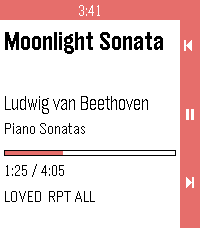
RemotesUltrasonic for Pebble is a wrist-side controller for Ultrasonic, the open-source Subsonic/Navidrome client for Android. It runs on Pebble 2 Duo and Pebble Time 2, and it needs a small companion app on your phone (available from the project's GitHub Releases). ON THE WATCH Now playing. Title, artist, album, a progress bar that ticks locally between updates, and flags for loved / shuffle / repeat. Transport. Up / down are previous / next. Long-press for volume. Select is play / pause. Long-press select opens the actions menu. Actions. Browse library, Love / Unlove the current track, Shuffle queue, Repeat (None / All / One). Browse. Ultrasonic's own library tree — Media Library, Artists, Albums, Playlists and their children. Select on a folder opens it; select on a track (or the "Play All" row) plays it; hold select on an album plays the whole album. ON THE PHONE The companion holds no credentials. Ultrasonic keeps authenticating, keeps the queue, and stars tracks the way its own notification does. The companion just drives Ultrasonic's media session and forwards the library tree. REQUIREMENTS - Ultrasonic 4.8.0+ paired to your Subsonic/Navidrome server - The Core Devices Pebble app paired to your watch - The Ultrasonic for Pebble companion APK (installed by hand from the project's GitHub Releases, one time) SOURCE AND SUPPORT Source and companion APK: https://github.com/P1R4N351/ultrasonic-for-pebble NOT AFFILIATED This project is not affiliated with Ultrasonic, with the Core Devices Pebble team, or with any Subsonic/Navidrome server implementation. Names are trademarks of their respective owners.
 4
4Talk to the Void
RemotesSimple app that sends your Voice Dictation and displays the response without saving anywhere. Quick Launching it starts the dictation automatically and exits 3 seconds after displaying the response. Used for a personal project to route around the built in Cloud APIs and send .wav files to a personal server.
 4
4Spectrum Torch
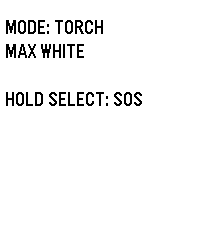
Tools & UtilitiesSpectrum: The Ultimate RGB Torch for Pebble Time 2 Transform your Pebble Time 2 into a versatile, wrist-worn torch. Engineered by Atomlabor, Spectrum leverages the exclusive hardware of the Emery platform to deliver genuine RGB backlight control. Spectrum is designed to be the perfect, instantly accessible companion in the dark. Key Features: Torch Mode: Need pure visibility? Start with maximum white light. Use the UP and DOWN buttons to dim the brightness in 10% increments to perfectly suit your environment. Gravity Colour Shift: Enter Gravity Mode and let physics take control. Tilt and rotate your wrist to seamlessly transition through fully saturated, true-colour RGB hues using the built-in accelerometer. The manual dimming function works flawlessly here, too. Emergency SOS: A long press of the SELECT button instantly overrides all settings, activating a high-intensity, flashing red SOS Morse code signal to ensure you are seen when it matters most. Clean UI & Luminance: To ensure the memory LCD does not block the LED hardware, the display intelligently adapts its background colour to match the backlight. All on-screen text automatically vanishes after five seconds, transforming the entire watch face into an unobstructed, pure light source.