 12
12Fifteen puzzle
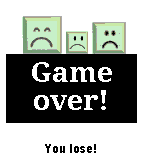
GamesThe Fifteen puzzle is a sliding puzzle that consists of a frame of numbered square tiles in random order with one tile missing. Any tile lying next to the space can slide into it. There are three difficulty levels. Try to solve the classic puzzle on your wrist!
 12
12FitoTrack Display
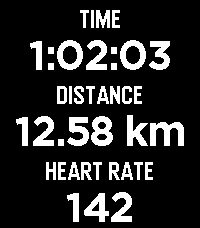
Health & FitnessFitoTrack Display shows the most important numbers of your current FitoTrack workout on your Pebble (Android only). Pebble support is available in FitoTrack since version 16.1. (Related pull request: https://codeberg.org/jannis/FitoTrack/pulls/669)
 12
12Crisse De Météo
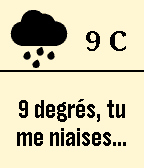
DailySupports French only. Français Une météo humoristique qui vous rappellera comment la météo n'est pas toujours clémente! Cette application contient un langage vulgaire, installation à vos risques. English A humorous weather app that will swear at the weather, maybe at you too... Up & down : Changes color Select : Starts/stops text cycling Select long click : Switch between C and F This concept comes from Marco van Hylckama Vlieg and Tobias van Schneider. Thanks to Pebble Rockstar Ayoub Briki for weather icons.
 12
12Password-O-Matic
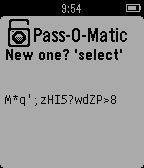
Tools & UtilitiesIt generates 16-chars strong passwords, contaning letters (both lower and uppercase), numbers and puctuation marks.
 12
12Velo
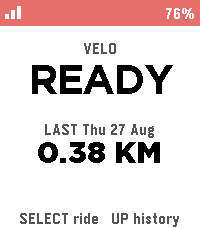
Health & FitnessBiking/Cycling Companion for your Pebble, local to your pebble. Download the companion app for your phone and click select to start tracking, currently tracks the following metrics: -Current speed -Distance -Ascent -Ride History Works natively on your phone and watch with no accounts required, no cloud needed.
 12
12Tennis Score
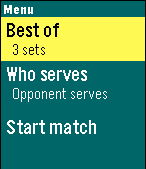
Health & FitnessDo you play tennis? Now you can keep track of the score in your Pebble! Tennis Score for Pebble tracks points, games, sets and who is serving. Update the score by pressing a button; undo available. Choose between best of 3 or 5 sets; tiebreak for all sets. Shows current time and match duration. Features: + Menu: - Select best of 3 or best of 5 sets - Select who starts serving - Start match! + Match: Use buttons to track the score. - Up: point to your opponent - Down: point to you - Select: undo last point; as many times as you want - Back: exit to main menu + Score: - Upper row: your opponent score - Lower row: your score - Left time: current time - Right time: match duration in minutes - Asterisk: who is serving +Statistics: Scroll down at the end of the match. - Match score - Number of points won - Match and set duration Give it a <3 if you like it! Thank you!
 12
12nBack
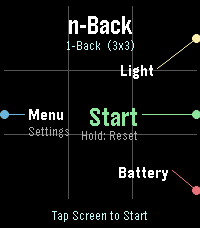
GamesnBack - Advanced Working Memory Training for Pebble Time 2 (Emery) Elevate your cognitive performance with nBack, a scientifically grounded working memory training application crafted exclusively for the Pebble Time 2 (Emery Platform). Rooted in cognitive neuroscience standards, nBack challenges your brain to retain and update dynamic sequences of information in real time, expanding your active working memory capacity and attentional control. KEY FEATURES: - Multi-Modal Stimuli: Train across multiple modalities simultaneously, including Spatial Position (3x3 grid), Color palette, 10 Geometric Shapes, Numbers (1-9), Phonetic Letters, Haptic Vibration patterns, and Audio Morse tones. - Adaptive Auto-Leveling: Automatically scales difficulty from 1-Back up to 7-Back based on your real-time performance thresholds. - Full Emery Hardware Utilization: Optimized for the 200x228 64-color Sharp MIP display, capacitive touchscreen, 4 physical buttons, and built-in raw tone generator. - Flexible Input: Respond using tactile physical buttons or intuitive touchscreen taps. - Customizable Protocols: Fine-tune exposure times, pause intervals, stimulus combinations, and performance thresholds. TRAINING STATISTICS & SETTINGS (BETA): Access the companion Settings page directly from your Pebble mobile app to inspect your cognitive progression: - Peak n-Back level, average accuracy rate, and total completed sessions. - Sandboxed local storage powered by your phone browser's Origin Private File System (OPFS). - Complete control over session logging via the in-app 'sync Data' preference toggle. Challenge your mind, track your neuroplastic progress, and master working memory on your wrist.
 12
12Restricción Vehicular Chile
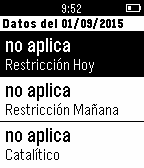
DailyRestricción vehicular Chile permite ver cual es la restricción para la circulación de vehículos en la ciudad de Santiago - Chile.
 12
12Pinball Map
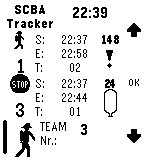
DailyFind nearby pinball machines! The Pinball Map Pebble App tells you the closest places to play pinball, as well as which machines have been recently added to spots. You can also use it to find nearby pinball tournaments and events! The Pinball Map Pebble App is powered by pinballmap.com, and covers select areas of North America.
 12
12SCBA Fire Scene Team Tracker
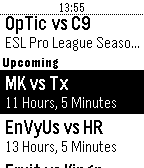
Tools & UtilitiesThis app assists you to monitor up to three SCBA teams on a fire scene. Supports 9l, 6l, 6.8l, 2x6.8l, 2x4l and 2x6l SCBA bottles. You can choose the default breathing rate, specifiy the bottle types you want to support, select your default bottle type and switch between [bar] and [psi]. Please note that this app is for assistance purposes only and that I do not give any warranty on the functionality of the app.
 12
12CSontheGO
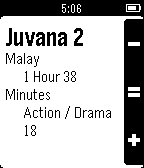
DailyPebble app to display upcoming, live and completed CSGO (Counter Strike Global Offensive) match details Displays all upcoming CSGO match information, as well as completed match information with extra detials listed if you click through (see screenshots for example) There is an issue where I can't seem to reload the page after a config change in the settings page. This just means if the filter results that are returned after you change the filters are fewer then what is already displayed on the screen, you will see old results until you restart the app. Still trying to find a work around for this There is no colour in the app (yet!). Although this installs on Chalk (Pebble time round) it is not configured to display on round yet Features * view live, upcoming and completed CSGO match details * view more information for completed matches * Pin upcoming matches to your timeline, and be reminded when they start (Long press) * Filter your results! Upcoming features in 1.1 release 1. Colour! Please email me for suggestions, bug reports, or visit the repo's home page :) If you would like to contribute, please get in contact
 12
12Malaysia Showtimes
DailyMalaysia Showtimes allows you to easily browse for the movie showtimes right on your wrist. This app only works for all major cinemas across Malaysia. Movie showtimes provided by showtimes.my.
 12
12Adelaide Bus
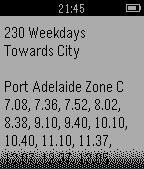
DailyA timetable for the 197X, 200, 200B, 200C, 229X, 230, 506X, 721X, T722, 723F, 723X and 750X bus services in Adelaide that operate under the Adelaide Metro. More services and routes will be added soon. Tell me your bus route and I will add it to the app! COMING SOON: 200, 300 and other routes!
 12
12DR Nyheder
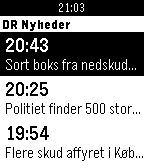
DailyLatest news from DR Nyheder in danish.
 12
12Box Office
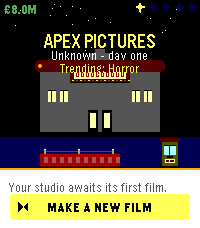
GamesBox Office is a movie maker sim where you run a film studio from your wrist. Pick a genre, set a budget, hire your cast and crew, then watch your film hit cinemas in a real-time 3-minute box-office run. Every decision matters - wages, marketing, reshoots, release strategy - and every hit you ship grows the studio's reputation, signature genre, and roster of signed talent. Make a Masterpiece. Survive a flop. Build an empire one film at a time.