 13
13Scubawatch
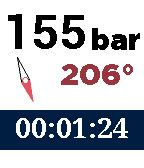
Health & FitnessA companion to scuba divers. This app can help you time your dives, and record your air consumption and compass heading. Simply press the up and down buttons to change the air pressure, and it will be recorded and time-stamped. To record the compass heading, press the middle button. You can see a log if you long-press on the select button. To reset the timer and clear the log, double-press the select button. Every five minutes it will vibrate to remind you to log the air pressure.
 13
13thumpa
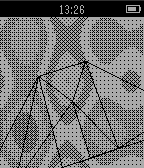
Gamesplasma and spinning 3D wireframe
 13
13ZWay Control
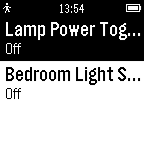
RemotesPLEASE NOTE: I no longer have a Z-Way system, I cannot verify whether this app still works. If you have one and want to take over maintenance, please reach out. --- New in 1.2: Fixed compatibility with Pebble Classic Control your Z-Wave light switches from your wrist! This unofficial app integrates with your Raspberry Pi-based Z-Way system. Currently this app only supports on/off switches, more support to come in the future. Please be sure to run Settings - a username/password can be set via http://<raspberry-pi ip-address>:8084/ if you haven't already. This app requires a Raspberry-Pi based ZWay system (http://www.z-wave.me/) to function, and also requires your phone be on the same local network as your Z-Wave system. Not compatible with other ZWave systems such as Vera. Questions or feedback welcome: [email protected] Contribute to the app at: https://github.com/radicand/PebbleZWay 13
13Nieuw Currency Converter
Tools & UtilitiesBEST Currency Exchange Rates App Updated! Custom amount, to and from currency selection. Get accurate and instant currency exchange conversion between any two currencies right from your wrist! NO companion app required, and you can use the Pebble App to modify settings. Enjoy!
 13
13NYTimes Top Stories
DailyTrending news on your wrist. This news app lists Top 10 stories from NYTimes.com. Select a story to see an abstract. Shake/move your wrist to refresh news.
 13
13Randomizer
Tools & UtilitiesCalculate random number by pressing Select button. Receiving number from 0 to 99 and show sum of digits.
 13
13QuickTodoist
Tools & UtilitiesI wanted a Todoist app that starts instantly, so QuickTodoist caches your tasks and shows them the moment you open the watch. No spinner, no waiting on your phone. It refreshes quietly in the background after that. It's meant for a quick glance at your top tasks and to jot down a new one. Everything else is faster on your phone or desktop, so it's deliberately left out here. FEATURES - Today at a glance: each task is a fullscreen card with due time, project, priority color and description - flip through them with up/down - Instant startup from cache; auto-refresh every time you open the app - Add tasks by voice on watches with a mic (Todoist quick-add understands "buy milk tomorrow p1"); other watches refresh manually instead - Shows Today's tasks, or any Todoist filter you choose - Mark tasks done from your wrist (hold select) - Timeline pins for tasks scheduled at a specific time today - Configure once on your phone: API token, filter, and sort order (Todoist order, priority, or due time) - Text size follows your watch's own Text Size setting No token yet? The app shows sample tasks so you can try it right away. Add your free Todoist API token when you're ready (Todoist: Settings -> Integrations -> Developer). Not affiliated with Doist. Todoist is a trademark of Doist Inc.
 13
13Type Reminders
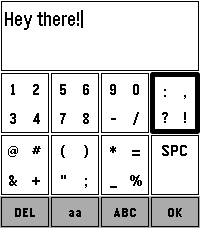
Tools & UtilitiesMoving from Alpha to Beta! If you find any bugs or have any recommendations, let me know! I've had a lot of issues with Pebble's voice to text feature, partly due to my use case, and I wanted a way to still add reminders to my timeline. I couldn't find anything I liked, so I thought I'd try making a keypad style keyboard to type in reminders. I can only test on the Time 2 for now, but it should work on all but the round watches! This is now in a fairly stable and usable state. There may still be some issues and I have a few more minor changes I'll make, but nothing that should change the functionality of the app by much. Still, if you find any bugs or have any ideas you'd like to see me implement, let me know!
 13
13Nice Timer
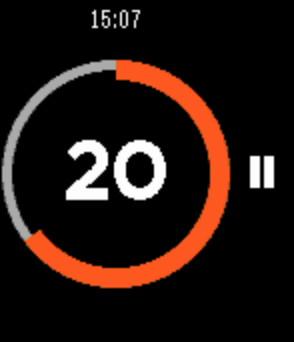
Health & FitnessNice Timer is a simple to use fitness timer. No need to set duration every time. No risk of deleting your timers. Just select the desired interval, and start your training. Useful for crossfit, or any other intensive training that consists of short intervals. You can select one of three intervals: 10 seconds, 30 seconds and 1 minute. After your timer begins to tick, you can pause or completely reset it. Go back to the menu to select another interval. The timer will vibrate shortly a few times to let you know that it stopped.
 13
13Diamond Crush
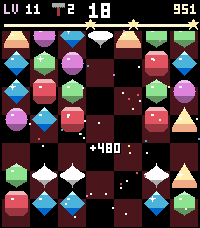
GamesDiamond Crush is a sparkling match-3 puzzle game made for the Pebble Time 2 touchscreen. Swipe a gem onto its neighbour (or tap two gems) to line up three or more of a kind. Level after level the goals get tougher: reach the target score within a few moves, or break all the ice on the board. FEATURES - Made for touch: swipe or tap to swap - buttons work too - Six bold gems, each with its own shape: ruby, crystal, citrine, emerald, sapphire, amethyst - Special gems: match 4 for a striped gem, L or T shapes for a bomb, 5 in a row for the rainbow diamond - Combine two special gems for huge chain reactions - Endless levels with score and ice goals, 1 to 3 stars per level - Leftover moves turn into a diamond rain bonus - Juicy effects: screen shake, lightning, shockwaves, chain praise and confetti - Hammer booster: smash any gem - earn it with 3 stars and your daily play streak - New worlds every 10 levels: Candyland, Cherry Garden, Chocolate Factory, Graphite Mine - Own soundtrack and sound effects (uses the Pebble Time 2 speaker) - Online world ranking at pebble.ni3d.de/diamondcrush 7 free play days, then unlock the full version once via KiezelPay (one-time purchase, no subscription). Made by Ni3D.
 13
13RingView
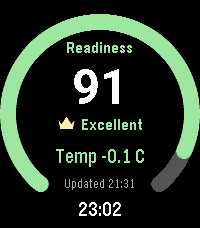
Health & FitnessRingView brings selected Oura readiness, sleep, activity, heart-rate, and stress/recovery summaries to Pebble in a focused native watch app. Move between full-screen metric overviews with the hardware buttons or touch gestures. Each overview shows the latest value, a glanceable progress or range ring, and the last successful update. Open a detail view for seven-day score history, last-night sleep stages, an intraday heart-rate graph, or recent stress and recovery durations. RingView connects directly to Oura from PebbleKit JS on the paired phone. The access token remains phone-side and is never sent to the watch. API failures retain the last valid display, and refreshes are intentionally conservative. RingView has no backend, accounts, advertising, analytics, or trackers. An Oura account and compatible Oura data are required. RingView is an independent companion and is not affiliated with or endorsed by Oura Health Oy. It is not a medical device and should not be used for medical decisions.
 13
13timer
Tools & Utilitiessimple stopwatch
 13
13Idle Dungeon
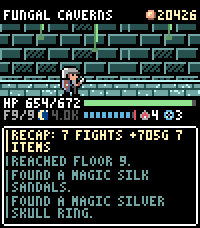
GamesIdle Dungeon turns the steps you take during the day into a dungeon crawl. Pick a dungeon in the morning and go about your day. Every step carries the hero deeper: monsters, traps, fountains and loot all happen while you walk, and the app shows you what you missed when you next open it. Nothing to tap, nothing to grind. - **Steps are the game.** Floors are hundreds of steps apart; the deepest dungeon is 12,000 steps down and the same distance back. Steps taken in town are saved for your next expedition, so a morning walk is never wasted. - **Sleep well and the day goes better.** Six hours of sleep makes the hero Rested, seven makes them Refreshed: more experience, more gold, better finds. - **1000 items to find.** 150 shapes across six materials, plus 64 uniques and 12 three-piece sets with their own art and effects. Rare gear drops unidentified: carry it home to the appraiser, or read an identify scroll where you stand and wear it on the spot - gear can be changed anywhere, dungeon included. - **Hunt what you are missing.** The tavern trades in rumours: pay for a lead and that item starts turning up where it drops. The codex tells you where to look. - **Real risk.** Run out of health and your gear stays where you fell. Walk back for it, or pay someone to fetch it before it is gone for good. - **Also:** a blacksmith who upgrades gear to +10, a 48-slot stash, portal scrolls for the walk home, an auto-return setting, and a morning reminder so you never forget to set out. Runs entirely on the watch. No account, no ads, no in-app purchases; your save never leaves your wrist. Requires a Pebble Time 2 and step data from Pebble Health.
 13
13PebbleSky Detail
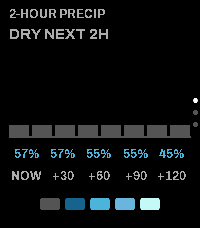
Tools & UtilitiesCompanion app for the PebbleSky watchface. Three screens, cycled with the Up and Down buttons: - 2-hour precipitation: bar timeline, rain countdown, and precipitation probability - 5-day forecast: condition icon with daily high and low - Now: location, temperature, feels-like, wind, and humidity Opens from the watchface via Quick Launch. Configurable: - Weather source: Open-Meteo (no API key) or Tomorrow.io (API key) - Temperature units (°F / °C) - Accent and warning colors
 13
13Pebble PWS
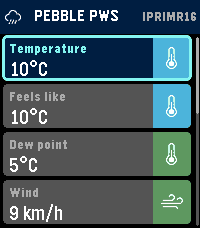
Tools & UtilitiesPebble PWS shows live Personal Weather Station data from WeatherUnderground on your Pebble Time 2. Choose your Weather Underground API key, station ID, and preferred units in the phone app settings, then view current temperature, feels-like temperature, dew point, wind, gusts, wind direction, rainfall, rain rate, pressure, and humidity on your watch. Select a metric to see 24-hour history charts, including wind and rainfall visualizations. Designed for quick, glanceable local weather from the station you care about most. Developed using AI assisted coding techniques.