 17
17AskMe
GamesDo you need to make a hard choice or decision, and could use a little divine assistance? The amazing and mystical AskMe App is here for you! Just pose a question and get a quick response, then decide for yourself what to do. Prank your friends by telling them you have a ★ Magic AskMe ★ that can answer all your questions! The answers are randomly chosen, but you would be surprise how much it's sometimes so true!
 17
17Magic Life Counter
GamesKeep your life count on your wrist , this app helps you easily keep track of it when playing Magic the gathering® Press up and down key: --to increase or deduct lives respectively. Press select key: --to change between Lifes and Tokens Press and hold select key: --reset the counter Enjoy it!
 17
17Petrello
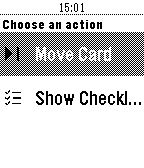
Tools & UtilitiesPetrello is a simple Trello client, allowing you to navigate through your boards, check/uncheck checklist item, move cards within lists and add due cards to your timeline. More info at http://trapias.github.io/blog/Petrello
 17
17Population Viewer
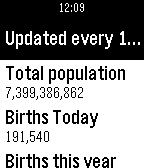
Tools & UtilitiesEver wondered, "How many people are living right now on Earth?" Then this is the app for you! Features include: • World population • Births today • Births this year • Deaths today • Deaths this year • Population growth today • Population growth this year • Population in the top 5 countries: • China • India • USA • Indonesia • Brazil
 17
17Press The Button
GamesThis is just my first app.It is simple and does not do much.
 17
17BKK Futár
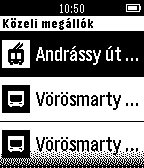
Tools & UtilitiesKözelben lévő megállók és járatok lekérdezése egyszerűen
 17
17Banner
Tools & UtilitiesBANNER will show very large scrolling characters/texts on your watch. This allows for showing texts to others up to 15 feet away. Texts are stored in the watch and may be entered on the phone or on the watch. Texts may be scrolled both horizontally and vertically. All Help texts are available on the phone and on the watch using single word help (Spritzing) All settings can be changed on the watch, no need to use your phone. Created with CloudPebble. Thank you Katharine! Open Source, use in your own App. See: https://github.com/Ruud48/Pebble-Banner
 17
17BitCloud (F)
DailyBitCloud is a simple, yet powerful forecast and weather app for your Pebble Time. It uses information collected from your phone to determine your approximate location, then gather weather information for that location. It does all of this in just a split second. Please note this is the imperial version. If you rely on the metric system (C), check out "BitCloud (C)". :)
 17
17Ishiki
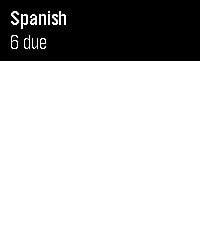
Tools & UtilitiesIshiki — Anki on your wrist Flashcards on your wrist. Flip, grade, repeat. Review your Anki decks straight from your Core Time 2. Pick a deck, read the front, press to flip, and grade with a single button — ✓ Good · ~ Hard · ✗ Again — with a color flash and a buzz. Long cards scroll, due counts update as you study, and a quick vibrate tells you if the phone link drops. Private and offline: it reads your cards from AnkiDroid on your phone (which syncs to AnkiWeb itself) — no account, no server, nothing leaves your device. Requires (Android): the free Ishiki companion app + AnkiDroid on the same phone → github.com/f4nu/ishiki Controls: Up/Down scroll · Select reveals · then Up Good · Select Hard · Down Again · hold Up/Down to scroll a long answer.
 17
17Pexic
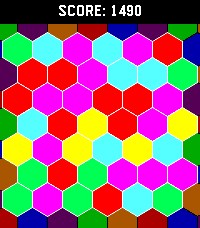
GamesHexic but for pebble! It's the classic you know and love, optimized for Pebble Time 2 (emery) and Pebble Round 2 (gabbro)
 17
17French Basics
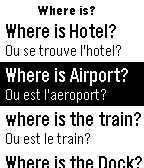
Tools & UtilitiesJust A Few Basic English To French Translation With More On The Way!!! This is my first app, hope you guys like it! If you do Please leave a Heart! Email me if I might have made any mistakes or if you want me to add more translations or if you have any suggestions for any apps you want me to make or how to improve my app! Thank You!!!
 17
17HEARTBEAT animation meme
GamesI ported an animation meme to PT/PTR because I was bored. I know, no one asked for this app to exist lmao. You can toggle the subtitles by pressing select, and the app vibrates to the beat of the song. (PTR doesn't have subtitles because there's not enough room for them) The original animation meme is made by zephyr on YouTube, and the song used is Childish Gambino - Heartbeat.
 17
17Ajouter à votre timeline
NotificationsAjoutez facilement des pins à votre timeline avec la voix (français uniquement): Exemples: - Pin à venir (dans la journée ou le lendemain si l'heure est dépassée): "À [20h45|20 heure] [rendez vous avec Antoine] ([à la gare|au cinéma]) (pendant [1 heure|10 minutes])" - Pin mis à la date et heure actuelles: tous textes ne matchant pas avec le schéma précédent L'application est stable mais toujours en cours de développement.
 17
17Train 2 Time
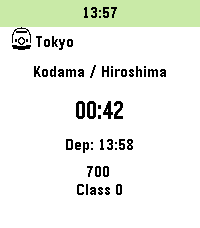
DailyInspired by "TrainTime" by otoone_dev: https://apps.rebble.io/en_US/application/5904a0c90dfc329df8000706 I created this app to improve its usability for my own needs. It is a simple app that counts down the minutes until your train departs. Timetable data is fetched from user-created Markdown (.md) or Text (.txt) files hosted online (intended for use with GitHub Gist "Raw" URLs). Sample data is also available on GitHub. Note: Since this was designed for the Japanese railway system, some behaviors may differ from your local transit rules. Controls: - [UP / DOWN]: Change train - [Hold UP / DOWN]: Add to timeline - [SELECT]: Change station - [Hold SELECT]: Change current data slot Features: - Fetches timetable data only at app launch. - Customizable limits for the number of trains and the time range to fetch (within stable memory limits). - Stores up to 5 timetable URLs. - Supports 3 schedule types per station: Weekdays, Sundays/Holidays, and Saturdays. - Fallback logic: Sunday/Holiday and Saturday schedules can be omitted; the app will default to the Weekday schedule. - Uses a 24-hour format from 04:00 to 27:59 (considering 4:00 AM as the start of the day). - Supports "\n" in the remarks section for up to 2 lines of text (approx. 9 full-width characters per line). - Optimized for approximately 5-10 stations. - For color-enabled Pebbles: Background color for the current time and highlight color for post-departure count-ups can be customized. - Text and background colors for train types are now customizable on Pebble Time 2 and later (Defaults: Text #000000, BG #FFFFFF). - Japan-specific: Can automatically fetch Japanese public holidays via: https://holidays-jp.github.io/api/v1/date.json (Disabled by default). Special thanks to Hiroshi Matsuo. otoone_dev氏作の「TrainTime」を愛用していたのですが、自分なりに使い勝手を良くしようと思い立ちこのアプリを作りました。 列車の発車時刻まであと何分?をカウントダウンするアプリです。 時刻表データはユーザー自身がweb上にmarkdown(.md)またはtext(.txt)ファイルを作成し、それを参照する方法をとっています (Github Gistの非公開URL、Rawを想定しています)。 GitHubにサンプルデータを用意しました。 特徴: - アプリ起動時のみ時刻表データを参照します - 参照する列車の本数や、向こう何時間まで参照するかは設定で変更できます(クラッシュしない程度の制限をかけています) - 時刻表データのURLは5つまで記憶できます - 駅ごとに時刻表は平日、日曜祝日、土曜の3種類 - 時刻表は[平日>日曜祝日>土曜]の順に参照するため、日曜祝日と土曜は省略可 - 時刻表は午前4時を一日の基準とした04:00から27:59の24時間を使います - 備考部分は改行「\n」が使えるので2行までなら表示できます(全角9文字x2行を想定) - 5-10駅くらいのデータを想定して作っています - カラー対応端末は現在時刻の背景色と列車出発後カウントアップのハイライト色を変更できます - Pebble Time 2以降では列車種別の文字色と背景色を指定できるようになりました(デフォルトで文字色000000、背景色FFFFFF)。 - 日本向けの設定として、自動で日本の祝日を参照できます(デフォルトではdisable)。Hiroshi Matsuo様ありがとうございます。 Data Example: // Force specific dates as Holidays or Saturdays (Optional) // 特定の日付を強制的に祝日や土曜として扱えます(省略可) @HOLIDAYDAY:2026-12-31 @SATURDAY:2027-01-01 // Station Name // 駅名 # Tokyo // Icon to the left of the station name (Optional) // 1:Shinkansen 2:Retro Train 3:Modern Train 4:Bus 5:Clock 6:Monorail 7:Cable car 8:JR Central Shinkansen 9:JR East Shinkansen... // 駅名の左隣に表示するアイコン(省略可) // 1:新幹線 2:国鉄風電車 3:現代風電車 4:バス 5:時計 6:モノレール 7:ロープウェイ 8:東海道新幹線 9:東北新幹線 10:国鉄風特急 11:京急風電車 12:L特急 13:寝台特急 14:SL 15:アプリアイコン ## 1 // Schedule Type: weekday, holiday, or saturday ### weekday // Format: Departure Time, Destination, Type (Optional), Remarks Line 1 \n Line 2(Optional) \n Remarks Line 3 (PT2 or later), Text Color (PT2 or later, Optional), Background Color (PT2 or later, Optional) // 発車時刻,行先,列車種別(省略可),備考1行目\n備考2行目(省略可),種別文字色(PT2以降のみ),種別背景色(PT2以降のみ) - 04:00,Kyoto,exp,Dir.\nFirst,000000,FFFFFF - 27:59,Osaka
 17
17WDTVble
RemotesWDTVble lets you control your WD TV Live player from your Pebble watch. Before using the app for the first time, the IP address of your WD TV Live player has to be set in the settings page. Works with the WD TV Media Players (This is not an official app by WD TV)