 6
6SimpleCounter
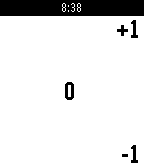
Tools & UtilitiesA simple counter app. Saves count on exit, no vibrations, no fancy colors. Comma separated digits by groups of 3. (Free Pro feature) Up / down buttons for +1 / -1 . Long press down to reset count to 0 . Long press select to adjust count by +50 / -25 , long press select again to return to normal counting mode.
 230
230Step Goal
Health & FitnessStep Goal lets you set a daily step goal, and tracks your progress throughout the day towards your goal. It will buzz your wrist when you reach the goal you've set. It also features an optional periodic reminder if you haven't been very active to move around some. Features: • Set a daily step goal of 2k, 4k, 6k, 8k, 10k, 15k, or 20k Steps • Choose to enable a bonus goal you can reach, you over achiever. • Counts your current streak, if you want. • Motivates you if you've been inactive for a while to get up and move around some. (This feature is beta.) • 8 Color Themes • Displays the time (It's almost like a watch!) • Circles • Sloths
 3
3One Click Vera Unlock
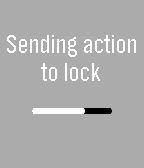
RemotesUnlock or lock your house door with a single click on your watch! The app toggles the current state of the doorlock. It works whether your home in your local network or outside connected to any wireless network. This app is for Vera U17+ Only. If you experience any bugs, send me an email!
 0
0DVB Trinity
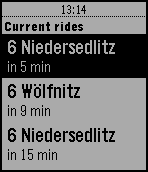
Tools & UtilitiesDisplays DVB rides from the Trinitatisplatz station in Dresden
 23
23Currency Exchange
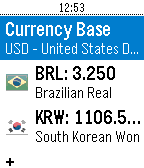
Tools & UtilitiesWorld Currency Exchange Converter. Up to 32 currencies.
 375
375Powernoter
Tools & UtilitiesCreate and search Evernote notes by voice. Check off checkbox items, view color images from your notes, append to existing notes and more. Notes you've modified recently as well as Evernote reminders are automatically added to your timeline. You can add a reminder to a note by pressing Select when viewing it. Powernoter is in no way affiliated with Evernote. Show your appreciation at http://4r.io/pn
 31
31Daily Text 2016
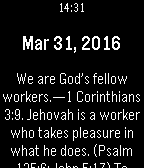
DailyEnjoy the daily text on your wrist... Donate: [email protected] https://www.paypal.com/myaccount/transfer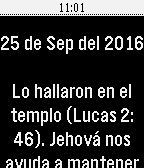 22
22Texto Diario 2016
DailyMuchos quisieramos tener un texto bíblico para meditar en él, durante la escuela o el trabajo. Ahora podrás revisar el Texto del Año, Texto del Día y el comentario de la Atalaya desde tu Pebble Watch además podrás volver al pasado y revisar los textos leídos anteriormente. (Pines Pasado, Futuro) Solo basta con abrir la WatchApp y ver el texto bíblico correspondiente para ese día. (La información fue tomada del Examinando las escrituras diariamente 2016 de la JW.ORG) Donaciones Paypal: [email protected] https://www.paypal.com/myaccount/transfer/buy 10
102C: Double Counter
Tools & UtilitiesMinimalistic double counter with persistent storage. Short press up key to increase the upper counter. Long press up key to decrease the upper counter. Short press down key to increase the lower counter. Long press down key to decrease the lower counter. Long press select key to reset both counters. Use config to define custom colors for background and counters or enable status bar. Works without connection to the phone.
 30
30Simple Pomodoro
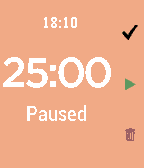
Tools & UtilitiesThis pomodoro app in pebble can: Customize time (work, rest, long rest and long rest frequency) and UI Screen Color Ability to take a long break after several iterations Shows the time and status Easily to set the intervals in pebble app under setting Count the number of pomodoro Use the setting under Apps tab in pebble to customize this app Direction: Top button: Skip to the next iteration Middle button: Play and skip Bottom button: Clear everything Courtesy: this app is based on POMO D'ORO by Lucas Conceicao. I wrote this app to cater my needs. Enjoy :)
 14
14511NY
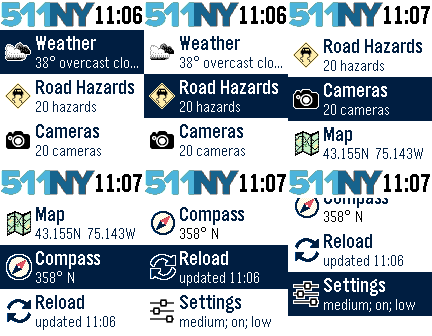
DailyThe 511NY app displays weather and traffic information to help you navigate the roadways of New York State. When launched, you can view your local weather by selecting the first menu item. The closest recorded road hazards are displayed when you choose the Road Hazards item. The roadway hazard list is sorted by distance from your location. Your location is based on your smart phone GPS, so make sure Location Services are enabled for your Pebble Time smart phone app. A list of traffic cameras is next in the main menu, also sorted based on your location. When viewing a traffic cam, the UP button displays the camera name, the MIDDLE button refreshes the camera image, and the DOWN button displays the distance to the camera. The Compass and Map features are next. The compass may need you to rotate your Pebble in a figure eight motion a few times for calibration. When viewing the map, use the UP and DOWN buttons for zooming, and the MIDDLE button to refresh your location. There are custom settings for text size, automated reloading of information, and GPS accuracy. This app was originally created for the DevPost HackFrost competition in February, 2016.
 14
14pSprites
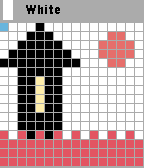
Tools & UtilitiesFirst sprite editor for pebble. You can draw small images on pebble and phone. Free trial for 24 hours. Usage:back button go to the toolbar with color, long press back button-exit. Up-go to forward, Down-go back, select-draw, long press select -menu
 11
11Pickle Pal
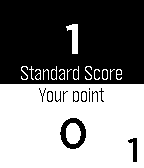
Health & FitnessPickle Pal is the score keeper especially designed for Pickleball. - Easily tracks score, server position and number (1/2) - Works for both regulation and rally scoring - Simple and easy to view display - Simple interface with error correction Display Layout: - Layout matches court - Opponents score is always on top - Your teams score is always on bottom - Serving team is highlighted in white - Current server (1 or 2) and position is indicated at the corners of the display To Start Pickle Pal Application: - Click [Select] button - Click [Down] button until Pickle Pal application is highlighted - Click [Select] button Button Quick Reference: - Double click [BACK] button - Starts a new game - [Select] button - Toggles the starting server position between your team and opponent's team (at start of new game only) - [UP] button - Increments score when your opponent wins the rally - [DOWN] button - Increments score when your teams wins the rally - Holding the [UP] button - Decrements your opponent's score - Holding the [DOWN] button - Decrements your team's score - [SELECT] button - Changes the server position - Holding the [SELECT] - Changes the server number (1/2) - [BACK] button - Exit game or exit setting menu (with confirm)
 100
100Reminder Pro
NotificationsProfessional way to make reminders My first app Leave your feedback at forums. (App's website link) If you've found any issue, contact me
 870
870Ventoo - GPS sports tracker
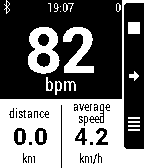
Health & Fitness(formerly known as Pebble Bike) Ventoo is a GPS sports tracker for your Pebble. It uses your phone's GPS to send speed, distance and altitude data to your Pebble. You can automatically upload your track to Strava or Runkeeper at the end of the track. If you got a Bluetooth LE Heart Rate Monitor (HRM) or Cycling Speed and Cadence (CSC), you can display heart rate (and zones with alarms) and cadence on your Pebble. Ventoo also has an innovative auto start feature which will auto start the bike computer on your watch when it detects you are riding a bike (it uses low battery technology, you can leave this switched on all day). Ventoo has a Live Tracking function that sends your position every 30 seconds to the internet. You can receive your friends'positions and display them with your own track, directly on your Pebble. Features: * GPS cycle computer (instant speed, average speed, distance, altitude, positive ascent, ascent rate, slope) * If available, use pressure sensor to improve altitude accuracy (Galaxy S3+, Nexus 4+...) * Tracks can be saved as GPX and exported to compatible services (Strava, Runkeeper...) * Multiple units (metric, imperial, nautical, pace...) * Bluetooth Smart (BLE) Heart Rate Monitor (classic bluetooth HRM are not supported) and Cycling Speed and Cadence (CSC) * Watchapp in english, german, spanish and french * Customizable screens with built-in configuration or with Canvas plugin * OruxMaps integration This app has no affiliation with the Swiss rights holder named Ventoo GmbH.