 2
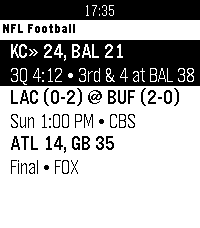
2Football for Pebble
DailyLive NFL football on your wrist featuring real-time down & distance, field position, drive tracking, and score alerts.
 24
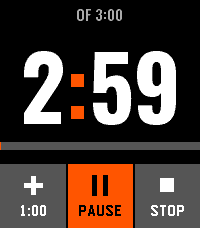
24Clear Timer
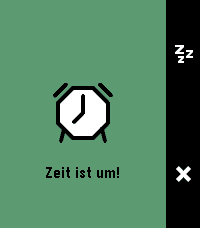
Tools & UtilitiesA touch timer for Pebble Time 2: three wheels you turn with a finger, six timers it remembers, and an alarm you silence with a palm.
 1
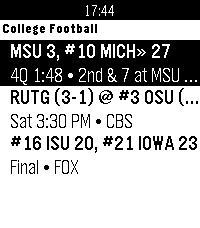
1CFB for Pebble
DailyLive NCAA college football on your wrist featuring AP Top 25 rankings, real-time down & distance, field position, drive tracking, and score alerts.
 17
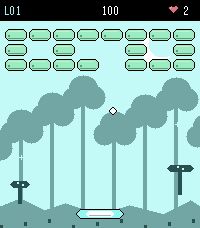
17Brickline
GamesBrickline is a brick-breaker game built specifically for the Pebble Time 2, combining classic arcade gameplay with touch controls, Pebble-style pixel art, sound, haptics, and extensive customization. Play through 24 hand-crafted levels, each with its own layout and visual character, and use seven different power-ups to change the flow of the game: Wide Paddle, Glue, Extra Life, Turbo, Shield, Fireball, and Multi-ball. Brickline is designed around the hardware of the Pebble Time 2. You can play using touch or buttons, adjust touch sensitivity and button directions, enable or disable vibration, control sound effects and speaker volume, keep the backlight on during gameplay, choose between light and dark themes, change difficulty, or enable a reduced-effects mode to conserve battery. A major part of Brickline is now available on the phone side of the app as well: you can create your own custom levels, send them to the watch, and share levels with other players. This makes Brickline more than a fixed set of stages and opens the door to an expanding collection of community-created levels. The game currently includes: - 24 built-in levels - 7 unique power-ups - Touch and button controls - Adjustable touch sensitivity - Custom button directions - Sound effects using the PT2 speaker - Adjustable sound volume - Optional vibration feedback - Adjustable difficulty - Light and dark modes - Keep-backlight-on option - Reduced-effects battery-saving mode - Custom level creation on the phone - Level transfer to the watch - Level sharing between players Feedback, bug reports, balance suggestions, and custom level creations are very welcome. Break the bricks. Build your own. Share the challenge.
 236
236PebbleNavi
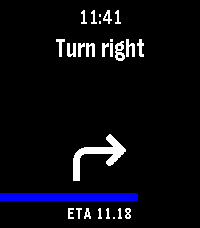
Tools & UtilitiesAndroid 16 Google Maps live notification navigation directions to Pebble. Companion app is in Google play closed testing and will soon be opened to all. (Can be downloaded from https://lumie.red/pebblenavi_v14.apk but will not work anymore after september) Companion app update v1.3: Autolaunch of watchapp when navigation starts. Companion app update v1.4: Autolaunch timer reset. First attempt to filter non-navigation notifications from Google maps. Samsung OneUI support is still incomplete. App does not support old style "normal" notifications, only android16+ live notification navigation is supported currently.
 1
1Boxing Timer
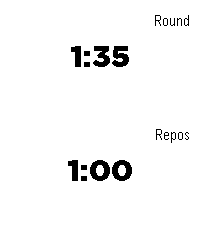
Tools & UtilitiesTimer which alternates between exercice timer and rest timer.
 1
1PebTrader Zero
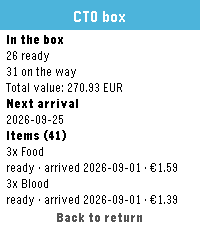
Tools & UtilitiesPebTrader Zero shows the state of your CardTrader Zero orders on your Pebble. • Your orders at a glance: state, item count, total and counterparty • Open an order for its timeline, totals, shipping method and tracking code • Hold Down for your CardTrader Zero box: what's ready, what's on the way and when it arrives • The last snapshot is cached on the watch, so it still works without your phone • Your API token stays on your phone and is never sent to the watch Requires a CardTrader account and an API token, which you paste into the app's settings (CardTrader → Settings → API). Built for Pebble Time 2 (Emery) and Pebble Round 2 (Gabbro). Open source: https://github.com/dottorblaster/pebtrader-zero
 5
5Dictionary - EN
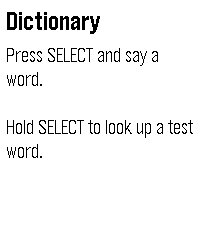
Tools & UtilitiesLook up any English word by saying it. Press SELECT and say a word. Your watch shows what it heard so you can confirm it or try again, then displays up to six definitions. Scroll with the UP and DOWN buttons, or drag the text with your finger. To try it without speaking, hold SELECT to look up a sample word. Requirements Dictation and lookups need your phone to be connected and online. Where the definitions come from Definitions are from Wiktionary (wiktionary.org), extracted by the Wiktextract project (kaikki.org). Wiktionary content is available under the Creative Commons Attribution-ShareAlike 4.0 license (CC BY-SA 4.0). Entries can be incomplete or wrong; anyone can correct them on Wiktionary. Privacy Your speech is converted to text by the Pebble app's dictation service; this app only receives the resulting text. To find its definition, the word is sent over an encrypted connection to the developer's server, along with your IP address, as with any web request. The server may keep standard access logs of these requests. To prevent abuse, it also counts requests per IP address, stored only as a one-way hash, and clears old counts automatically. No account, no ads, no tracking.
 8
8Cloudbreak
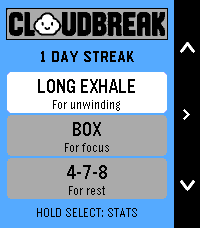
Health & FitnessCloudbreak — A little air. A little less chaos. Your wrist has enough reminders to do things. Here’s one to take a breath. Meet Cloudbreak: guided breathing with a happy little cloud and a whole lot of Pebble personality. Bold outlines, crisp colors, playful expressions and snappy slide-and-bounce transitions make taking a breather feel right at home on your watch. Between meetings, before bed, or after opening your inbox against your better judgment, make a little room in your day to pause. Pick a rhythm, choose your time, and let your cloud handle the counting. SMALL CLOUD. PLENTY OF FEATURES. • Four breathing rhythms: Balanced, Long Exhale, Box and 4-7-8. • Suggested session lengths, plus custom durations from 1 to 15 minutes. • An animated cloud that grows, floats, holds and puffs along with your breath. • Distinct vibration cues for inhale, hold and exhale, plus a session-complete celebration. • A starting heart-rate check, live heart rate and time remaining. • Session summaries with starting, ending and average heart rate, percentage change, duration and completed cycles. • A post-session mood check-in with a cloud face to match. • Saved daily streaks, personal bests and session totals. • 36 rotating daily tips selected around your usage and time of day. No leaderboard for breathing. No cloud judging your lung capacity. Just a small daily pause, with a very good face. Cloudbreak. Give your day some breathing room. Designed for Pebble Time 2. A valid heart-rate reading is required to start a session. Heart-rate changes are descriptive, not a relaxation score or medical assessment. Breathe comfortably; pause if a rhythm doesn’t feel right.
 9
9ChronoKit
Tools & UtilitiesStopwatch and Timer in one app
 23
23Flynformer
Tools & UtilitiesType the flight number on the watch. No hunting through the phone app: two letters, up to four digits, done. It stays until you change it. Meet Flyn — your flight companion. Three pages, in the order you travel. Before the flight — the gate in large type, terminal, departure time, countdown, delay. In flight — time remaining, a segmented progress bar, arrival time, flight time. At the destination — temperature, weather, local time, baggage belt, arrival gate. The app opens on the page that matches the current phase of your flight. It tells you when something changes. Your flight goes into the Pebble timeline as a pin, carrying two reminders: two hours and thirty minutes before departure. Those buzz on their own, without the app running. If the gate, terminal, status, baggage belt or a time changes by more than five minutes, the pin goes out again and the watch lets you know — even with the app closed. Countdowns and progress deliberately don't count as changes: they move on every fetch and would be noise, not news. You bring your own API key. Flight data costs money. Flynformer uses aviationstack, whose free tier allows 100 requests per month.
 2
2Timer / Chrono
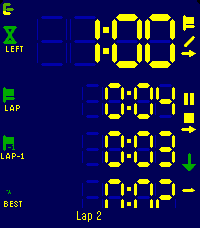
Tools & UtilitiesModes ----- Count up, count down for a duration, or count down until a clock time. The three are distinguishable modes, each with its own screen layout, colours and alarms. Flexible layout --------------- You decide what every line shows. Up to four lines per mode, each one picked from: total time, remaining, current lap, prior lap, fastest, average, the gap between the current lap and any of those, the end time, or the lap count. Pick a size per line: XL, L, M or S. The LCD digits fill whatever space is left. Laps ---- Laps work in both directions and exclude paused time. The lap list shows each lap against the one before, with the fastest marked. Alarms ------ Alarms fire at the end, before the end, at intervals, or when a lap reaches a reference lap. Each one can vibrate, sound, or both. Alarms still fire with the app closed. Buttons ------- Every button shows what a short press and a long press will do, and how far a hold has got. Touch ----- Setup, changing start/end times etc. can be done with gestures too: Click a field and use clockwise to increment, counter clockwise to decrement. Watch/Phone ----------- Everything runs on the watch. Layouts and colours are edited on the phone, where there's room for it, which is a single-setup most of the times. Ready for Pebble Time 2, Pebble Time and Pebble 2.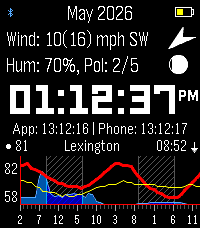 19
19ForeCasWatCompanion
Tools & UtilitiesI made a version of the forecaswatch2 watchface that runs as an app, so you can interact with it and have different info. I found that binding the app to a quicklaunch button helps it feel like a seamless feature of the FCW2 face. Features are: Top screen shows extra weather info, such as wind speed and direction, moon phase, humidity, pollen info (need a key from google cloud maps pollen, otherwise shows barometer), second screen shows personal weather station from wunderground via ID entered in settings screen. Bottom screen shows 48 hour extended forecast with wind line in yellow thanks to cdlenfert on a branch of the original face that has not been implemented there yet. 2nd screen shows 7 day high and low temps with rain chances as bars beside. Middle screen shows time with seconds, or zulu time. Side buttons toggle corresponding screens, as well as touching the top and bottom screen. Holding middle button forces a weather fetch. Last sync shown below clock, will auto sync if older than 10 minutes or location has moved more than 5k. App times out after 30 seconds of interactivity (minus touch screen) and exits back to watchface. Stays open when settings screen is open on phone. All credit to mattrossman for building original watchface, all this was based on forecaswatch2, using google antigravity to code additional features mentioned.
 1
1YaNaviPeb
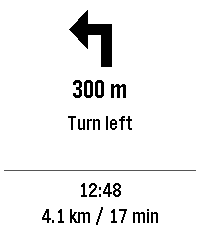
Tools & UtilitiesTurn-by-turn directions from Yandex Maps or Yandex Navigator on your Pebble watch. While you navigate, the watch shows the maneuver arrow, the distance to it, the maneuver text, your arrival time, and the remaining distance and time. The watchapp opens by itself when navigation starts and closes when it ends. REQUIRES AN ANDROID COMPANION APP This watchapp only displays data. The free YaNaviPeb Android app reads the Yandex navigation notification and sends it to the watch via the Pebble app. 1. Install this watchapp. 2. Download the YaNaviPeb Android app (app-release.apk) from https://github.com/DimaK21/YaNaviPeb/releases/latest and grant it notification access. 3. Start a route in Yandex Maps or Navigator and minimize the app. Test without driving via "Start watch demo". IMPORTANT Directions arrive only while the Yandex app is minimized: opening it on the phone hides its navigation notification, and the watch stops updating. REQUIREMENTS • Android 11+ with the Pebble app (coredevices.coreapp). iPhone is not supported. • Yandex Maps, or Yandex Navigator with "Background navigation" ("Фоновая навигация") turned on. • Text appears in the Yandex app's language. For Russian, the watch needs a Cyrillic language pack (Pebble app). • Tested on Pebble Time 2 only. PRIVACY Only the navigation notification of Yandex Maps or Navigator is read. Everything is processed on your phone: no Internet permission, accounts, ads or analytics. Open-source (0BSD). Not affiliated with Yandex, Pebble or Core Devices.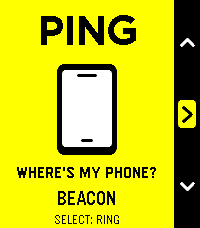 11
11Ping
Tools & UtilitiesPING — Lost phone. Found your cool. Your phone is playing hide-and-seek. Your Pebble just became very good at seeking. Under a cushion? In yesterday’s jacket? Somewhere you put it “so you wouldn’t lose it”? Open Ping, press Select, and follow the sound. An essential little utility with unmistakably native Pebble styling: bold outlines, crisp white graphics, cheerful yellow while you search, and orange when your phone starts chiming. - One button to ring. One button to stop. - Three distinctive chimes: Chirp, Doorbell and Beacon. - No extra companion app required: works through the Pebble app already on your Android phone. - Two-minute automatic cutoff. - Perfect for Quick Launch: less searching, more smugly saying, “Found it.” Simple. Essential. Unmistakably Pebble. Requires Android, the Pebble mobile app, and an active Bluetooth connection. Phone media volume must not be silenced—Ping cannot override muted media. Sound follows your phone’s current audio output, including connected headphones or speakers.