 14
14BeTrain
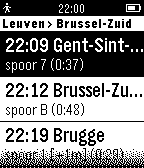
DailyImagine having a complete train information billboard on your wrist ! This app shows the available trains of the Belgian rail service (NMBS / SNCB) from up to 4 favorite stations. Data is displayed in real time, indicating departure + delay time and the arrival platform. This app uses the iRail.be API. This is not an official NMBS Pebble app. Issues can be reported on https://github.com/kristofwillen/Pebble-NMBS/issues/
 121
121Couch To 5K
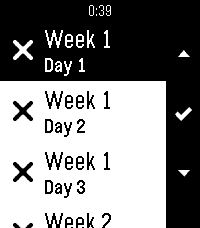
Health & FitnessCouch to 5K (C25K) Training app. Multi lanauge support: English, Français, Deutsche, Español. Supports a list of 24 days, all with individual progress indicators. Select a day to see the steps for that day, proceed to get a countdown clock with feedback for each step along the way. Open source, check description for github link.
 31
31TokyoSubway
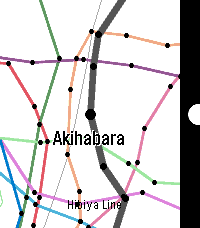
Tools & UtilitiesTokyo Subway Map. for English and Japanese. (Included JR Yamanote Line) (1) SELECT: Choose the train. (2) UP, DOWN: Go to the next station, or return to the previous station. SELECT: Change to the other line. BACK: Back to select menu.
 18
18ID Stopwatch
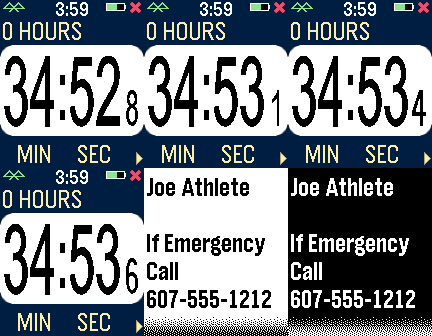
Health & FitnessThe ID Stopwatch app is similar to Big Stopwatch with an identification alert feature. Your name and an emergency message are entered in the settings screen. If your stopwatch is running and no activity is registered for several minutes, an alert is displayed with flashing and vibration alerts. BACK button clears the alert, and long-press the SELECT button to test. App idea by Greg East.
 9
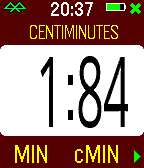
9Centiminutes
Tools & UtilitiesThe Centiminutes app is a stopwatch that measures time in centiminutes, which are hundredths of a minute. This watch is based on Big Stopwatch, so it has similar customizable settings for date format, screen background, vibration alerts, intervals, and more. Use the bottom button to start/stop, the center button to briefly display the time, and the top button to reset. A long press of the center button activates the settings menu. Yes, this is an unusual stopwatch.
 27
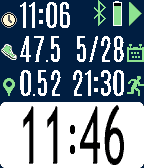
27Pal Fit
Health & FitnessFitness app specifically designed for the Pal Strap. Bottom button to start/stop. Top button to switch screens, or a long top button press to reset the time and distance. Press the middle button for the settings menu. If you are using the Pal Strap for GPS, the distance icon will either be red or green depending on whether the GPS signal is locked. You should first get the Pal Strap working with the Hey Pal app before using this app. Calculating distance is based on the haversine formula, and it is admittedly an approximation based on a homegrown algorithm. Your mileage will (literally) vary! Although the Pal Strap is designed for the Pebble Time, I am releasing this app for the Pebble Round and Pebble 2 also since it works with phone-based GPS. If you hack the Pal Strap to work with one of these devices, let me know!
 35
35Intrinsic Gravelty
GamesBedrock Bros. --- Intrinsic Gravelty a demo for a Pebble smartwatch and two Game Boys 1st place at Evoke 2017 in Alternative Platforms http://www.pouet.net/prod.php?which=71545 Credits: @hbehrens -> code, tools lastfuture -> music, gfx Comments: Demake of Still's "Intrinsic Gravity" for the Original Pebble Smartwatch (24KB RAM, 2 color e-paper) and two original Game Boys using nanoloop cartridges. Original: Still - Intrinsic Gravity for Under Construction 2014 http://www.pouet.net/prod.php?which=64756 pixtur -> gfx, code, tools hoffman -> music
 60
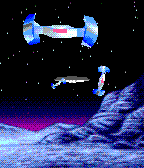
60Rocky Reality
GamesBedrock Bros. --- Rocky Reality a demo for a Pebble Time smartwatch 2nd place at Evoke 2016 in Alternative Platforms http://www.pouet.net/prod.php?which=67961 Credits: @hbehrens -> code, animation lastfuture -> gfx, animation tools Comments: Demake of Future Crews's PC Demo "Second Reality" for Pebble Time Smartwatch (64KB RAM, 64 color e-paper). Original: Second Reality - Future Crew for Assembly 93 http://www.pouet.net/prod.php?which=63
 70
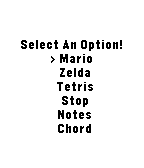
70Music
Tools & UtilitiesPlay music out of your phone with no companion app. Only works on (most) Android phones. Play Mario or Zelda or Tetris music, as well as some simple beeps.
 27
27Counter
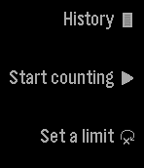
Tools & UtilitiesCount using the up and down buttons. You can set a limit to how far you want to count. You can also save your counts by long pressing select on the counting screen. (It is not currently possible to restore them.) Reset it by long pressing on the down button. You can delete an element from your history by long pressing on the select button.
 22
22Football v1.1
DailyCheck the latest premier league scores.
 6
6AVFC v2.1
DailyCheck the Aston Villa Score!
 17
17Pal Basics
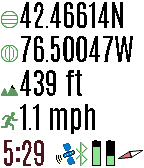
Tools & UtilitiesView the GPS satellites as seen by your Pal Strap. The top button switched between GPS location, a map of your area, a list of satellites, and the relative position of the satellites. A long press switches to the previous screen. When viewing a map, press the bottom button to zoom in. A long press zooms out. Press the select button for custom settings. If you have trouble locking in the GPS location using your Pal Strap, first make sure your Pal Strap is working by using the app supported by the Pal Strap creators. The Pal Strap is not designed for Pebble 2, but this app will work on the P2. If you do modify your Pal Strap for the P2, let me know!
 186
186Pal Map
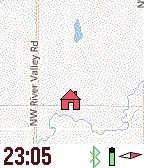
Tools & UtilitiesMapping on your wrist, with panning, zooming, and realtime tracking. Markers can be dropped and distances estimated. And the best feature? Designed for Pal Strap (but works without it also). Top button for backlight, and bottom button to pan map based on watch tilt. Press middle button for zooming, panning, and access to the menu. The menu has Pal Strap options, marker options, and the custom settings (which include mapping service, vibration, icons displayed, etc.). This app is under development, and will be completed once I have a Pal Strap in hand. Mapping tiles Copyright and courtesy of OpenStreetMap, OpenStreetMap contributors, Google Maps, ESRI ArcGIS, Stamen, Bing, and NOAA. Stamen data by Stamen Design (http://stamen.com); OpenStreetMap (http://openstreetmap.org) mapping tiles under Creative Commons licenses.
 7
7Disney Parks Fuel Rod Locator
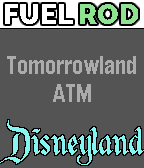
Tools & UtilitiesThis app lets you find Fuel Rod rechargeable battery swap kiosks at any Disney park in North America. Pressing select will toggle between Walt Disney World locations and Disneyland locations. Shaking the watch will refresh the nearest location. This won't direct you to the exact location, you may still have to ask a cast member where it is, but it'll tell you the building/store where the kiosk is located.