 13
13MASH
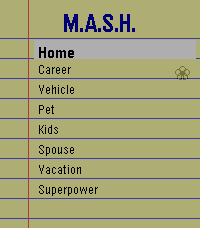
GamesMASH! You know it! Pick your categories and options and seal your fate! It's never wrong! ________ Option if you want to mentally pick an option not listed, but i tired to include a lot of fun options!
 181
181FindMy for Pebble
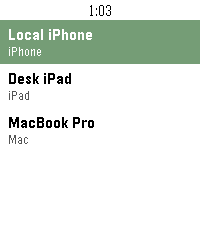
Tools & UtilitiesSee and ping your Apple devices
 21
21Edo Clock
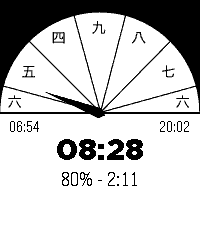
Tools & UtilitiesThis app is an Edo Clock. Edo period clocks are based on 6 hours spaced from sun rise to sun set. Summer hours are longer then winter hours.
 8
8Shut the Box
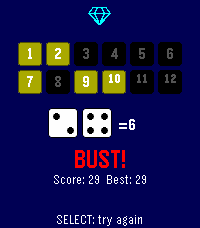
Games1-6 player Pass & Play. Score keeping solo mode and smart select tile options. Chose # of tiles, and scoring system and roll the dice! Try to 'close' all the numbers, or get as low as you can.
 196
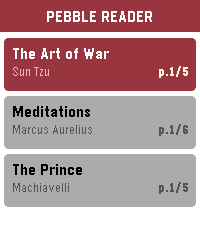
196Pebble Ebook Reader
Tools & UtilitiesTurn your Pebble into an e-reader, perfect for quick reads during commutes, waiting rooms, or anywhere you have a spare moment. Time to read on your wrist. The app is being developed right now, specially tricky on the companion app side to manage the loaded books/remove/sync etc... Even more difficult to test for now until the real hardware arrive, but I'm on a mission to make a nice ereader app in order to binge a bit of books from time to time. But feel free to play with the current demo, let's go!
 27
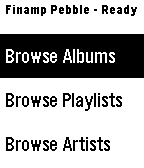
27Finamp Remote (Jellyfin)
RemotesPebble companion for Finamp, the Jellyfin music player. You can browse your music by album, playlist, artist, and genre. You can initiate playback of any of those items or add a single song to the queue under any of them. This required some changes that I've made to the finamp app for android. I'll be making a pull request to try to get them accepted into the official finamp app, but for now you can compile the app yourself from this repo: https://github.com/tannermeade/finamp/tree/redesign-pebble-support I compiled a debug apk if you want to use it before finamp merges the PR: https://github.com/tannermeade/finamp/releases/tag/debug-pebble-1 The PR for the changes: https://github.com/UnicornsOnLSD/finamp/pull/1597
 34
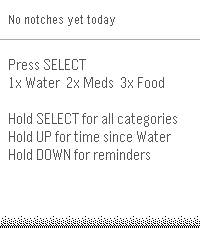
34Notch
Tools & UtilitiesNOTCH A one-press wrist logger. NOTCH turns your Pebble into a personal tracking companion. Whether you're monitoring hydration, logging medications, tracking symptoms, or timing your workouts, NOTCH makes it effortless. Press SELECT once for Water, twice for Meds, three times for Food. Hold SELECT to access all 15 categories. Every notch is timestamped and stored automatically. Smart categories 15 categories covering health, fitness, work, and wellness: Hydration: Water (oz), Coffee, Drink Nutrition: Food with meal size Health: Pain (1-10), Migraine, Mood (1-10), Meds with dose tracking Bathroom: Toilet with Bristol Stool Scale, Urine Fitness: Exercise with intensity, Activity type, Sleep duration Work: Task timer with type (Meeting, Drive, Call, Chart and more) Wellness: Urge/craving Paired logging Sleep, Exercise, Work, Migraine and Activity categories use start/stop pairing so NOTCH automatically calculates duration. Start a work session, end it when you're done, and see exactly how long you spent. Quantity picker Select from options for each category. Water logs in oz. Pain rates 1 through 10. Toilet uses the clinical Bristol scale. Meds tracks Dose 1, 2, 3, or PRN. At a glance The main screen shows your last notch with timestamp, a live daily summary, and a scrollable timeline of everything logged today. Hold UP to see how long ago you last logged Water. Reminders Set per-category vibration reminders from 30 minutes to 8 hours. Hold DOWN to adjust any category's reminder interval directly from your wrist. Works on all Pebble platforms including Time 2 and Round 2. If anyone is using this app and has feedback or would like to request a change please email me at [email protected]. I so far have only used it in the emulator so have no idea how it performs day to day. Long term goal is to be able to export the log.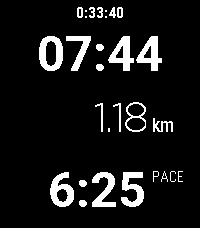 15
15Run Tracker
Health & FitnessThis is a run / walk tracker for Pebble with a focus on simplicity. It doesn't require a companion app but it does require a connection to a phone for GPS. The app shows the time, distance and pace of your run as well as the wall time. Press Select to start/pause/resume your run. While running, it shows your current pace. Wile paused, it shows your overall (average) pace. The app doesn't save any data about your previous runs. At the moment, the distance can be shown in kilometers but not in miles. The Pebble watch doesn't have GPS so it needs to use your phone to get the current position. It seems that Pebble can query the current position but can't trigger a precise GPS lock. The location will be inaccurate unless another app on the phone is requesting the location. Therefore, I recommend that you use a separate app on your phone, such as Strava or Google Fit, to record an activity to ensure that precise location data is available.
 396
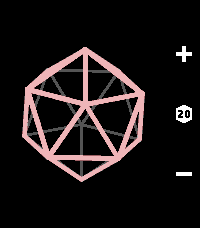
3963D Coins & Dice
Tools & Utilities• Features a coin, D4, D6, D8, D10, D12, and D20. • Roll up to 4 dice at once by holding + or -. • Real-time 3D geometry and tumbling animations. • Incredibly satisfying vibrations. • Minimal and intuitive interface.
 10
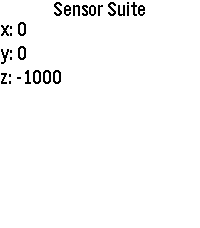
10Sensor Suite
Tools & UtilitiesA simple app to show some of the sensor data on Pebbles. Currently only shows accelerometer and compass data but hopefully more can be added. Very much a WIP.
 53
53Pebble Fidget App
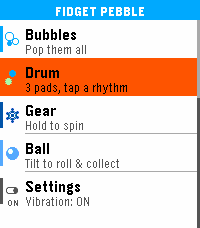
GamesFidget Pebble turns your wrist into a fidget toy — 7 satisfying minigames, all powered by haptic feedback. If you need to focus, decompress, or just keep your hands busy, it has you covered Pop It — Navigate a 5×5 bubble grid and pop them all. Tap to pop, hold to move back. Clears with a celebration animation. Pusher — Two cylinders take turns rising. Press the right button at the right moment to keep the rhythm going. Choose your vibe pattern with SELECT. Screw — Tighten and loosen a hex bolt with UP and DOWN. Feel the thread with every turn. SELECT snaps to the nearest end. Bubbles — Three screen zones, three buttons. Pop bubbles and watch your history fill up. Drum — Three pads, three distinct vibration patterns. Tap out your own rhythm. Gear — Two interlocked gears fill the screen. Hold UP or DOWN to spin them, release and feel the haptic pulse. SELECT cycles vibration intensity. Ball — Tilt your wrist to roll a ball around the screen. Collect targets laid out like dice faces — 1 dot, then 2, then 3, up to 6. Controls vary by minigame — all intuitive, no instructions needed. Settings — Toggle vibration on/off globally from the main menu. The setting persists across restarts. Supported Platforms: Emery
 11
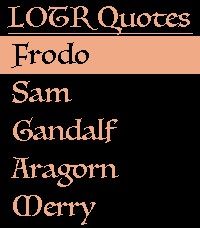
11LOTR Quotes
DailyGet quotes from your favorite Lord of the Rings characters. Pick a character from the Fellowship or browse the top 20 most-quoted heroes (configurable in settings). Give your wrist a shake to get a new quote. Built using The One API and Luminari font from macOS. If the API becomes overloaded you can get a new API key from https://the-one-api.dev/ and override the shared key in settings. Icons generated from Peter J. Yost's Ring Render https://en.wikipedia.org/wiki/One_Ring#/media/File:One_Ring_Blender_Render.png
 31
31PixelTurf
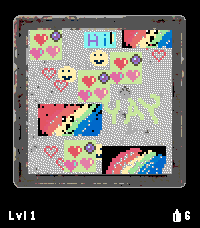
GamesPixelTurf: The World is Your Canvas 🎨🌍 Claim your neighborhood and your continent in a global, location-based pixel art turf war right from your wrist! PixelTurf divides the world into Geohash zones, starting on a massive global scale. Access your current area's shared 72x72 pixel graffiti wall to paint custom tags. Will you overwrite rivals in a fierce turf war, or collaborate with locals to build art pieces? Highly contested zones eventually "lock down" as permanent historical Monuments, shrinking the board to smaller, local levels. Will your name be etched in history? FEATURES: - Real-World Zones: The map moves with you, placing you in your exact physical Geohash square. - Pixel Art Editor: Design custom graffiti tags via the app settings - Earn More Paint Cans By Steps: Integrated with Pebble Health. Walk in the real world to earn digital paint! - Monument System: Be a top 3 contributor when a zone locks down to permanently lock your name on the leaderboard. HOW TO PLAY & CONTROLS 1. Gear Up: You get 3 FREE Spray Cans daily. Earn 1 extra can for every 1,000 steps walked (up to a 20-can max). 2. Make Your Mark: Open the phone settings to set your Username and design tags. Larger tags cost more cans. 3. Paint: In an active zone, press Select and choose "Paint tag". - Move: UP and DOWN buttons move your blinking tag. - Toggle Axis: SHORT PRESS Select to switch between Y-axis (Up/Down) and X-axis (Left/Right). - Confirm: LONG PRESS Select to spend cans and leave your mark. 4. Compete or Collaborate: Overwrite others to claim space, or team up to piece together collaborative pixel art! If a zone reaches high coverage with heavy action, it locks down permanently. The zone then subdivides into smaller Geohash grids, and the game restarts! This shrinking stops at Level 6. 🔒 PRIVACY & SECURITY Your location is used strictly on-the-fly to calculate your grid square. GPS coordinates are never stored, tracked, or shared. WHAT IS A GEOHASH? A public domain standard that divides the Earth into a grid of alphanumeric bounding boxes. - Learn the basics: Wikipedia - Geohash - Explore the map: Use Geohash Explorer (geohash.softeng.co) to visualize active zones around you! Supported Devices: Pebble Time, Pebble Time Steel, and Pebble Time 2. (support for Pebble Time Round and Pebble Round 2 coming soon!)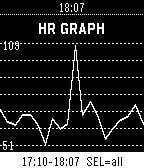 81
81Health monitor +
Health & FitnessHealth monitor + tracks your heart rate, steps, and sleep continuously in the background using your Pebble's built-in sensors. Heart rate samples are recorded at regular intervals (1–6 minutes) alongside your daily step counts and sleep durations, with all data stored right on your watch for up to 7 days. View your current BPM, daily steps, last night's sleep, and resting heart rate directly on your wrist, or sync to your phone to explore detailed charts and your complete health history in the app config page.
 48
48Own Health - Final Frontier Edition
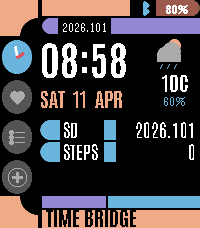
DailyA health companion for the final frontier. Four LCARS-styled pages designed for Pebble Time 2. Own Health Features: Time Bridge: Current time, date, stardate, live weather with temperature, and daily step count. Health Bridge: Steps with progress bar, weight, strength logged status, and sleep duration pulled from Pebble Health. Mission Plan: Visual progress bars for your three core weekly goals: 7 hours of sleep, strength training, and 10,000 daily steps. Entry Console: Manual logging for strength (toggle logged/pending) and weight (adjustable spinner). Navigate pages with UP/DOWN. Live weather via OpenWeatherMap. Bluetooth status indicator. Real health data from Pebble Health service. Own Your Health.