 0
0Aura Weather
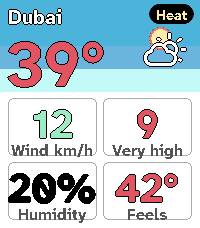
DailyAura Weather carries my Spain weather app's design language onto the Pebble Time 2: a living sky you read at a glance. The hero screen draws the sun (a moon at night) arcing over a day-to-night gradient computed from the real sunrise and sunset times for your location, with no baked art, so it always matches the light outside. Page through a deck of cards with UP and DOWN, with SELECT to refresh: the next eight hours, the next six days, a sun-and-moon card with golden and blue hour, a wind compass, UV and air-quality rings, a details grid, and a colour-coded warning card when one is active. Every number is tinted by Aura's own data ramps, so a hot day reads red, a calm wind reads teal, and the whole deck reads as one system. Cards appear only when they have something to say, and you choose which to show, reorder them, and pick the one the app opens on. It fetches its own weather on the phone through Open-Meteo, worldwide, with no account and no API key, so it just works on install. In Spain you can switch to the official AEMET source with a free key. There is a light theme alongside the default dark one: long-press UP to switch it on the watch, or set it from the phone. The last forecast is kept, so a card shows the moment you raise your wrist, before the phone answers. Free and open source.
 33
33Redloj - Bip!QR e Itinerario
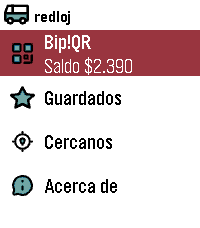
DailyEnglish: (This application was called "Transanpbl" and then "Redpbl". It maintains that functionality, adding Bip!QR payments) Santiago de Chile's Public Bus System (Also known as Red Movilidad) wallet app and schedule checker. Add your Bip!QR wallet and favorite bus stops using the app's config webpage, then check when the bus you need will stop using your Pebble. Español: (Previamente, esta aplicación se llamó Transanpbl y RedPbl. Hoy mantiene esa funcionalidad, agregando Bip!QR) Billetera de pago e itinerario de Buses del Sistema de Transporte Público de Santiago de Chile (También conocido como Red Movilidad) . Agrega tu Bip!QR y tus paraderos favoritos mediante la configuración de la aplicación y luego revisa cuánto falta para que pase el bus desde tu Pebble.
 1
1JP Trails
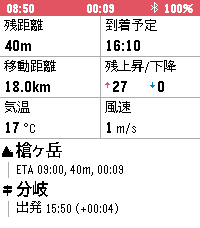
Health & FitnessJP Trails は、登山記録アプリと併せて使う Pebble Time 2 用の登山ナビです。スマホを取り出さなくても、手首を見るだけで登山の状況を一目で把握できます。 YAMAP で作った登山計画の URL をアプリの設定から取り込むだけで、地図に登山計画とルート・現在地が表示されます。 記録を開始すると GPS の軌跡やデータフィールドを確認できます。 できること (UP/DOWN で画面切り替え) - 記録の開始: Select 長押しで開始/停止 - 地図: 登山計画の取り込み時に地図を事前取得するので圏外でも地図が確認できます - データフィールド: 次の項目から 6 つを選んで表示できます - 累積上昇/下降: 記録開始からの累積の登り・下り - 心拍数 - 消費カロリー: YAMAP 式の消費カロリー (体重と装備重量を設定) - 現在標高 - 最高標高: 記録開始からの最高到達点 - 移動距離: 記録開始からの距離 - 上昇速度: 直近 20 分の平均上昇率 - 残距離 / 残上昇・下降 / 残時間 / 到着予定: 本日のゴールまで - ゴール標高差: ゴールと現在地の標高差 - コース逸脱: 計画のルートからの距離 - 日の入 / 日の出: 次の明暗の変わり目の時刻と、そこまでの残り時間 - 気温 / 風速 / 最高・最低気温: 現在地の予報 - 天気変化: 次に空模様が変わる時刻と変化の内容。記録中は 3 時間ごとに予報を更新 - 次の経由地ナビ: 次の経由地の名前・種別アイコン・到着予定時刻・残り距離・残り時間と、直近に通過した経由地の名前・通過時刻・計画との差分 (遅れ/進み) を常時表示 必要なもの - 計画の取り込みには通信が必要です。今のところ YAMAP のみ対応で、ヤマレコなど他のサービスや GPX の取り込みは今後検討します - 位置情報はスマホの GPS を使います。山行中は時計側で JP Trails を開いたままにしてください (終了するとスマホ側の GPS も止まります)。スマホの画面は消えていて構いません --- 出典 地図データ: 国土地理院 (地理院タイル一覧 https://maps.gsi.go.jp/development/ichiran.html) を加工して作成 天気: Open-Meteo
 6
6Pooble
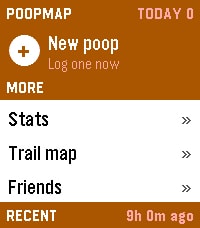
Health & FitnessPooble, an unofficial client for PoopMap Log a poop from your wrist. Rate it, dictate a note, and it lands on your map with the time and the place. LOGGING Pick "+ New poop". UP/DOWN sets a rating from 0.5 to 5.0, SELECT submits. Hold UP to dictate a voice note, or hold DOWN to set an exact time for logging after the fact. The home list shows date, time, rating and note, plus today's count and how long it's been since the last one. SELECT opens an entry, SELECT again edits it, and holding SELECT twice deletes it. Optional: auto place tags. A new log takes its place name — Home, Work, wherever — from your nearest saved place within 500 m. The coordinates stay live; only the label is borrowed. TRAIL MAP Every stop you've logged, plotted. UP/DOWN walks them in order and SELECT zooms. Hold UP for region mode, which jumps between areas instead of stepping through every stop. Hold SELECT to hide the connecting line. Optional: the map layer draws real streets, rivers, coastline and state lines behind your stops. It sends a box around the areas you've logged to a third-party OpenStreetMap server (overpass.openstreetmap.fr, in the EU) — approximate coordinates only, no account details and no note text. Data is cached on your phone for 30 days and cleared when you log out. Switch it off in settings for a plain grid, and nothing leaves the phone. FRIENDS AND STATS Your friends' recent activity, with ratings and notes. SELECT leaves a dictated voice comment; hold SELECT shows that friend's stats. Your own stats run to four pages, SELECT to flip between them: - Numbers — today, this week, month, year and lifetime totals, average rating, daily average, current streak and personal best. - Cadence — your distribution by hour and by weekday, the time of day you typically go, and how tightly that clusters. - Rhythm — when the next one is due, your typical gap, how regular you are, and your quickest turnaround and longest wait. - Windows — the six windows of the day, how many land in each, and the grade each one tends to earn. The launcher shows today's count and time since your last log, updating without opening the app. SETUP Requires a free PoopMap account. Log in once from the app's settings page in the Pebble phone app. Trail, Friends and Stats are on out of the box; each can be switched off there, and you can move them above or below your recent logs. This is a first release and it's experimental. Screens, settings and defaults may move between versions. If something breaks or looks wrong, report it through the developer contact screen on this listing. Pebble Time 2. Phone required for syncing.
 1
1TinyMaker Monitor
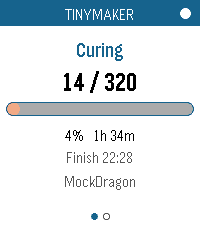
Tools & UtilitiesWatch a print on your TinyMaker resin printer from your wrist. Layer count, time left, resin level — live, on any Pebble. Requires the TinyMakerWifi community firmware (github.com/slibbinas/TinyMakerWifi). WHAT IT DOES Status page - Current print phase — Curing, Lifting, Peeling, Paused, Idle, Finished - Layer counter, e.g. 142 / 860 - Progress bar and percentage - Time remaining, plus the clock time it'll finish - Freshness dot: white when data is current, red once it's more than 50 seconds stale Resin page - Resin left as a percentage of the VAT, and in millilitres - LOW RESIN banner when the printer raises its low-resin flag - Print name and elapsed time Alerts — distinct vibration patterns for print finished, low-resin pause, print cancelled, and power-loss recovery. A finished print shows a summary card with total time and resin used; a low-resin pause jumps straight to the resin page. (These only fire while the app is open — see Limitations below.) Controls — every touch gesture has a button equivalent, so it behaves the same on watches without a touchscreen: - Switch page: Up/Down buttons, or swipe left or right - Refresh now: Select button, or tap the progress bar - Show "last updated": tap the header dot - Exit: Back button Two ways to get data — polls the printer's web API, or subscribes to MQTT if you have a broker. Picks automatically and falls back on its own. Runs on all seven Pebbles — aplite, basalt, chalk, diorite, emery, flint, gabbro. The layout rescales from 144x168 to 260x260 round, and the palette collapses to black-on-white on the monochrome watches. Gentle on the printer — polls every 20 seconds while printing, backs off to every 3 minutes when idle. SETUP Open the app's settings in the Pebble phone app and set Printer host to tinymaker.local (or its IP). That's it — the app finds the status endpoint itself. Your phone needs to be on the same WiFi as the printer. For MQTT instead: enable it on the printer, give your broker a WebSocket listener (Mosquitto: listener 9001 + protocol websockets — PebbleKit JS can't reach port 1883), and enter ws://<broker>:9001. The app reads the printer's Home Assistant auto-discovery configs to work out the topics itself. LIMITATIONS The app has to be open. PebbleKit JS only runs while the watchapp is in the foreground, so nothing is polled — and no vibration fires — once you exit. For alerts when you're not watching, use the printer's own notifications: tinymaker.local, then Settings, then Notifications sends you a Telegram, WhatsApp or Discord message when a print finishes, pauses for low resin, or is cancelled. Those arrive on your phone and forward to your Pebble automatically. Use this app for checking on the print; use those for being told about it. Verified end-to-end against a live print on emery, gabbro, chalk, basalt and aplite. MQTT is implemented but untested — the firmware ships with it disabled, so there was no broker to try it against.
 26
26qnote
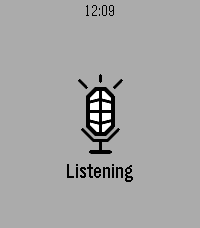
Tools & UtilitiesSpeak a note into your Pebble. It's on your phone before you lower your wrist. Opening qnote starts dictation immediately - no menu, no button to find first. Speak, confirm the transcription, and it is saved. Put qnote on a Quick Launch button and a single long press takes you from idea to recorded note. NEVER LOSES A NOTE. Every note goes out over two paths at once. When your phone is nearby it arrives instantly. When it isn't, the watch spools the note in its own storage and delivers it as soon as you are back in range - even if you closed the app hours earlier. HONEST ABOUT ITS LIMITS. The watch keeps the last 12 notes, because Pebble gives an app about 4 KB of persistent storage and a note is 256 bytes of it. Your phone is the archive. If all 12 are still waiting to reach the phone, qnote tells you rather than quietly overwriting something you said. FREE SOFTWARE. qnote is licensed under the GNU General Public License v3. Source for both the watchapp and the companion is on GitHub - read it, change it, pass it on. YOU NEED THE COMPANION APP. qnote stores its notes on your phone, so the watchapp alone will capture nothing. The companion is a free download from GitHub - it is NOT on the Google Play Store, so Android will ask you to allow installing it from your browser or file manager: https://github.com/neonfire42/qnote/releases/latest/download/qnote.apk Android only. There is no iOS companion, so qnote cannot store notes from an iPhone. Also requires a Pebble with a microphone (every model except the original Pebble and Pebble Steel) and the Pebble mobile app 1.0.7.7 or newer. On the phone you get categories, full-text search, editing, sharing and Markdown export. No account, no server, no analytics - notes move only between your watch and your phone.
 16
16Sykerö Smart Alarm
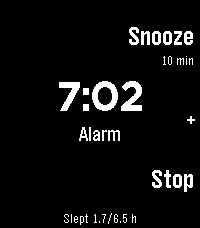
Tools & UtilitiesSykerö Smart Alarm wakes you a few minutes early, at a moment you are already stirring — and never a minute later than the time you set. Instead of firing at the first twitch of movement, it learns how still you have been tonight and waits for a sustained rise above your own baseline: a real lighter-sleep signal, inside a window you choose ahead of your alarm. There is always a hard time behind it, so a quiet night still wakes you on time. A "last night" summary on the watch shows how still you were, what it took to trigger, and when it would have fired at each other sensitivity — so you tune it from your own data instead of guessing. A gradual wake instead of one abrupt buzz: vibration starts gentle with long gaps, then tightens and strengthens, with sound joining later on watches with a speaker. Choose Gentle, Normal or Insistent, or set your own timing. A deliberate stop gesture (long press, or a two- or three-tap) means a sleepy hand can't dismiss it by accident. Up to 8 alarms, each with its own repeat days, snooze and skip-next. Everything is configured from your phone; the watch shows status and quick actions. Worth ten minutes before your first night — what the watch measures, how it decides, every setting, and what the app deliberately does not do: https://github.com/Sykero-Software/PebbleSykeroAlarm/blob/master/docs/how-it-works.md
 56
56Blackjack
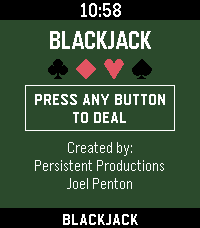
GamesBlackjack for Pebble Classic player vs. dealer, single 52 card deck, no betting Designed for Pebble 2 Duo Open source code — github.com/Joel256/Pebble-Blackjack Made by: Persistent Productions - Joel Penton
 1
1unWatch
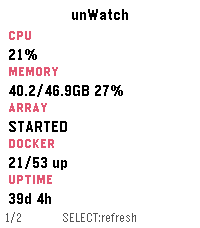
Tools & UtilitiesMonitor your unRAID server directly - nobody else sees your data! A Pebble Time 2 watchapp that shows live stats from an unRAID server on your local network, spread across several pages you can enable/disable in settings. Press SELECT to refresh, swipe or press UP/DOWN to change pages. Everything happens over your LAN. Your phone talks to the watch over Bluetooth, and the phone talks to Unraid's GraphQL API directly over Wi-Fi. Nothing goes over the internet. You can connect remotely using a service like Tailscale or other VPN. Pages Stats - CPU/memory %, array state, Docker running/total, uptime. Temperatures - CPU temp and the 3 hottest disks. Array - capacity (used/free/total in TB) and parity check status. Virtual machines - running/total count and up to 3 running VM names. UPS - status, battery %, load %, estimated runtime. Alerts - unread warning/alert/total counts from Unraid's notification center. Pages can be disabled as desired.
 44
44Hacker News Reader
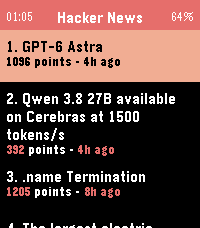
DailyBrowse Hacker News and read full articles directly on your wrist. The app fetches the top stories from Hacker News, with more available at the tap of a button, and lets you read the full article content by scrolling with the Up/Down buttons or your finger on the touchscreen. Press Select to switch between light and dark themes, and Back to return to the story list. Requires a phone connection to fetch content.
 514
514Touchy Weather - Weather App
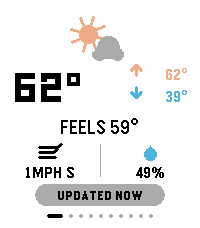
DailyTouchyWeather is a playful, card-based weather app for Pebble that mixes useful forecast data with personality for touchscreen Pebble Watches. It is the most feature complete weather application for the Pebble Platform. It’s designed around fast swipes, quick glances, and weather advice that is very practical. Keywords: weather, forecast, pebble, smartwatch, touch, swipe, current conditions, temperature, feels-like, wind, humidity, hourly forecast, 6-hour outlook, week ahead, 4-day forecast, precipitation, rain probability, UV index, air quality, AQI, sunrise, sunset, sun cycle, moon phase, night sky, golden hour, blue hour, weather radar, meteorology, climate, real-time, touch-first, wearable, glance-first, weather app, widget, interactive, customizable, weather cards, location-based, atmospheric, radial gauge, dynamic guidance. Included Features: ✓ Real-time current conditions (temperature, feels-like, high/low) ✓ Wind speed & direction display ✓ Humidity tracking ✓ 6-hour hourly forecast ✓ 4-day week-ahead view ✓ Precipitation probability charts & alerts ✓ UV index gauge with risk classification ✓ Air Quality Index (AQI) with health context ✓ Sunrise & sunset times ✓ Moon phase & illumination percentage ✓ Golden hour & blue hour timing (for photographers) ✓ Live weather radar imagery ✓ Touch-gesture controls (swipe, pull-to-refresh) ✓ Personality-driven weather advice ("Touch & Go" card) ✓ Fully customizable card layout ✓ Multi-platform support (rectangular & round displays) ✓ Location-aware weather data ✓ Celsius & Fahrenheit support ✓ Dark mode / theme options Device Compatibility: Pebble Time Round, Pebble Time 2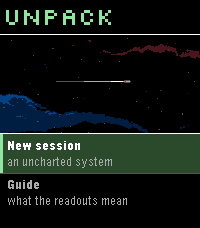 23
23Unpack
GamesA von Neumann probe game for Pebble. You arrive in an uncharted system with a seed payload and no infrastructure. Unpack yourself into power and extraction, work the bodies you find, and build what the colonists will arrive to -- factories, colony frames, and finally the orbital ring you leave through. The system keeps interrupting with decisions that have no clean answer, and the clock never stops for them. A run takes 2-4 minutes, start to departure or failure.
 3
3Trains France
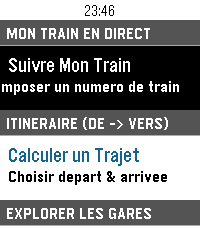
DailyApplication non officielle pour suivre vos trains sur le réseau ferré français. Fonctionnalités : Suivi de train en direct avec itinéraire complet, arrêts intermédiaires et retards en temps réel (TGV INOUI, OUIGO, TER, Intercités, Transilien, RER) Calculateur d'itinéraire entre deux gares avec sélection rapide du départ (immédiat, plus tard, le lendemain) Recherche rapide de gare via clavier intégré sans défilement Gares à proximité par localisation GPS avec distance affichée Info Trafic en direct (détection des perturbations et alertes sur la ligne) Interface optimisée pour Pebble Time 2 (Emery) : écran couleur 200×228, support tactile et boutons Prêt à l'emploi : fonctionne immédiatement sans configuration mobile préalable Mentions légales : Données fournies par SNCF Open Data. Projet open-source indépendant développé par 3DTero, non affilié, approuvé ni associé à SNCF Voyageurs, SNCF Réseau ou au groupe SNCF.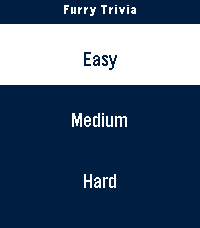 6
6Furry Trivia
GamesA simple trivia game pertaining to the furry fandom! Play it alone or with friends and test your knowledge. I've tested the ability to play this on round screens and I believe I've done a good job based on the online emulator. Any issues or concerns feel free to reach out through the app store or on any IM under @furchee
 11
11Catholic Rosary
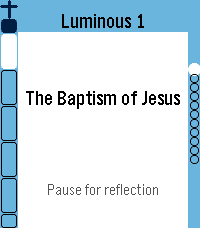
Tools & UtilitiesUPDATE: Now in English, Spanish, German, Italian and French. Quiet, reliable prayer companion. It walks you bead by bead through the entire Holy Rosary with gentle haptic feedback marking each bead as you go. Simple, reverent, and built to get out of your way — so you can focus on the prayer, not the app. ★ Full Rosary Tracker — a bead ring (round watches) or bead column & strip (rectangular watches) shows exactly where you are at a glance, with the current bead always highlighted. ★ Two Ways to Pray — Traditional mode advances one physical bead per button press, just like praying with beads in hand. Complete mode gives every single prayer its own screen — great for praying slowly, word by word, or learning the Rosary for the first time. ★ All Four Mysteries — Joyful, Sorrowful, Glorious, and Luminous, with "Today's Mystery" auto-selected by the day of the week, plus jump-to-section and resume support if you're interrupted. ★ Full Prayer Text — read every prayer right on your wrist, with adjustable text size and a scrollable reader that auto-advances as you finish each one. ★ Daily Mass Readings — today's readings (and up to a week ahead), fetched from Evangelizo straight to your watch. ★ Prayer Drawer — look up any Rosary prayer on demand, without starting a full Rosary. Note: on the original Pebble (Aplite), the Rosary Tracker runs fully; the prayer text reader, Daily Readings, and Prayer Drawer aren't available due to hardware limitations.