Guided Pilates mat workouts on your wrist, paced by your breath.

Pilatable turns your Pebble Time 2 into a calm, glanceable Pilates coach. Instead of staring at a screen, you follow your breath: the watch leads every inhale and exhale with gentle vibrations, so you can close your eyes and stay in the flow. One buzz means breathe in, two buzzes mean breathe out, and each exercise follows its own breathing rhythm.

HOW IT WORKS
Build a session on your phone, then run it hands-free on the watch. The watch keeps your last session, so you can practice even when your phone is in the other room.

ON THE WATCH
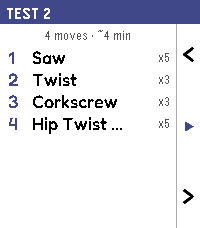
Open the app and review your session first: the moves, how many, and roughly how long. Press the middle button when you are ready to begin. During each rep a breathing ring expands as you inhale and contracts as you exhale, with a clear count in the center and your cycle progress below. A short, natural pause sits between reps, with a little extra time when you need to catch your breath. Between exercises a countdown shows your rest and the move coming up, then the workout carries on by itself. The three side buttons handle everything: previous move, pause and resume, and skip. No tapping required.

ON YOUR PHONE
Open the app settings to plan your practice. Browse all 46 classic mat exercises, grouped into six chapters and filtered by level, from Fundamental to Advanced. Set the reps, pace, and rest for each move, choose your vibration cues and their intensity, and turn on a 3, 2, 1 lead-in before each set. Keep several sessions on hand and pick which one to send to the watch.

GETTING STARTED
A ready-made Daily Flow session is built in, so you have a balanced, chill but challenging workout from the very first launch. Works offline once a session is on the watch; your phone is only needed to change the workout.

CREDIT
App icon: Pilates icon by Freepik on Flaticon (https://www.flaticon.com/free-icon/pilates_2320695), used under the Flaticon Free License.
 8
8 63
63