 14
14Garadget Controller
RemotesRemote control for the Garadget garage door controller. Shows door state, time since last change and wifi signal strength. Controls are as follows: Up: open door Down: close door Select: check door status and if you have more than one door: Long up: go to previous door Long down: go to next door
 408
408Send Message
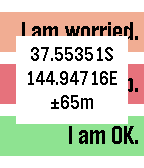
RemotesGPS-aware HTTP client supporting GET and POST requests and server response verification or display. Allows configuration with three sets of label, URL, JSON data segment (if using POST) and string to check for in the response to verify that the server accepted the message or specifying which part of the response to display on the watch (if starting with ~). For example, the label might be 'I am OK." and the URL/data fields contain the string: http://server.domain.com/folder/subfolder {"SenderId":"Peter","Text":"~Lbl", "Lat":~Lat,"Long":~Lon,"Accuracy":~Acc}. The URL and data can be spread across four setting strings to allow for long URL's. In the URL and data, ~Lat will be replaced with the latitude, ~Lon with the longitude, ~Acc with the accuracy, ~Alt with the altitude, ~Spd with the speed, ~Hed with the heading, ~Lbl with the label text, ~Adr with your street address, ~Gmp with a URL to your location on Google maps and ~Txt with your dictated text. If you don't have a server of your own, you could use one of the many public SMS-sending services to send text messages for you, e.g. http://www.smsglobal.com/http-api.php? action=sendsms&user=<user>&password=<password> &from=Peter&to=61456789123&text=~Lbl at ~Adr (see ~Gmp). This app is provided as is - you are responsible for testing this app thoroughly and determining whether it works appropriately and meets your needs. The source code is available if you want to examine how it works or customize it. If you find it useful, please give it a heart. 5
5GPS Tester
FacesSimple utility to test the age of GPS reads on your phone - runs once per minute and then displays the age in seconds of the GPS reading. This should be no more than six seconds, but in practice it can be much longer. See the source code link if you're interested. If you try this, please let me know the results you get from it and what type of phone you have (model, OS version) by emailing [email protected]. I'll post a summary of results in this description. Yes, this may look slightly familiar. No, I didn't write it from scratch. :-)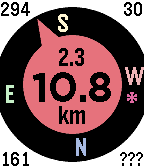 538
538Get Back To
Tools & UtilitiesGet back to a previous location, or go to one selected from your list of favorites - built on the original by samualmr but now shows GPS accuracy, bearing, speed and heading, supports a list of favorite locations and pinning locations to the time line, features a proximity warning (for public transport users who like to read) and a car mode (for when the compass won't work), monitors the Javascript more closely and allows tweaking of the way the GPS is called for improved performance. A long press on the Up button enables car mode. A long press on the Select button sets the target to the current location or one of the favorite locations set in the configuration menu. The format for these locations is label: latitude longitude (e.g. "Home: -37.6543 144.5678"), or you can just enter a label (e.g. "Home:", to which it will append your most current location), or you can enter a street address, with or without a label, which will be passed to Google to resolve. A long press on the Down button saves the current location to the time line. See the instructions on the settings page for more details. Displays are as follows: Top left = direction of travel (when available); Top right = accuracy in metres or yards; Bottom left = bearing to target; Bottom right = orientation of watch (or ??? if not available, or --- in car mode); Top centre = speed in km/h, mph or knots (when available); Centre = distance to target; and Bottom centre = units. See the web site link for more details. If you like it, please give it a heart.
 33
33Moon, Health, Location and Weather Watch
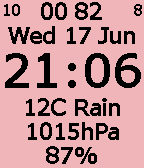
FacesThis watch face displays the following: - time zone - phase of the moon (0-29 days, 0=new, 14=full), - location of the moon (0-99 x ~15-minute intervals), or - any one of Pebble's health metrics such as steps, distance, active time, sleep, kcal burnt, - link status (! if lost), - am/pm - battery (0-10), - date, - time, and one of - latitude, longitude and altitude; - distance and direction to a reference point, speed and heading, altitude; - street address; - weather with temperature, wind and humidity/rainfall; or - weather with temperature, air pressure and humidity/rainfall. If you obtain and enter an API key for Weather Underground in the settings then it will use that instead of OpenWeatherMap. These are updated every minute, five minutes or half-hour as per your settings, or triggered by a vigorous shake along the Y axis of the watch (6 to 12 o'clock). The moon location should be accurate to a standard deviation of about five minutes - 0 corresponds to the moon on the opposite side of the earth and 50 to its being at its highest point in the sky. The reference location can be specified in degrees (e.g. -35.34532 124.45221), in degrees and minutes (e.g. -35,20.342 124,26.345), in degrees, minutes and seconds (e.g. -35,20,21 124,26,20) or as a street address that will be handed to Google to resolve. The display is designed for people with poor eyesight or reading under low light. If you make any enhancements to this, please send me a copy. If you like it, please give it a heart.
 106
106TramFinder
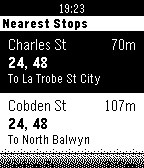
DailyGet live tram arrival times for the Melbourne tram network. The app uses TramTracker™ to display your closest tram stops, and gives you the next scheduled trams with minutes until departure. By Pete Hare, maintained by Peter Summers as Pete has moved out of Melbourne. If you like it, please give it a heart!