 32
32Cairn
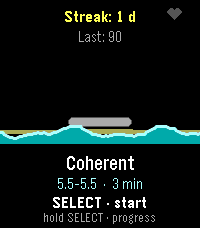
Health & FitnessBreathe with the tide. A guided breathing coach with live heart rate. Inhale and the water rises, exhale and it falls. Finish a session, lay a stone. Cairn turns a breathing exercise into a tide. Start a session and the waterline rises while you inhale and falls while you exhale, uncovering a cairn of stones on the shore — no counting, no timer to stare at, just a rhythm to follow. A pulse on your wrist marks every phase change — a nudge to breathe in, a double tick to hold, a longer pull to breathe out — so you can follow the rhythm with your eyes closed. While you breathe, the watch reads your heart rate every second. Afterwards you get a calm score out of 100 built from completion, how far your heart rate came down, how strongly it rose and fell with your breathing — real physiology, respiratory sinus arrhythmia — and, on watches that deliver it, your actual heart rate variability (RMSSD, the beat-to-beat detail behind true HRV). It is the difference between a session you were present for and one you merely sat through. Finish a session and a stone is added to your cairn. Keep it up day after day and the stack grows, badges unlock, and the progress screen shows where your calm score and resting heart rate are heading over the last week and month — with one line of coaching drawn from that history. FEATURES • Four patterns: Coherent (5.5 s in / 5.5 s out), Box, 4-7-8, and a Custom rhythm you set in half-second steps. • Sessions of 1, 2, 3, 5, 10 or 15 minutes. • Live heart rate, sampled every second, with a priming screen so the starting reading is a real baseline. • A calm score from completion, heart-rate drop, breath-linked heart-rate swing and — where the watch supports it — real heart rate variability (RMSSD), with an honest fallback when there is no reading at all. • A growing cairn, six badges, a personal best and your last 20 sessions. • 7- and 30-day trends for calm score and resting heart rate, plus a coaching line. • A distinct haptic pulse per breathing phase, and soft chimes at four volume levels; backlight, vibration and heart-rate display all switchable. • Settings on the watch or from the phone (Clay). • Made for the Pebble Time 2 (Emery) colour screen; works without the phone. • Available in English, Nederlands, Français, Deutsch and Español, following your watch's system language.
 6
6PBL-7
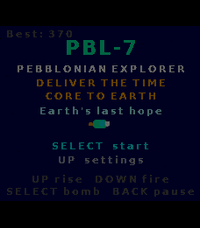
GamesA landscape shmup through the solar system. Hold your Pebble Time 2 sideways and fly PBL-7 to Earth. Rise, fire, dodge, and beat a boss on every planet. 11 planets, secrets, 5 languages. PBL-7 is a sideways-held arcade shoot-'em-up for the Pebble Time 2. Turn your watch a quarter turn — the three buttons line up along the bottom and the screen becomes a 228×200 landscape playfield. You are PBL-7, a Pebblonian explorer carrying the Time Core to Earth to save it. Every planet mistakes you for an invader and sends its champion to stop you. Hold UP to rise, release to fall, DOWN to fire (don't hold it too long or the gun overheats and jams), and SELECT for a screen-clearing smart bomb. Fight your way past a themed boss on each of Mercury, Venus, Mars, Jupiter, Saturn, Uranus and Neptune — each with its own gimmick, from acid clouds and gravity wells to splitting rings and lightning storms. After every boss you choose one of three Pebble-themed upgrades that carry through the run. Hidden on each planet is a lost Pebble device to collect — find all eight to unlock the true ending, and beat Neptune without taking a hit to open a secret portal. FEATURES • Landscape gameplay — held sideways, a real quarter-turn shmup. • 11 planets: Mercury → Neptune, a secret boss-rush, a hidden ally world, a Moon base and a three-phase Earth finale. • A themed boss with a unique gimmick on every planet. • Upgrade cards after each boss, 8 hidden collectible Pebbles, and two secret endings. • Weapon-heat system: burst-fire beats mashing — or switch the jam off in Settings for easy mode. • Settings: backlight, weapon jam (easy mode), rumble, sound, reset save. • Made for the Pebble Time 2 (Emery) colour screen; plays entirely offline. • Available in English, Nederlands, Français, Deutsch and Español, following your watch's system language automatically. • Progress, records and collectibles saved on the watch.
 9
9PebbleDiver
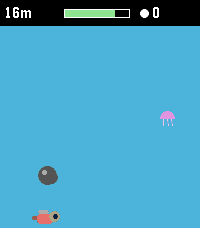
GamesA one-button deep-sea dive. Hold to swim up, let go to sink. Dodge rocks and jellyfish, grab pearls and air, upgrade your gear, and dive as deep as you dare. PebbleDiver is a one-button arcade dive for the Pebble Time 2. Hold SELECT to swim up, hold DOWN to dive faster, let go to sink — that's the whole control scheme. Dodge rocks and jellyfish on the way down, scoop up pearls and air bubbles, and see how deep you can go before your oxygen runs out. Pearls carry over between runs. Spend them in the shop on a bigger oxygen tank, faster fins, a lamp that pulls nearby pearls and bubbles toward you, or a sword. The deeper you go, the darker the water and the faster the current — and from 30 m down, sharks start hunting you instead of just drifting past. Dodge them, or equip a sword and tap UP (or the touchscreen) to fend one off for extra pearls. Legend says a magic Pebble waits deep below for divers who have fully equipped themselves. Whether that legend is true is for you to find out. FEATURES • Genuine one-button gameplay: hold to rise, release to sink, DOWN for a burst of extra descent speed. • Oxygen meter with a fair "pity" system — bubbles never stay scarce for long, so a dry spell never turns into an unfair death. • Pearls persist between runs — build up your stash and gear up over time. • Shop with four upgrades, five levels each: Oxygen tank, Fins, Lamp, Sword. • Sharks actively hunt you from 30 m down — dodge them, or fend one off with a sword (UP or a screen tap) for a pearl payout. • Water darkens and the current quickens the deeper you dive, for a real sense of descent. • Made for the Pebble Time 2 (Emery) color screen. • Plays entirely offline — no phone app, no internet connection needed. • Available in English, Nederlands, Français, Deutsch and Español, following your watch's system language automatically. • Your pearls and upgrades are saved on the watch itself.
 5
5PebbleKimai
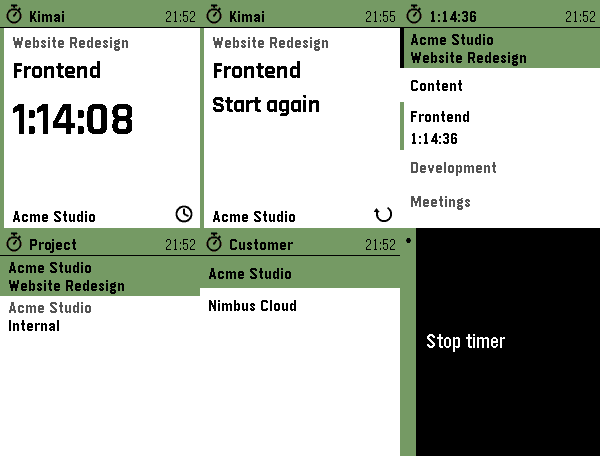
Tools & UtilitiesTrack your time in Kimai, straight from your wrist. Start, stop and switch Kimai time tracking from your Pebble. Recent activities in one press. Touch on PT2. 5 languages. PebbleKimai puts your self-hosted Kimai time tracking on your wrist. The home screen is a card: the project you are booking on, the activity you are on, and a big ticking elapsed time — or, when idle, your last activity with a one-press "Start again". Tap the time to stop, long-press Down for the activities you ran recently, or open the full list to start something else. The Kimai server always stays the source of truth. FEATURES • Start screen at a glance — project, activity and a big ticking elapsed time, or your last activity with a one-press restart when idle. • Recent activities — one long press shows the last five activities you ran, across every project. Picking one books it on its own project and selects that project on the watch, so an activity bound to another project just works. • Touchscreen on Pebble Time 2, using the watch's own touch navigation: tap a row to start/stop/switch, swipe right to go back — the same feel as every other menu on the watch. On the start screen, each part does what it shows: tap the elapsed time to stop, the project to change it, the icon for your recent activities. Physical buttons keep working everywhere. • Active-project row on the watch — tap to choose the project time is booked on; long-press to choose a customer, and the project list filters to that customer. Your latest choice is remembered on the watch. • Shows your global activities plus the activities bound to the active project. • One press to start when idle. Stop and switch each ask for a single confirmation, so a running timer is never stopped by accident — including a stray tap on the screen. • Live, drift-free elapsed time: the watch always recomputes it from the server's start time, so it stays accurate even after a reconnect. • Available in English, Nederlands, Français, Deutsch and Español — on the watch and in the settings — following your watch language or set manually. • Privacy: your API token stays on the phone and is never sent to the watch. SETUP 1. In Kimai, create an API token (your profile → API Access). 2. In the Pebble app, open PebbleKimai settings and enter your server URL and token. Reopen settings to pick a default project (and customer, if you have more than one). You can change both on the watch anytime. Your phone needs network access to your Kimai instance (same network, or via a reverse proxy / VPN). HTTPS with a valid certificate is recommended. Works on Pebble Time / Time 2 (Basalt, Chalk, Emery) and the Aplite and Diorite platforms.
 33
33PebbleDoist
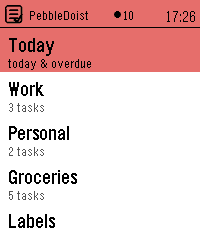
Tools & UtilitiesYour Todoist tasks on your wrist — add them by voice. Browse Todoist by list, label or Today, read details and subtasks, tick tasks off, and dictate new ones. Touch on PT2. 5 languages. PebbleDoist puts Todoist on your wrist. The overview opens on a Today row, the lists you picked (each with its open-task count) and your labels. Open a list to see its tasks with their due dates, select one to read its description, labels and subtasks, and tick things off as you go — instantly, with a short undo window before anything reaches Todoist. Adding a task takes one press and your voice: dictate it, and natural-language dates like "friday" land as a real due date. FEATURES • Today — everything due today or overdue, each row prefixed with the list it belongs to and its due date underneath. • Labels — browse your Todoist labels and see every task carrying one, across all your lists. • Details — a task's full title, deadline, description and labels as coloured badges, with its open subtasks listed underneath, each with a checkbox. • Add by voice — dictate a new task, or a new subtask straight into the task you are looking at. Bound to Quick Launch, one press starts the dictation. • Complete or delete — a task's menu completes it in Todoist right away, or deletes it after a confirmation. Optional quick-complete turns a single press into a tick, with an undo window. • Touchscreen on Pebble Time 2: tap a row to open it or tick it off, drag to scroll, swipe right to go back. One tap is enough everywhere. The buttons keep working exactly as they did. • Timeline pins (optional) — tasks due in the next few days appear on the Pebble timeline with a reminder that buzzes at the deadline, and completing or rescheduling a task clears or moves its pin. • Text size — small, medium or large task rows, set from the phone. • Available in English, Nederlands, Français, Deutsch and Español — on the watch and in the settings — following your watch language or set manually. • Privacy: your Todoist API token stays on the phone and is never sent to the watch. SETUP 1. In Todoist, copy your API token (Settings → Integrations → Developer). 2. On the phone, open PebbleDoist's settings, paste the token and save. Reopen the settings to tick the lists you want on the watch, choose the start screen, and optionally turn on timeline pins. 3. Optional: bind PebbleDoist to Quick Launch for a one-press "speak a task". Requires a Pebble Time 2. Touch needs firmware 4.33.2 or newer; on older firmware the buttons do everything the touchscreen does.
 19
19Polly
Tools & UtilitiesPolly — your talking parrot Polly is a colourful parrot for your Pebble Time 2 that actually talks out loud through the watch speaker. - **SELECT** — dictate a sentence and Polly speaks it back. - **UP** — ask a question and Polly answers in a sentence or two, powered by Google Gemini's free tier. - **DOWN** — pick one of your own preset "quick phrases" and say it instantly. Speech is generated by Google Cloud Text-to-Speech, with dozens of languages and voices to choose from. Between chats the parrot blinks, tilts its head, steps, hops and flaps on its branch. Requires a Pebble Time 2 (speaker + microphone). Bring your own free Google API keys — Cloud Text-to-Speech for the voice, and an AI Studio (Gemini) key for the optional ask-AI button. Both are entered in the app settings and stay on your phone. Voice, language, volume, animation frequency and quick phrases are all configurable.
 23
23PebbleKuma
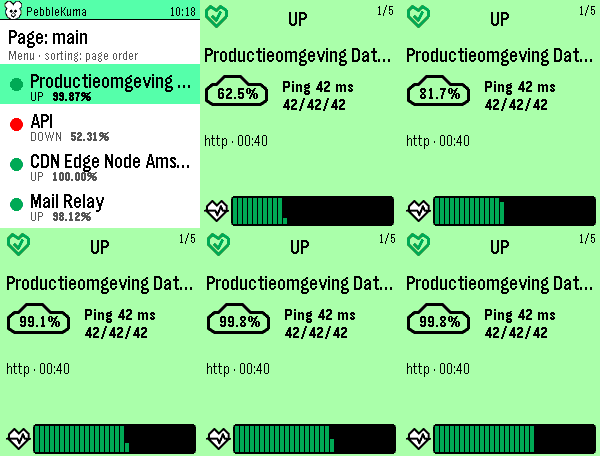
Tools & UtilitiesPebbleKuma brings your Uptime Kuma status pages to your Pebble Time 2. Browse a clean list of your monitors at a glance, a colored dot tells you what's up, down, in maintenance, or pending, with the 24-hour uptime right beside it. Tap a monitor for a full card, color-coded by its status, showing the uptime percentage, current ping (with min/avg/max), monitor type, last check time, the latest status message when something's wrong, and a heartbeat history graph. Page up and down to flip through monitors; the numbers count up and the heartbeats sweep in as you go. Sort by page order, name, or "problems first" (down → pending → maintenance → up, worst uptime leading). Pick a default in settings and switch instantly from the watch. Setup is quick: enter your Uptime Kuma base URL and the status-page slugs you want in the phone settings. Everything is fetched on the phone and streamed to the watch, so it stays light and responsive. Note: your Uptime Kuma server must be reachable from your phone (use your VPN if it's internal).
 8
8Demi
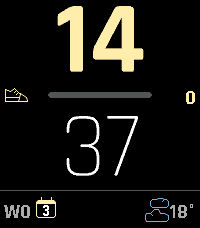
FacesA vector watchface that tracks whatever matters to you. Bold vector digits with progress bars for steps, daylight, battery or your own JSON stat - plus weather, sunrise/sunset and a light theme. Demi is a configurable watchface for the Pebble Time 2, built around large anti-aliased vector digits and progress bars that stay out of the way until you need them. Track steps, calories, distance, battery, how much daylight is left, how much of the week has gone, or your own JSON feed. Round out the bottom row with date, weather, sunrise/sunset, battery or heart rate - pick any three. Dark or light: the whole face flips between white-on-black and black-on-white, and a light accent colour is darkened automatically on white so your choice stays readable either way. FEATURES • Large FCTX vector digits (hours/minutes), scaled from the real screen size - no fixed layout, so it adapts under the Timeline Quick View peek. • Dark and light themes. Every colour is chosen per theme, including the weather icons; nothing has to be reconfigured when you switch. • Three layouts: vertical (hours above minutes), horizontal (hours beside minutes, vertical bar), or horizontal with two independent bars, each tracking its own metric and optionally its own colour. • Progress bar sources: steps, battery, calories, distance, daylight remaining, day/week/month/year elapsed, or a custom JSON url of your own. • Your own goals. Set where the steps, calorie and distance bars reach 100%, or enter 0 and the watch uses your own daily average from its health history. An optional mark shows where you normally stand at this time of day, so you can read today against your usual pace. • Sunrise and sunset, from the same weather request - no extra setup. A widget shows whichever comes next, and the day-elapsed bar marks both on its track, so you can see at a glance how much daylight is behind you. • Beside the bar: icon + value, icon only, or nothing (lengthens the track). Swap icon and value to reverse the fill direction. A tap on the wrist can reveal the hidden details for a few seconds - so a face kept deliberately bare still gives up its numbers on demand. • Tap to see the seconds or the full date, without leaving the watchface. • Three configurable bottom-row widgets (left/middle/right): date, weather, sunrise/sunset, battery (graphical glyph + %), or heart rate. • 12-colour accent palette, 8 hour/minute contrast schemes including accent-tinted variants tuned for e-paper. • Metric or imperial: distance follows your watch's own measurement setting, or pin it to kilometres or miles. • Automatic status icons: Quiet Time and Bluetooth-disconnected indicators. • Weather via Open-Meteo - no API key, no account. Persists across launches so returning to the face never flashes a placeholder. • English, Nederlands, Français, Deutsch and Español - for the date and for the settings page, or following your watch's own language. CUSTOM JSON METRIC Point "Custom 1" or "Custom 2" at a url returning `{"items":[{"name":"...","value":0-100}]}` (item 0 → Custom 1, item 1 → Custom 2) to track anything you can turn into a percentage - a self-hosted stat, a script's output, whatever you track. The url stays on your phone and is never sent to the watch; only the resulting percentage and a matching icon (hourglass / burst / generic gauge, picked from the item's name) cross Bluetooth. Refreshed every few minutes; oversized or malformed responses are refused rather than parsed. PRIVACY Weather and sunrise times are fetched by your phone from Open-Meteo using your location; nothing else leaves the watch. Health data is read on the watch and never transmitted. If you configure a custom JSON url, the url itself stays in your phone's storage - only the fetched percentage reaches the watch. Works on Pebble Time 2 (Emery).