 19
19SolarPath
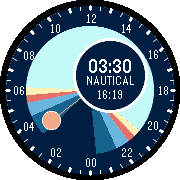
Faces**SolarPath** turns your Pebble into a 24-hour solar clock. A color-coded ring shows exactly where you are in the day — from deep astronomical night through nautical and civil twilight, into the golden hour and full daylight. The current time is displayed in a floating clock face that always orbits to the opposite side of the sun, while a glowing dot tracks the sun's real position around the dial. The golden hour is shown as a two-tone arc at each end of the day: orange close to the horizon fading into yellow as the sun climbs, giving you an instant feel for the quality of light at any moment. **Features** - Accurate sunrise, sunset, golden hour and all three twilight zones calculated for your location - Live GPS positioning via your phone, or fixed coordinates you set yourself - Automatic phase label: Golden Hour · Day · Civil Twilight · Nautical · Astro Twilight · Night - Day length display - Supports Pebble Round 2 (260 × 260) and Pebble Time Round (180 × 180) - Sun data is stored on the watch and updated automatically at midnight — or immediately when the phone reconnects after a gap in Bluetooth coverage - Add moon showing correct angle and phase in relation to the sun Configure your location in the Pebble app settings. GPS is used by default; fixed coordinates are useful when travelling or when GPS is unavailable.
 41
41Casix
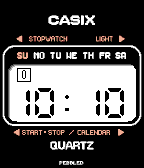
FacesCasix Some watches are just tools. Others become part of who you are. This watchface is a tribute to my very first quartz watch — a Casio from the late 1970s that I wore every single day for years, and still keep to this day. The chunky digits, the row of progress boxes counting through the minute, the blinking colon — every detail brings back a time when digital watches felt like the future arriving on your wrist. Casix recreates that experience on your Pebble. While the original inspiration was a classic round Casio, I have designed this face to look stunning on all Pebble models, bringing that retro LCD charm to both round and rectangular displays. It features a crisp seven-segment display with a sweeping minute tracker, AM/PM indicator, and a quick wrist flick to check the date. Just time, the way it felt back then. Features: - Universal Compatibility: Optimized for all Pebble watches (Round and Rectangular). - Wrist-flick: Toggle between time and date with a simple motion. - Progress Tracker: Six boxes tracking each 10-second interval of the minute. - Authentic Details: Blinking colon, PM indicator, and a clean black-on-white retro LCD aesthetic. Coming Soon: For the Pebble 2 and Time 2 series, I am working on a full recreation of the original watch's button functions, reimagined for the hardware. This update will be implemented as soon as the final testing on physical hardware is complete — so stay tuned!
 17
17Vintage_LED
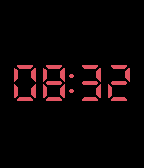
FacesA minimalist watchface that shows the time only when you need it. Just give your wrist a quick flick, and the time appears in a bold 7-segment display style, then fades away after a few seconds. Features: Flick your wrist to reveal the current time (12h or 24h format) A second flick optionally shows the date (MM/DD or DD/MM) Configurable display timeout Four font sizes to choose from Fully customizable text and background colors Optional backlight control on motion Keep your screen dark and distraction-free, and reveal the time only when you want it.
 16
16Cubic
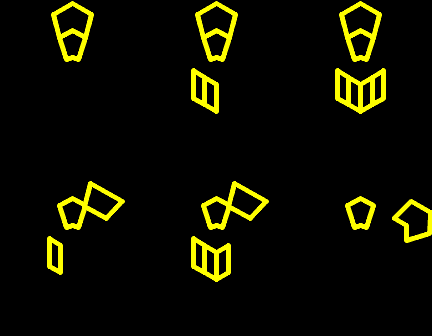
FacesCubic is a hybrid between an analog and a digital watch. Hours and minutes are represented by facets, that are arranged in two equilateral hexagons. The idea was to simulate a sort of LED illumated facets. The outer hexagon shows the hours and the inner hexagon shows the minutes in 5-minute chunks. In the center you'll see a cube with two functions. The upper surface reprents am (off) or pm (lit) and below of this 4 single minute facets are located. With this the exact time is always available. To get closer to the idea look at the screenshots: yellow - 12:00 am red - 2:42 pm (grid enabled) cyan - 9:15 am (thickest line) pink - 11:05 am (filled) green - 10:22 pm (thinnest line) Configuration allows you to set up line thickness or choose fully lit facets. A grid can be enabled/disabled to reveal all facets — helpful when learning to read the time. Choose any color, on monochrome models colors are displayed in white. Optimized for Pebble Time 2 and Pebble Round 2.
 22
22LaunchPad
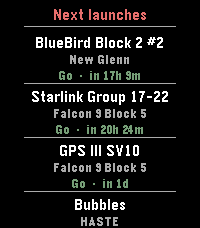
Tools & UtilitiesLaunchPad brings the world's rocket launch schedule to your Pebble. Scroll through the next 10 upcoming orbital launches, each showing: * Mission name — what's flying (BlueBird, Starlink, GPS III ) * Rocket — which launcher (Falcon 9, New Glenn, Electron…) * Status & countdown — color-coded Go / TBC / TBD with a human-readable time like "in 17h 1m" or "25 Apr · 14:00Z" App is pure alloy, data comes live from Launch Library 2 by The Space Devs — the same open database that powers many of the best space-tracking apps. Credit: launch data provided by thespacedevs.com
 234
234Fix
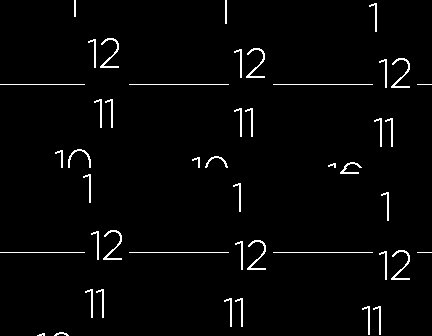
FacesFix turns the watch into a set of rolling drums. The numbers travel along a wide arc and a single horizontal line points at the one that counts right now — the way a tuning dial or an odometer reads. Nothing spins around a centre, nothing needs decoding: whatever sits on the line is the time. The hours ride the outer arc. Depending on the mode you pick, an inner arc carries the minutes, the seconds, the weekday, the month or the day. And the dates roll too, so yesterday and tomorrow stay in view above and below today. Exact minutes is new. By default the minute drum is marked in steps of five, the way a clock face is. Switch exact minutes on and every single minute gets its own position on the drum, so the line points at 37 rather than somewhere between 35 and 40. The drum keeps the same spacing and the same type size — it simply steps once a minute instead of once every five. Every element has its own colour: background, hours, minutes, seconds, date and the pointer line. The display can be flipped left to right, and the drums can be told to roll the other way. Minutes, seconds and dates each have a bold option. Built for the whole family, from the original Pebble to Pebble Time 2 and Pebble Round 2. On the two large displays the numerals are drawn from a dedicated typeface at a size the system fonts cannot reach, so they fill the screen the way they do on the smaller models. Settings - Background / Hour / Minute / Seconds / Date / Line colour — one for each element of the face. - Use 24-Hour Format — 0 to 23 instead of 1 to 12. - Flip Display — moves the whole dial to the other side of the screen. - Toggle Auto-Rotation — reverses the direction the drums roll in. - Exact Minutes — every minute on the drum instead of five-minute steps. Works in every mode that shows minutes. - Bold Minutes / Bold Seconds / Bold Date — heavier type for those rows. - Static Date (no rotation) — keeps today's date on the line instead of letting the date drum turn through the day. - Select Time Mode — what the inner arcs carry: - Hours only - Hours and Minutes - Hours, Minutes and Seconds - Hours, Weekday, Month and Day - Hours, Weekday and Day - Hours, Month and Day - Hours, Minutes and Day - Hours and big Minutes Displaying seconds keeps the watch redrawing once a second and will drain the battery faster.
 111
111LCD Hands
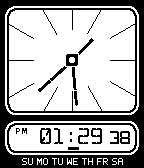
FacesA clean, tribute to classic dual-display LCD watches, built for rectangular Pebbles. Dual View: Beautiful analog-style LCD hands on top, powerful digital display below. Interactive: Enable tap gestures to cycle through secondary functions (Time, Date, Steps). Customizable: A couple of things to explore. Found a bug or missing a core feature? Drop me a line! (Before you ask: No, color settings will never be added – let's keep the retro vibe alive!)
 148
14891 Steps & Heart Rate
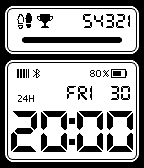
FacesInspired by and partly based on 91 Dub (thanks for the great watchface!), this watchface displays real-time sensor data. The configuration includes a daily step goal, a 12-hour format option, and the ability to show your heart rate instead of the progress bar.
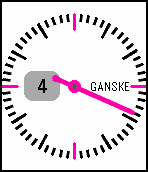 42
42Ganske
FacesSimple minute centered watchface. Config options: - choose between black or white background - select hand/quarter mark color - switch on thicker hand and marks - enable/disable 24-hour display - suppress half-an-hour display - increase size of hour - enable smoother transition of the hand
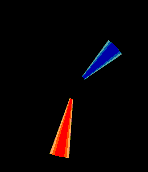 1
1Segmento
FacesStylish segment design watchface.
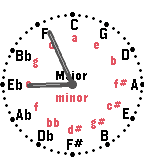 12
12Circle of Fiths
FacesThe Circle of Fifths, combined with a simple watch face. Battery display, step counter, and shorter hands (for better readability) are fully configurable. Nothing more, nothing less. Any comments or feedback? Drop me a line at [email protected]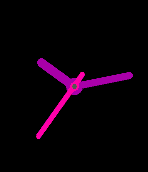 157
157Your Style
FacesConfigure your watchface as you like it. All possible colors for your model can be applied to the watchface elements. Hide hour and minute marks, enable seconds if you like that. Fullscreen option for rectangular devices can be disabled (last screen). Adjust length and thickness of all hands. Adjust position and thickness of marks. Date can be applied either round or square. Enable bluetooth display, set appearance of sign and let the pebble vibe on disconnection Battery display and hour numbers, a moon phase disc that can be scaled up to fill the whole screen, and a step counter — either as plain text or as a sub-dial with its own needle and a progress arc. Hands can now start away from the centre, which turns them into floating dots or dashes, and they can be snapped to 6° steps so they line up exactly on the marks. The centre hub and its axis dot can be recoloured or switched off separately. Five named presets store complete configurations. If you want to be safe, copy the preset code — it restores a configuration on any phone, at any time. Please note: * The settings page does not work inside CloudPebble. That is down to a software setting there, not to the watchface. On the phone and on the watch it works without problems; I use this watchface myself * Presets are stored on the phone. I cannot promise they survive a release update or a reinstall, so note down a setting you would hate to lose * Development is finished for my part. If you want to take it further, the code is on GitHub
 23
23Hourglass
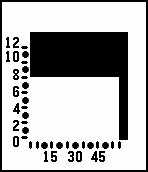
FacesLike an hourglass this watchface fills the screen as time goes by. Hours go bottom-up and minutes from left to right. First screen 06:30 Second screen 08:59 Third screen 12:45 Chosse a black or a white rim and a black or a blue background.
 3
3Broken
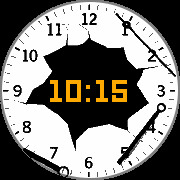
FacesThank god, it has a digital heart.
 42
42Tuuckuu
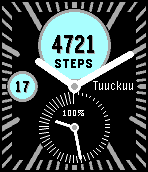
FacesA straightforward activity oriented watchface. It shows the actual activity value in the upper LCD circle. The percentage of your personal daily goal is shown by the longer dial in the lower circle (turning clockwise). Battery charge is displayed with the shorter dial in the lower circle (turning counterclockwise while discharging). Seconds can be enabled by configuration as well as different color styles.
 8
8Utgahn
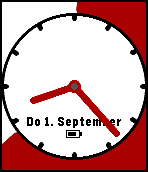
FacesWatchface für die wesentlichen Dinge im Leben - Uhrzeit - Datum - Batteriestatus - Schrittzähler Der Schrittzähler am äußeren Rand verwendet die Minutenskala jede "Minute" entspricht 100 Schritten. Nach 6000 Schritten kommt es zum Überlauf, daher erscheint im inneren Bereich des Ziffernblatt jeweils ein Punkt für eine Runde (=6000 Schritte). Die Beispiele zeigen also: 3.800 Schritte, 7400 Schritte, Marathon
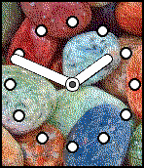 28
28Nomen Est Omen
FacesNomen est omen.
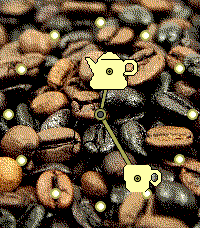 3
3Coffee Time
FacesTime for a coffee break?
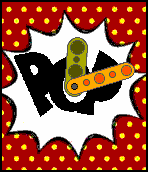 15
15Pop
FacesSimple Pop Art style watch.
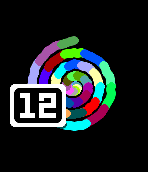 7
7Spiral
FacesSpiral shows the minutes as an Archimedean spiral that is growing clockwise. Each turn represents 10 minutes, each minute has its own color. All colors are remixed every minute. The hour number behaves like a minute dial and is turning once an hour. This watchface look best in sunlight. The screenshots show 12:59, 12:40, 12:20 and 12:00.