 2
2Power Sources
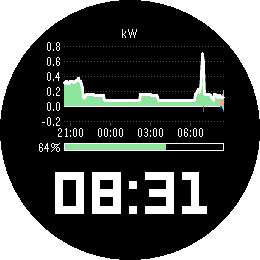
FacesPower Sources puts the power sources graph from the Home Assistant energy dashboard on your watch, right above the time. At a glance you see where your power has been coming from: solar, battery and grid, stacked the same way Home Assistant stacks them. Above the zero line is what feeds the house - solar in orange, battery discharge in green, grid import in blue. Below it is where surplus goes - battery charging and grid export. A line on top traces your total consumption, just like the "Now" view in Home Assistant. There is nothing to map. Power Sources reads your energy dashboard configuration and uses the power sensors you set up there for your solar, battery and grid sources. Two batteries or several solar arrays are summed per type, exactly as in Home Assistant. Give it the address of your Home Assistant and an access token, and the graph appears. If your batteries have a state of charge sensor in the energy dashboard, a bar between graph and time shows how full they are, from 0 to 100 percent. With several batteries it shows the combined level, weighted by the usable capacity you entered for each, just as Home Assistant does. Without a state of charge sensor the bar simply stays away and the graph takes its place. The graph always ends at the current time and reaches back 3, 6, 12 or 24 hours - your choice. Axis labels show kilowatts and the time of day, and the scale adapts to your values. It refreshes every five minutes, in step with the five minute statistics Home Assistant keeps. Only new data is loaded after the first fetch, so the phone does not pull the whole day every time. The time sits in the lower 40 percent of the display in the built-in LECO numerals, large enough to read without thinking about it. Two colour schemes, one for the day and one for the night, each with its own background and text colour. Night mode switches between them at the times you choose - a dark face during the day and a light one at night, or the other way round, or any colours you like. Your access token stays on the phone. It is never sent to the watch. Made for Pebble Time 2 and Pebble Round 2, each with its own layout. Requirements: Home Assistant with the energy dashboard set up, and power sensors entered for your sources (Settings > Dashboards > Energy, the power field of each solar, battery and grid source). For the charge bar, add the state of charge sensor and, with several batteries, the usable capacity to each battery source. Your phone needs to reach your Home Assistant, at home or through remote access. SETTINGS - URL - the address of your Home Assistant, for example https://ha.example.org or http://192.168.1.10:8123. - Long-lived access token - created in Home Assistant under your profile, Security tab. Stays on the phone. - Time span - how far back the graph reaches: 3, 6, 12 or 24 hours. - Day colours - background, and the colour of the time, axes and consumption line. - Use night colours - switches to the night colours between the two times below. - Night begins / Day begins - any time of day. - Night colours - background, and the colour of the time, axes and consumption line at night. 12 or 24 hour format follows the watch setting.
 23
23Coast
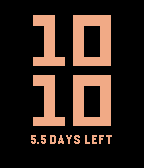
FacesMost watchfaces redraw the screen every minute. A face with a second hand redraws it 86,400 times a day. Coast redraws it 288 times - and if you ask it to, only 96. It does that by rounding. The time steps in five minute intervals, and between two steps nothing on screen changes, so nothing is drawn - not the digits, not the background, nothing. No second hand, no sweeping animation, no minute that ticks over just to prove the watch is awake. You choose which way it rounds. Down shows the step you have passed, so the time is never ahead of itself. Up shows the step that is coming, which keeps you running a few minutes early - useful if you are the sort who is always catching the train by a hair. There is no Bluetooth traffic while it runs. No weather to fetch, no timeline to sync, no phone to wake. Nothing is subscribed to the accelerometer or the heart rate sensor. The backlight is never switched on by the face itself. What is left is the smallest amount of work a watchface can do and still tell you the time. Two styles, same principle. Digits sets the time in two lines, hours above minutes, filling the display. Hands is a bare dial of twelve marks and two flat hands. The minute hand jumps from mark to mark like a station clock, so the rounded time is simply where the hand stands. Neither style costs more to draw than the other. Alongside the time, Coast tells you what all of this buys you. It measures how fast your watch actually discharges and turns that into the days you have left - not a percentage you have to interpret, but a number you can plan around. That number gets better the longer you wear the watch. The first estimate arrives after a single percentage point of discharge, which makes it early but rough. Every measurement after that is folded into the figure, and the later ones are taken over longer stretches, so the estimate stops moving and settles. After a few days it is no longer a rule of thumb but a reading of your watch in particular - your notifications, your backlight, your time out of Bluetooth range. Until that very first measurement is in, the line simply shows the charge level. Both colours are yours. Pick a background and a colour for the digits or the dial; if you happen to pick the same one twice, the watch quietly substitutes something you can read. Night mode simply trades the two, between an hour you set in the evening and an hour you set in the morning, so a bright face turns dark for the night and back again on its own. A note on the rounded time: Coast is deliberately not accurate to the minute. Rounding down, 11:07 shows 11:05; rounding up, it shows 11:10, and with hands the minute hand points at the mark it belongs to. If you need the exact minute at a glance, this is the wrong watchface - and that is the whole point of it. SETTINGS - Style - Digits or Hands. - Update step - 5 or 15 minutes. The displayed time is rounded to this step. Fifteen minutes redraws the screen 96 times a day instead of 288. - Rounding - down to the step you have passed, or up to the one coming. - Background - the face colour. - Digits and hands - the colour of the numerals or the dial, and the battery line. - Show runtime estimate - turn the battery line off entirely for the barest possible face. - Swap colours at night - trades the two colours between the hours you set. - Night begins / Day begins - any full hour, listed in both 24 hour and AM/PM form. Set both to the same hour to leave the colours alone all day. 12 or 24 hour format follows the watch setting; there is nothing to configure.
 9
9HA Trigger
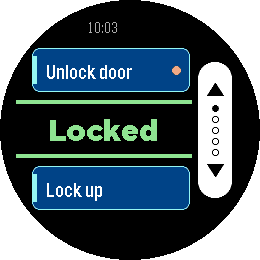
Tools & UtilitiesHA Trigger puts Home Assistant actions on your wrist and keeps the answer in front of you. Each screen carries two actions: the top button runs one, the bottom button the other. Between them sits the state of an entity of your choice, in large type and coloured by what it says: green when things are as they should be, amber while a lock is still turning, red when the entity is unavailable or Home Assistant did not answer. It refreshes by itself every 15 seconds while the app is open, so you can read it without pressing anything. Set up as many as five screens — front door, garage, lights — and flip through them with the middle button. Only screens with at least one action are shown, and dots on the button rail tell you where you are. The app reopens on the screen you left it on. Each action can ask before it fires. Turn the prompt on for anything you do not want to trigger from a pocket, and the watch shows a countdown ring: the middle button runs the action, any other button cancels, and doing nothing cancels it too. Actions with a prompt are marked with a dot on their card, so you can see which one is the careful one. Any service works — `lock.open`, `script.turn_on`, `switch.toggle`, `scene.turn_on`, `cover.open_cover`. Give it a target entity, or leave that empty for scripts that take no arguments. For the status line, a template sensor is worth setting up: whatever text it produces is what the watch shows. Your settings live on the watch as well as on the phone, and the two sync in both directions. Reinstall the phone app and the watch hands its configuration back; reinstall the watch app and the phone restores it. You should not have to type a long-lived token twice. Built for Pebble Time 2 and Pebble Round 2, with a layout drawn for each — a full-height button rail on the rectangular display, a rounded rail set inside the circle on the round one. Settings - HA URL — base URL of your Home Assistant, no path and no trailing slash. If you leave out `http://` or `https://` it is assumed to be `http://`. - Long-Lived Token — from Profile > Security in Home Assistant. Best created under a dedicated, non-administrative user. - Screens 1 to 5 — each with its own status entity and a top and bottom action. Leave both actions of a screen empty to hide it. - Status Entity — shown in the centre of the screen. Leave empty to use the top action's entity, or the bottom one's if the top is empty. A template sensor works well here. - Top / Bottom Action — a label, a service in `domain.service` form, an optional target entity, and whether to ask before running it. For a script, scene, automation or button you can name the entity alone and leave the action empty — the matching action is derived from it. Without a label the card shows the entity's name. - Color Scheme — Dark uses a white button rail on black, Light a black rail on white.
 11
11LED Watch
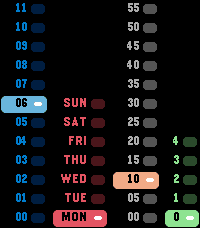
FacesLED Watch brings back the column display of a binary LED wristwatch — and makes it readable. Four columns stand side by side, twelve rows tall, counting upwards from the bottom: the hour in blue, the weekday in red, the minutes in blocks of five in orange, and the single minutes in green. Exactly one cell in each column is lit at any moment. The lit cell is a solid bar of its colour with the label set in black on top, so the current value carries across the room while the dark cells stay as quiet context around it. Add the two right-hand columns to read the minutes e.g.: 50 and 3 is 53. Two changes make it easier to read than the watches it borrows from. The minute blocks start at 00 rather than 05, and the single minutes run 0 to 4 rather than 1 to 5 — so something is always lit in every column and the sum is never ambiguous. And on a 24-hour watch the hour column simply shows 00 to 23 instead of asking you to check an AM/PM lamp; set to 12 hours it shows 1 to 12 and the PM field appears in the top corner. Shake your wrist and the date slides in over the grid — weekday, day of the month, month. Shake again for the ISO calendar week and its year. A third shake returns to the time, and so does simply waiting a few seconds. No buttons, no menus, nothing to hold down. Built for Pebble Time 2, using the full height of its display: twelve rows of nineteen pixels, edge to edge.
 4
4ASCII Mood
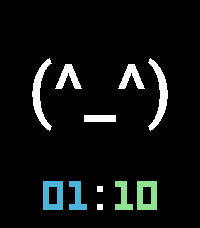
FacesASCII Mood puts a text emoticon on your wrist at full size — the face fills the display, and the clock steps back into a quiet line underneath it. Eight moods are built in, from `(^_^)` to `(o_O)`, `(>_<)`, `(;_;)` and `(-_-)`. Pick one on the settings page, or just **shake your wrist** to flick to the next one — no menus, no buttons, and it sticks until you change it again. A short buzz confirms the switch, and if you would rather keep one face for good, shake switching turns off. The face is drawn in a proper typeface rather than the built-in system fonts, so it reads as a deliberate piece of lettering at 90 pt rather than oversized small print. Hours, colon and minutes each take their own colour, so the time can pick up an accent without competing with the face. Nothing else is on the screen. No date, no steps, no battery bar — just a face and the time, on a background you choose. Built for Pebble Time 2 and Pebble Round 2, with the face sized for each display. The clock follows whatever 12-hour or 24-hour setting your watch is already using. ## Settings - **Face** — which of the eight moods to show. Shaking the watch moves to the next one from wherever you are. - **Shake to change mood** — turn this off to keep the mood fixed to what you picked above. - **Background** — the colour behind everything. - **Face** — the colour of the emoticon. - **Hour digits**, **Colon**, **Minute digits** — the three parts of the clock, coloured separately.
 7
7Afterglow
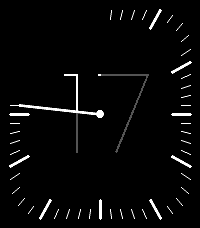
FacesAfterglow shows the hour as a single large numeral in hairline type — and then lets the minutes eat into it. A slender hand sweeps clockwise from twelve. Behind it the minute marks appear one by one, so the rim fills as the hour fills. And the part of the numeral the hand has already swept past is dimmed, so the bright, unspent remainder of the hour shrinks away in front of you. At quarter past, a quarter of the numeral has gone dim. At quarter to, only a quarter is left lit. On the hour everything resets: the rim clears, the numeral comes back to full strength, and it begins again. You read the hour as a number and the minutes as a shape — no second scale to decode, no small print. Both colours are yours to choose: one for the background, one for the hand, the marks and the numeral. The dimmed shade is mixed from the two, so the whole face stays in one palette whatever you pick. Choose two colours with real contrast between them — the dimmed segment is derived from that contrast, and a low-contrast pair will wash it out. Also configurable: 24-hour or 12-hour display. Built for Pebble Time 2 and Pebble Round 2, with a layout drawn for each — the round face uses a full circle of marks, the rectangular one follows the rounded edge of the display.
 10
10Bauhaus
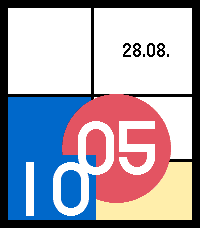
FacesBauhaus turns the time into an abstract composition. A red disc carries the hour and stands where that hour falls on the dial. A blue field carries the minute. A black rule travels once around the edge as the hour passes. The grid behind them is drawn anew each day, so the same time gives you a different picture tomorrow. Three compositions to choose from: Mondrian an irregular grid of black rules with colour fields set into it Albers nested squares whose bands breathe with the time, after Homage to the Square Moholy-Nagy diagonals, a wedge, and planes that overlap The numerals are not a font. They are built from half circles, bars and stems in the spirit of Albers' stencil alphabet, which keeps their curves smooth at any size and lets them take the colour of whatever plane they sit on. Settings: - Legibility, from pure shapes through small numerals to large ones - Four palettes: primaries, muted, mono, and a night palette on black - How often the composition is redrawn: every minute, hourly, daily or never - Grid weight, date, minute rule - An optional steps or battery bar - Transitions on the minute change, where the old number collapses and the new one grows back out Built for Pebble Time 2 and Pebble Round 2.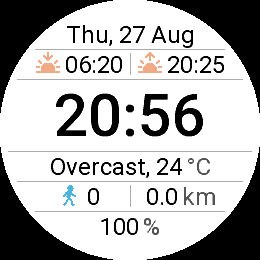 6
6HA Watch
FacesA complete watchface, with room for your Home Assistant. Out of the box it works on its own: date, sunrise and sunset for wherever you are, the time, the current weather, your step count and walking distance read straight from the watch's own health sensor, and the watch battery. No account, no server, nothing to set up. If you do run Home Assistant, three of those lines are yours to take over: one above the time and two below it. Each holds one or two entities, whatever you track: battery state of charge and stored energy, solar output and grid draw, indoor temperature and humidity. Put a single entity in a line and it stretches across the full width. Leave the unit field empty and the unit comes from Home Assistant automatically. Every line you leave alone keeps its default. Time and date follow your habits. The clock takes the 24-hour setting from the watch itself, or you can fix it to 24 or 12 hours, where a small am/pm sits to the left of the digits. The date comes in six formats, from "Tue, 25 Aug" to ISO. Temperature switches between °C and °F, automatically or by hand. Connecting Home Assistant takes a minute: open the settings page, enter the URL your phone uses to reach it and a long-lived access token from your HA profile, then paste in the entity IDs you want. Values refresh every five minutes. Your URL and token stay on the phone and are never sent to the watch or anywhere else. Built for Pebble Time 2 and Pebble Round 2. Weather data by Open-Meteo (CC BY 4.0). Not affiliated with the Home Assistant project.
 2
2Tacho Regulator
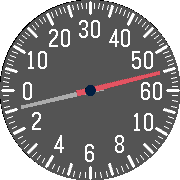
FacesA speedometer-style regulator watchface. Minutes run across the top scale (0 to 60), hours across the bottom scale (12-hour). Two tapered needles, on a car-dashboard dial. Extras: a small battery gauge at the bottom with an E-to-F needle, and a step marker that runs along the hour scale (1 hour mark = 1000 steps, full at 12000). On startup all needles sweep to zero and back like a gauge self-test. Fully configurable: every color, the outline around the needles, plus toggles for the battery gauge and step marker.
 3
3Beach Pebbles
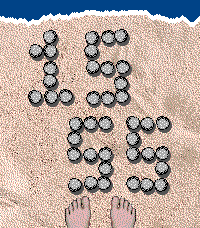
FacesA top-down view of a sandy beach, with your toes at the water's edge. The time is spelled out in small pebbles arranged on the sand, hours and minutes in a 3x5 grid. The pebbles never sit in a perfectly straight line, so every minute looks naturally scattered. When the minute changes, a surf wave rolls in from the top, covers the pebbles, and reveals the new time as it pulls back. You can turn the wave on or off, and optionally trigger an extra wave with a flick of your wrist.
 8
8Swan 108
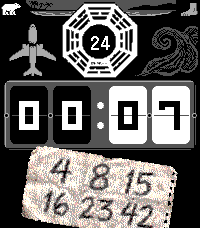
FacesA LOST-inspired flip-clock. The hieroglyphs surface each minute, then the numbers lock back. 4 8 15 16 23 42 Don't forget to push the button.
 107
107Solar & Moon Arc
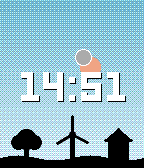
FacesDESCRIPTION Watch the sky change through the day. The sun and moon move along curved paths based on your location, declination and time. They rise and set at the right horizon points and reach realistic heights for your latitude, not a fixed fake arc. Whether you are north or south of the equator, the sun and moon travel and orient themselves correctly for your hemisphere, including which way the moon's phase faces. The sky shifts smoothly from night through dawn, golden hour, daylight and dusk, with the horizon color following a V-shaped curve: warm orange at sunrise and sunset, fading to cool blue by midday and back again. A quiet landscape sits along the horizon: tree, wind turbine and house. The weather, told by the sky itself. Clouds grey the sky as they gather, fog brightens the horizon, and the wind turbine turns with the real wind - fast in a gale, standing still on a calm day. With the forecast turned on, clouds sit on the sun's path at the hour the sun will reach them, so you can see at a glance that it clears up at noon or that the sun runs into rain mid-afternoon. Rain, snow and thunder show beneath their clouds. Hours that have passed drop away, so the sky ahead of the sun is always the weather still to come. After sunset the path shows tomorrow. Prefer a fixed spot? The hourly view puts three clouds side by side: the current hour large in the middle, the previous and the next hour smaller to its left and right. Thin cloud cover gets a smaller cloud, a clear hour leaves its place empty. The row sits at the top of the sky, or below the date when the time is shown at the top. Sun and moon always stay in front of the clouds. The weather adds to the sky, it never hides what this watchface is for. Location comes from your phone (GPS or fixed coordinates). Astronomical data is refreshed once per day, the weather once per hour. The watchface keeps a full day of forecast on the watch, so it continues to work for hours without a phone connection. Weather data comes from Open-Meteo.com, no account or API key needed. Built for round and rectangular Pebble displays. Sun and moon use high-contrast borders (dark red and black/white) so they stay visible against any sky color. The landscape elements are spaced with a small random offset so no two instances look exactly the same. SETTINGS Location - Use fixed location - use the latitude and longitude below instead of the phone's GPS. Display - Show time at top - moves the time display up into the sky area, leaving the date in place. - Auto cycle text color - time and date follow the sky: cool blue-white at night, warm yellow at golden hour and neutral white in daylight, with matching shadows. - High contrast time & date - a fully outlined text style with a hard day/night flip: dark text on the bright daytime sky, light text at night. Designed for easier reading and overrides auto color. - Show date - weekday and day number (e.g. SAT 13) above the time. - Show moon - turn the moon on or off. - Show moon phase - draws the moon's true illuminated shape (crescent, gibbous and so on) instead of a plain disc. - Run sun & moon ahead of time - advances the sun and moon slightly along their paths and draws them in front of the clock, so you can see where they are heading. When off, they travel behind the time as usual. - Animate wind turbine - the turbine spins briefly on every minute change and comes to rest at a slightly different angle each time. With weather on, the number of turns follows the wind speed. - Vivid sky colors - richer, more saturated sky tones through the day and twilight. Weather - Weather - Off, Current sky and wind, Plus forecast on the sun path, or Plus last, current and next hour. Off by default. - Show high / low temperature - the day's high and low in the date line, or in its place if the date is off. After sunset it shows tomorrow's. Needs weather turned on. - Fahrenheit - temperatures in degrees Fahrenheit instead of Celsius.
 13
13PFD
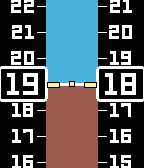
FacesYour wrist just got a glass cockpit upgrade. Speed tape on the left, altitude tape on the right, and an artificial horizon that actually banks and pitches every minute — because straight and level is boring. Trust the instruments.
 14
14Oronia
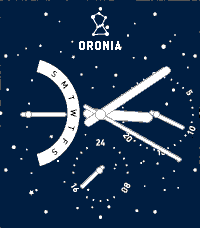
FacesOronia — A night sky on your wrist. Inspired by the elegant multi-complication design of luxury timepieces, Oronia brings a deep-blue starfield dial to your Pebble Emery. Three subdials keep you informed at a glance: a weekday arc on the left, a date indicator on the right, and a 24-hour display at the bottom — all framed by crisp rectangular hands with a subtle outline finish. Features: * Hour, minute, and optional second hand * Weekday, date, and 24-hour subdials * Seconds on/off toggle to save battery * Starfield background with centered logo
 2
2Tickotron
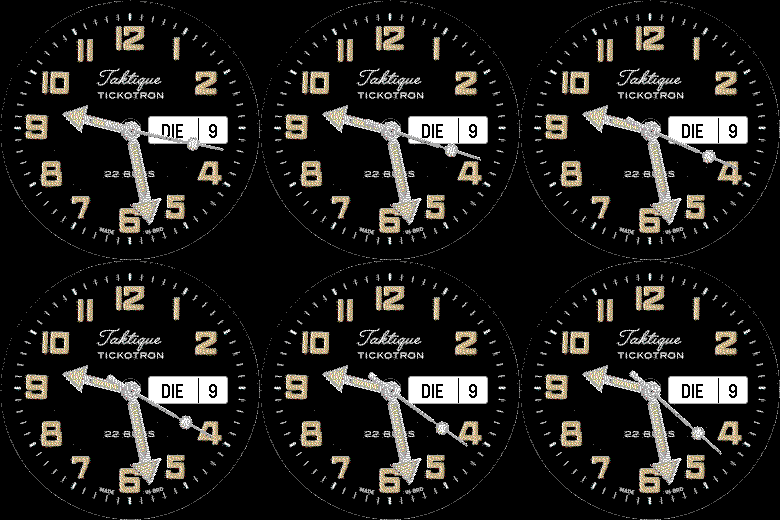
FacesWithout words, seconds can be switched off
 8
8Aurora
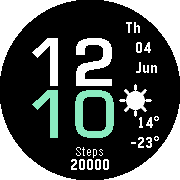
FacesAurora is a clean, high-contrast watchface for round Pebble watches. The hour and minute are stacked in large Eurostile-style numerals, with the minutes set in a fresh accent color so the time reads in an instant. To the right you get the weekday, date and month. Below them sits a hand-drawn weather icon with the day's low and high temperature, and a step count anchors the bottom of the face. Weather is powered by Open-Meteo, so there is no API key to register and nothing to sign in to. Your location is detected automatically, or you can pin a fixed one. Everything that matters is configurable from your phone: * Display language: English, German, French, Spanish, Italian or Dutch * Hour and minute colors * Celsius or Fahrenheit * Automatic or fixed location Designed for Pebble Round 2 (Gabbro) and Pebble Time Round (Chalk).
 15
15AstroCast
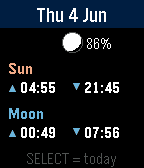
DailyAstroCast = Astronomical Forecast AstroCast turns your Pebble into a precise sun and moon almanac for your exact location. Open it for a clean overview of today, then step backward or forward through any day to plan ahead or look back. Features: * Overview page with sunrise, sunset, moonrise, and moonset at a glance, plus a small location-aware moon showing the current phase and illumination. * Detailed sun page: sunrise, sunset, solar noon, maximum altitude, day length, rise and set azimuth, and civil, nautical, and astronomical twilight. * Detailed moon page: moonrise, moonset, illumination, phase name, moon age, transit, maximum altitude, and rise and set azimuth. * A moon drawn and shaded exactly as it appears in your sky, rotated for your latitude rather than the flat calendar view. * Automatic positioning, or fixed coordinates you set yourself, with the nearest place name shown for confirmation. Navigation is simple: up and down move between days, select jumps back to today or switches between the sun and moon detail pages. Built for all Pebbles
 5
5MoonFace
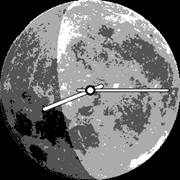
FacesA real moon on your wrist. Moonface shows the current lunar phase as a soft shadow over a full-disk moon, turned to match how the Moon actually appears in your local sky. Features: * Full-disk moon background with clean hour and minute hands in colors you choose * Live moon phase, drawn as a translucent shadow that dims the surface instead of hiding it, so the craters stay visible * Location-aware orientation: the whole moon rotates with your position, tilting correctly whether you are north or south of the equator * Automatic GPS location or fixed coordinates * Adjustable shadow strength and a fine alignment dial to match your view Built for Pebble Time Round and Pebble Round 2
 17
17Limb
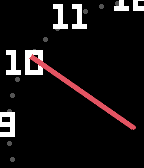
FacesLimb reimagines the classic clock face by placing its centre beyond the screen edge. Only the limb of the dial is visible — a gently curved arc carrying two or three hour numerals, a bold minute hand sweeping from the bezel, and the current minutes in a hollow red ring. The whole assembly rotates as time passes, keeping each hour exactly where it belongs on a real dial. Configurable arc distance, hand and ring colors and more. Designed for all Pebble models.
 45
45Marquee
DailyMarquee Got something you need to glance at quickly? Marquee shows any text you want right on your wrist. Always visible, no fumbling with your phone. Perfect for: 🔑 Door and gate PIN codes 📶 WiFi passwords for guests 🅿️ Parking spot or floor number 🔢 Locker combinations at the gym 🗺️ A hotel room number while travelling Different font sizes let you dial in exactly how much text fits comfortably on your screen. Set it once via the Pebble app, and your text stays on your wrist until you change it. Even after a restart. Scroll using up and down, center button jumps to the top. Use this sign ^ for line Feed. Simple. Fast. Always there.