 9
9KM Orbit
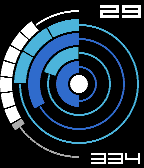
FacesCircular abstract watchface. Concentric circles tells time. Fills clockwise until halfway, then diminishes until empty. Outer ring displays hours. Each segment represents a hour. Empty ring12 AM (midnight), full ring 12 PM (noon). Second ring displays tens of minutes. Each segment represents ten minutes. Empty ring :00, full ring :30. Third ring displays ones of minutes. Each segment represents one minute. Empty ring :00, full ring :05. Fourth ring displays battery level. Full ring 100%, diminishes clockwise as battery depletes. Center displays Bluetooth connection. Filled circle means connected, unfilled means disconnected. Semi-circle to left displays steps. Upper portion represents 1,000s of steps, lower portion 100s of steps. Day of the month in upper-right corner, day of the year in lower-right corner. Full color customization (6 options). Image #1: 9:56 PM, 7,100 steps, 50% battery, connected Image #2: 9:59 PM, 7,100 steps, 50% battery, connected Image #3: 10:01 PM, 0 steps, 80% battery, disconnected
 41
41KaMet Arc
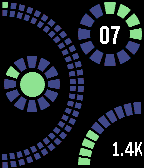
FacesTime is displayed on the left side of watchface. Big arc displays minutes, large segments equals 5 minutes. Minutes continue from top to bottom on outer arc for mintues 1 through 30 and bottom to top for minutes 31 through 59. Smaller circle indicates hour. Example: 9:33 Inner circle indicates bluetooth connection. Vibrates on connect/disconnect. Upper-right circle indicates date. Outer circle for month, inner digits for date. Example: 5 April Bottom-right arc indicates battery level. Example: 80%. Inside arc, step counter displayed per thousands of steps. Color scheme is now customizable via configuration screen.
 12
12KaMet Seven
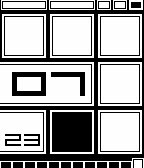
FacesSemi-abstract watchface. Hour displayed numerically in middle (24-hour format supported). Squares surrounding hour displays minutes. Big squares for every ten minutes, small squares for every one. Time displayed in screens: 7:48, 7:49, 7:50. Date displayed below hour. Battery indicator at top of screen. Full bar = fully charged. Each medium segment = 30%. Each block = 10%. 80% displayed in screens. Bars hollow out when charging (2nd screen). Month indicator at bottom of screen. Will hollow out on Bluetooth disconnect (except current month). Vibrates on Bluetooth connect/disconnect.
 4
4KaMet Arrow
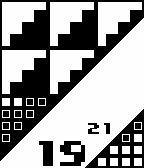
FacesHour is at bottom center of screen (supports 24-hour format). Minutes are read in upper-left corner. Each full triangle represents 10 minutes, each filled square 1 minute. Month date to the upper right of hour. Lower-right corner represents battery level. Black square in lower-left corner will display on Bluetooth disconnect. Vibrates on Bluetooth connect/disconnect.
 23
23KaMet Skull 2
FacesSkull face that displays time in teeth. Eyes randomly move around every minute. Hollow pupils on bluetooth disconnect. Supports 24-hour format.
 5
5KaMet Nines-H
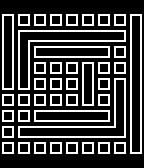
FacesInspired by the Neon IO X watchface. Nine-by-nine grid that fills in with the time. Reads from inside to out. Supports both 12-hour and 24-hour formats. Vibrates on Bluetooth disconnect/reconnect. Digits formatted similar to 7-segment display, with exception of 8 (two horizontal bars; see images 2 and 3). Image 1: 02:03 Image 2: 08:18 Image 3: 18:54
 2
2KaMet Nines
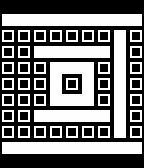
FacesInspired by the Neon IO X watchface. Nine-by-nine grid that fills in with the time. Reads from inside to out. Supports both 12-hour and 24-hour formats. Vibrates on Bluetooth disconnect/reconnect. Digits formatted similar to 7-segment display, with exception of 8 (two horizontal bars; see images 2 and 3). Image 1: 02:03 Image 2: 08:18 Image 3: 18:54
 14
14KaMet Skull
FacesLeft eye shows hour. Right eye + nose shows minutes (number of blocks in noses * 12 + right eye position; 5-block nose = 0). Shorten teeth shows month date (top row, ones; bottom row, fives). Eyebrows are battery indicator. First image: 10:57; 26th of month. Second image: 6:13; 8th of month.
 9
9KaMet Cross
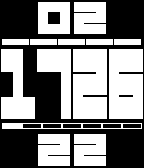
FacesTime displayed in middle, with month displayed at top and date at bottom. Battery indicator above time. Day of week indicator below time. Double-pulses at top of the hour. Vibrates on Bluetooth connection change (short pulse on connect; long pulse on disconnect). Battery indicator turns hollow when Bluetooth is not conected.
 32
32KaMet Square
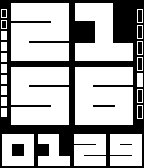
FacesTime in large font in middle of screen, with date (in MMDD format) on bottom. Battery indicator on the left. Day of week indicator on right (Sunday first). Vibrates at top of the hour.
 21
21KaMet Block
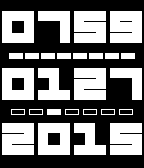
FacesDisplays time at the top, date in middle (MMDD format), year on bottom. Power indicator between time and date (each block represents 10%). Day of week indicator between date and year (starts with Sunday). Vibrates at top of the hour.