 26
26Return to by flwkt
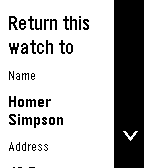
Tools & UtilitiesReturn to by flwkt Lost your Pebble? Make it easy to get back. Return to shows a clear “Return this watch to” screen with your name, address, phone, and email — so whoever finds it knows how to reach you. Set it once in settings and leave it on your app list. When it matters, the info is right there on the wrist. Fill in any combination of: - Name — Who the watch belongs to - Address — Where to return it - Phone — Number to call - Mail — Email address Empty fields are hidden so the screen stays clean. App list subtitle Choose which fields appear under the app name in the launcher (name, address, phone, and/or mail). Selected values are joined with “ / ” so you can spot your contact at a glance without opening the app. Recommendation Pin the app to the top of your app menu so anyone who finds your watch and opens the menu sees it right away: - Open the Pebble app on your phone - Go to Apps - Tap My Apps - Long-press Return to and move it to the very top Features Readable on Time 2, Round 2, Pebble 2, and Pebble 2 Duo — Layout adapts to rectangular and round screens (including B/W), with scroll hints on the action bar when there’s more to see. Configurable — Edit contact details and subtitle options from the phone settings page (Clay). Built for finding your way home — A simple ICE-style contact card for your Pebble, nothing more, nothing less.
 48
48Sidecar by flwkt
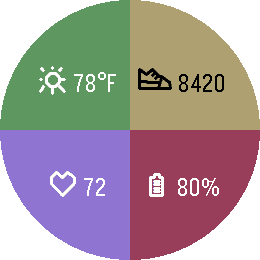
DailySidecar by flwkt Your watchface looks great — but it probably does not show everything you care about. Sidecar is a quick-launch companion watchapp that fills the gaps: a configurable grid of complications you can open in one press and dismiss just as fast. Love a minimal face with no clutter? Keep it. When you need steps, sleep, weather, or battery at a glance, Sidecar is there. Complications Assign any of these to up to six grid slots: - Current weather — Live temperature with a weather icon for current conditions - Weather forecast — High and low temperatures for today with a forecast icon - Steps — Today's step count - Distance — Distance walked or run today - Heart rate — Current heart rate in BPM - Battery — Watch battery level as a percentage - Date — Day of week and calendar date - Time (with seconds) — Current time including seconds; ticks every second only while shown - Sleep total — Total sleep duration for today - Deep sleep — Restful (deep) sleep duration for today - None — Leave a slot empty; only active slots are shown The grid layout adapts automatically based on how many slots you use, from a single full-screen cell up to a 2x3 grid. Features Built for Quick Launch — Assign Sidecar to a Quick Launch button on your Pebble Time 2 for instant access. Press Back, Up, or Down to exit and return to your watchface. Weather from your phone — Current conditions and today's forecast use your phone's location via Open-Meteo. Pick Celsius or Fahrenheit in settings. Health data — Steps, distance, heart rate, and sleep metrics read from Pebble health services when those complications are enabled. Make it yours — Set global background and foreground colors, or turn on per-cell colors for a bolder look. Pick a system font (Gothic, Roboto Condensed, Droid Serif, Bitham, and more) or leave it on Auto to scale with your grid size.
 110
110Retro Dot by flwkt
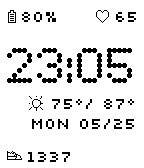
FacesBring a clean, nostalgic pixel aesthetic to your wrist! Retro Dot features a bold, stylized dot-matrix time display, giving you all your essential stats at a single glance. Features: Bold Dot-Matrix Time: Easy-to-read 24-hour pixel clock. Essential Stats: Live battery percentage, date, and heart rate tracking. Weather Info: Displays current and maximum temperatures with standard weather icons. Customization Options: Color Control: Change the background and foreground colors to match your style. Activity Toggle: Customize the activity text to show steps or distance.