 44
44Card Time
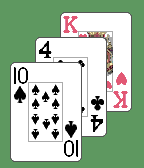
FacesYou don't have to be a card shark to enjoy playing cards. Now you can tell time with them too! Each minute, you'll get a 3 card deal: the first card is the hour, and the next two cards are the "tens" and "ones" digits of the minute. Ace reads as "1", King as "0", Jack as "11" and Queen as "12". Times for the screen shots are (left to right): 10:40, 2:37, 11:47, and 12:01.
 65
65Odometer
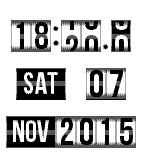
FacesGet your time through a rolling odometer-style watchface. From tenths of a minute through to the year, all fields "roll with the changes", just like an old style car odometer. Includes configuration of background color. PLEASE NOTE: By default, this watchface is continually in motion which will have an impact on your battery life. A number of settings on the configuration page allow you to significantly extend your battery life by restricting animation when you're sleeping, only when minutes change, or only when your Pebble is tapped.
 36
36Chord Magic
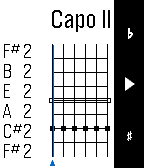
Tools & UtilitiesIf you want to master guitar chords, Chord Magic is for you. To input a chord, use the Up and Down buttons to change what's played on a string: open, muted, or a particular fret. Tap Select to move to the next string. For every position, Chord Magic tells you the chord name, the notes played, and the chord spelling, which helps you understand how the chord is constructed and how to change it. Chord Magic examines the actual notes to determine the chord, so it's not limited to the chords you find in books. In fact, it was designed to help play in alternative tunings. To change the tuning, press and hold the Select button to switch to tuning mode. There, you can adjust each string's pitch by using Up and Down, and use Select to move strings. You can set any tuning you want, and Chord Magic will confirm when it recognizes certain common tunings. The tuning feature can set a Capo as well by moving all strings up a fixed number of frets. Once your tuning is set, press and hold Select again to return to Chord Mode.
 167
167Nixie Watch
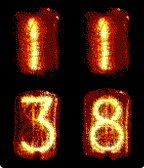
FacesThis watch face emulates a Nixie tube watch display. Nixie tubes are neon tube digit displays used before LEDs were invented. Show 'em that you're really an old school alpha-geek like the Woz! The display is dead simple: it shows the time (12 or 24 hour) in 4 big Nixie tube digits.