 9
9Pushup Reminder
A 100% Vibe Coding Project - built entirely with AI! 🤖

Get stronger every day right from your wrist! Pebble Pushups is your ultimate personal trainer for the Pebble Smartwatch. Whether you are stuck at a desk or working from home, this app ensures you stay active by gently reminding you to knock out a set of pushups at custom intervals.

Features:

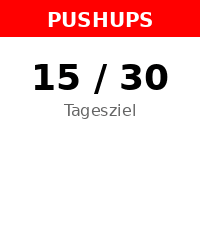
📈 Adaptive Daily Goals: The app intelligently learns from your performance! Crush your goals to trigger an 'Overload' day with a higher target, or get a 'Deload/Recovery' day if you need a break. You can always override the target manually!
⏰ Smart Reminders: Set your active time window and reminder intervals. The app uses the reliable Pebble Wakeup API so it doesn't drain your battery while waiting in the background.
⚡ Quick Log: Easily and reliably log your completed pushups with a few clicks. Your daily count is tracked seamlessly.
📊 Smartphone Dashboard: Dive into your workout history! Check out a beautiful 14-day performance chart right inside the Pebble app settings on your phone, and export your data as CSV.
🌐 Fully Offline & Bilingual: No cloud dependencies! The settings menu renders completely offline. Available in English and German.
Transform your daily routine and build healthy habits—one pushup at a time!
 8
8Cloudbreak
Cloudbreak — A little air. A little less chaos.

Your wrist has enough reminders to do things. Here’s one to take a breath.

Meet Cloudbreak: guided breathing with a happy little cloud and a whole lot of Pebble personality. Bold outlines, crisp colors, playful expressions and snappy slide-and-bounce transitions make taking a breather feel right at home on your watch.

Between meetings, before bed, or after opening your inbox against your better judgment, make a little room in your day to pause. Pick a rhythm, choose your time, and let your cloud handle the counting.

SMALL CLOUD. PLENTY OF FEATURES.

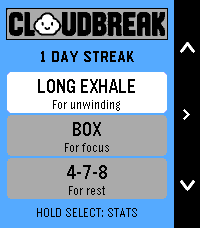
• Four breathing rhythms: Balanced, Long Exhale, Box and 4-7-8.
• Suggested session lengths, plus custom durations from 1 to 15 minutes.
• An animated cloud that grows, floats, holds and puffs along with your breath.
• Distinct vibration cues for inhale, hold and exhale, plus a session-complete celebration.
• A starting heart-rate check, live heart rate and time remaining.
• Session summaries with starting, ending and average heart rate, percentage change, duration and completed cycles.
• A post-session mood check-in with a cloud face to match.
• Saved daily streaks, personal bests and session totals.
• 36 rotating daily tips selected around your usage and time of day.

No leaderboard for breathing. No cloud judging your lung capacity. Just a small daily pause, with a very good face.

Cloudbreak. Give your day some breathing room.

Designed for Pebble Time 2. A valid heart-rate reading is required to start a session. Heart-rate changes are descriptive, not a relaxation score or medical assessment. Breathe comfortably; pause if a rhythm doesn’t feel right.
 52
52Tiny RPG Day
# Tiny RPG Day

*Your inner world, as an RPG character.*

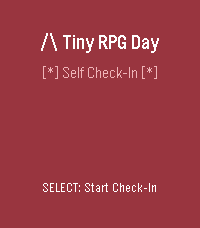
A self-awareness companion for Pebble smartwatches that transforms your current mental and emotional state into an RPG-style character—complete with class, narrative, and suggested quests.

## ✨ What Is It?

Tiny RPG Day isn't a game—it's a **tiny mirror**. Through quick check-ins throughout the day, it reflects your energy, mood, social battery, focus, and overwhelm as a playful character profile. Are you a **Fog-Walker** trudging through mental haze? An **Ember Knight** blazing with focus? A **Cozy Druid** in perfect balance?

Each check-in becomes a chapter in your daily story, tracking how your inner state evolves from dawn to dusk.

**Core Philosophy:** Supportive, not competitive. Clever, not childish. A companion, not a judge.

## 🎮 Features

- **Quick 5-step check-ins** — Rate your Energy, Mood, Social Battery, Focus, and Overwhelm
- **14 unique RPG classes** — Dynamically assigned based on your state
- **Narrative storytelling** — Each check-in is a "chapter" with time-of-day themes (Dawn, Journey, Return, Rest)
- **Transition tracking** — See how your state changed since your last check-in
- **60-day history** — Your story persists, viewable as a scrollable journal
- **Time-aware visuals** — Background colors shift with the time of day
- **Visual stat bars** — See your values as `[####--]` progress bars
- **Progress indicators** — Track your check-in flow with `[**---]`
- **Color support** — Beautiful colors on Basalt/Chalk/Emery, graceful B&W fallback on Aplite/Diorite
 110
110HalfLife - Smart Caffeine Tracker
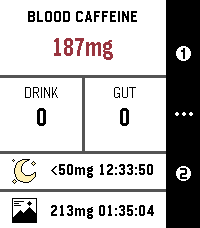
Track your caffeine like your body actually processes it. HalfLife is a real-time caffeine tracker for Pebble that simulates how caffeine is absorbed, peaks, and wears off — so you can stay energized, avoid crashes, and sleep better. Note: This is a mathematical model, not medical advice. > Why It’s Different Most apps just estimate. HalfLife simulates using a pharmacokinetic model, it tracks your caffeine levels continuously — so you always know where you stand, not just what you drank. > What You Get - Real-time caffeine levels: updates every second — no static estimates. - Peak prediction: see when your caffeine will hit hardest — and how strong it’ll be. - Smart sleep guidance: know when your levels are low enough for quality sleep. - 6 Custom drink presets: save your go-to coffee, tea, or energy drinks. - Flexible drinking durations: 3 presets of 5 to 120 minutes - Preferred caffeine range: Stay in your ideal focus zone at a glance. - Free-form logging: enter any caffeine amount anytime. > Built Around You Everyone processes caffeine differently. HalfLife lets you adjust: - Caffeine half-life (how fast it leaves your body) - Absorption speed (how fast it gets absorbed into your bloodstream) - Your personal sleep threshold - Your preferred caffeine range (color display watches only) - Or just use the built-in defaults and go. > Real-World Uses - Time your morning coffee for peak focus - Avoid the afternoon crash - Don’t ruin your sleep with late caffeine - Plan pre-workout energy boosts - Understand how multiple drinks stack over time > Private & Efficient - 100% on-device – your data never leaves your watch - No background drain – zero battery impact when closed - Open source – transparent and customizable > Coming Soon The core model is solid, but I still have some exciting plans for the future: - Redesigned UI: A visual "glow-up" is the top priority, including support for round Pebble watches. (Already making minor progress, but I'm a bioinformatician, not a designer — so bear with me.). - Edit active drinks: In case you set the wrong amount or duration, this feature will allow you to edit and delete your current drinks. - Shake For Help: Shake the watch on any screen of the app for a guide on the controls and meaning of values. (With an option to disable this if you already know what's what). - On-watch configuration: Configure most settings without needing to grab your phone. - “Preview before you drink” feature: See how a drink will affect your levels before you log it. - Drink planning: Plan you day's caffeine for workouts, productivity or to regulate your levels in advance. Get notifications for the drinks you scheduled when viewing the caffeine graph across 12-72 hours. - Closed-Loop Model: When the new Pebble hardware arrives, the plan is to use advanced heart rate (specifically HRV) data to create a self-tuning model that adapts to your body's unique response. This allows for a broad array of additional features. Note: Values in screenshots have been tampered with to show off the features. Have a feature idea or found a bug? The code is open and contributions are always welcome! (Also some extra details on the model coming soon for the science nerds) https://github.com/FPuzeras/HalfLife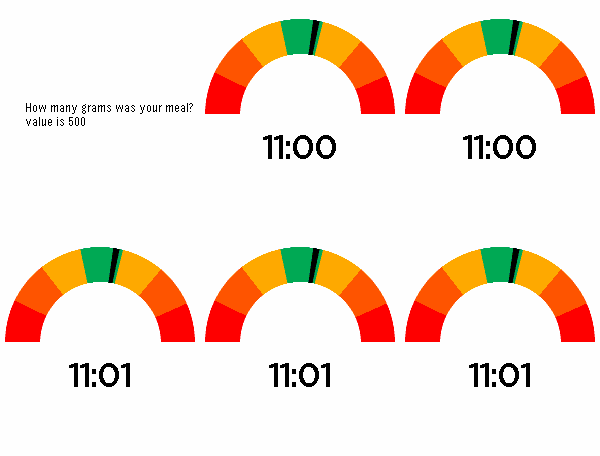 7
7Hunger Meter Watchapp
The companion app for Hunger Meter.

Get the watchface here: https://apps.repebble.com/26a55413a167438dbd6fda03
 8
8Touch Grass
Hello BornHack 2026

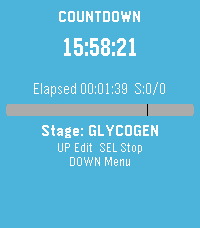
This app allows you to touch grass - everywhere!

Features:
 • Touch (the) Grass
 • Sun follows time of day-ish
 21
21FastForge
Track intermittent fasting from your wrist. Start and monitor fasts with a clear timer, use quick presets for common schedules, and review history and streak-friendly stats when you need context. Adjust settings to match how you fast, and export a backup when you want your data elsewhere. Built for Pebble so glances stay fast and the phone stays in your pocket.
 7
7Stamina
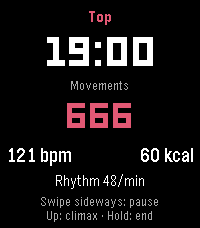
Stamina is a private wellness tracker for your intimate life, solo or with a partner. It measures rhythm, heart rate and estimated calories, and shows how a session affects your sleep and the start of your day.

All data stays on your watch. No account, no cloud. Only if you turn on timeline pins, their short text is sent.

TRACK
• Motion detection counts movements and shows your rhythm per minute
• Heart rate every second: average, min, max
• Calorie estimate from movement and heart rate
• Mark the peak moment with a button press or swipe

UNDERSTAND
• Sleep afterwards: time to fall asleep, duration, deep sleep, compared with your normal nights
• Start of the day: steps, activity and heart rate in the 4 hours after a morning session, plus a short mood check-in
• Charts per day, week and month, solo and partner
• 59 achievements for milestones, records and streaks

PARTNER MODE
• Teach the watch your own positions (name them by voice), with live detection and time share per position
• Optional partner initials

SMART AND DISCREET
• Auto start with optional time window
• Calibration adapts detection to you
• Display light options, touch controls on Pebble Time 2
• Optional timeline pins (sent via the Rebble timeline server)
• Neutral wording on the watch, 19 languages

TIP: Wear the watch on the hand that does the movement. Detection works best there.

This is a beta (0.6). Intended for adults. Values are estimates, not medical advice.

Vibe coded from start to store. That is the only reason it exists alongside a full time job.

Support development: buymeacoffee.com/SIDEffects
 21
21Baby Companion
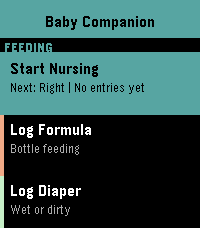
The complete baby tracking suite for your Pebble watch. Everything a new parent needs, right on their wrist.

Feeding
-Nursing tracker with left/right side, duration timer, and automatic next-side suggestion
-Formula tracker with adjustable oz and a bottle fill indicator — age-based volume suggestions from your baby's birth date
-Feed reminders via wakeup alarm (7 intervals from 1h to 4h)

Health & Diapers
-Diaper tracker (wet or dirty) with a 24-hour warning if diaper count drops below healthy levels
-Medication tracker for Tylenol and Motrin with dose logging

Sleep
-Sleep tracker with automatic nap vs. night tagging based on time of day

Medical Timers
-Colic timer to track crying episodes
-Contraction timer with automatic 5-1-1 and 4-1-1 rule detection — alerts you when it's time to call your doctor

Milestones
-Log 15 developmental milestones with timestamps — Social Smile, First Laugh, First Steps, and more

History & Settings
-Full activity history with timestamps
-3 color themes: Neutral, Boy, Girl
-Baby name and birth date settings
-Fully supports both Time 2 (rectangular) and Round 2 (circular) displays
 12
12FitoTrack Display
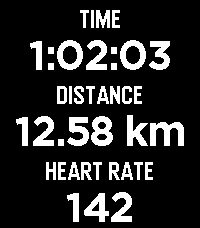
FitoTrack Display shows the most important numbers of your current FitoTrack workout on your Pebble (Android only).

Pebble support is available in FitoTrack since version 16.1.

(Related pull request: https://codeberg.org/jannis/FitoTrack/pulls/669)
 1
1Volleyball Score Keeper
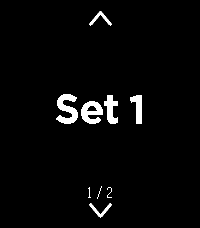
Volleyball Scorer turns your Pebble into a glanceable, sunlight-readable scoreboard. Hold the top button to add a point for US and the bottom button for THEM, and the watch buzzes the moment a set is won at 25 by two. Tapped the wrong team? Press the middle button to arm removal, then press a team to take a point back. Your score saves automatically, so you can close the app mid-match and reopen exactly where you left off, with each team's button sitting right next to its score.
 2
2GymBuddy
GymBuddy ======== GymBuddy is a watchapp for Pebble Time 2 (Emery) that replaces paper notes and your phone at the gym. Build your training plans comfortably on your phone — machine settings, sets, reps, weight and rest time per exercise — and have them available on your wrist in large, glanceable text during your workout. SESSION LIST ------------ On launch, the watch shows all saved training sessions (up to 10). Up/Down or swiping up/down selects a session (loops at the ends). Select loads the chosen session. If the session is already cached on the watch and the phone is currently connected, the watch asks: load from the watch (instant, no phone needed) or sync fresh from the phone? With no connection, the watch automatically falls back to the last cached data — so your exercise list stays usable even when your phone isn't nearby. EXERCISE VIEW ------------- Two views per exercise, switch with a left/right swipe: • View 1 — exercise name, machine number, weight • View 2 — seat position, pad position, angle, sets, reps, rest time All values in large text with icons instead of text labels — deliberately designed for maximum readability at a distance. Up/Down or swiping moves to the next/ previous exercise (loops back to the start at the end of the list). A long press on Select highlights the currently shown exercise in green — handy for keeping track of what you've already done during your workout. REST TIMER ---------- Select starts the rest timer for the current exercise, shown as large, classic LCD-style digits. When it reaches zero, the watch vibrates twice and jumps back to the exercise. Pressing Select during the countdown cancels it immediately. CONFIGURATION (via the phone app) ----------------------------------- A custom-built configuration page instead of Clay, since training plans need dynamic lists: • Create, edit, delete and duplicate sessions and exercises • Reorder exercises by dragging (☰) • Rename a session directly from its exercise list • JSON import/export (e.g. to load a complete training plan in one go) • Switchable language: German or English (applies to both the watch and the configuration page) NOTE ---- Touch-swipe and the four hardware buttons both work at the same time — whichever is more convenient in the moment. Pebble Time 2 (Emery) only, uses the touch screen, RGB backlight and vibration motor. APP PICTURES ----------- https://imgur.com/a/38bk1Cv Vibecoded with Claude · Pebble Time 2 (Emery) only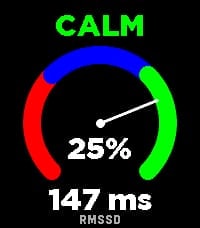 16
16DontPanic
DontPanic measures your Heart Rate Variability (HRV) right on your wrist to help you monitor your physical stress and autonomic nervous system balance.

The app evaluates RMSSD (Root Mean Square of Successive Differences) - the gold standard time-domain metric for measuring parasympathetic activity and physical recovery.

How to Measure:
1. Tighten your Pebble watchband comfortably above your wrist bone.
2. Lay down, relax, and keep your hand calm and still for 2 minutes.
3. A synchronized breathing visual and countdown guide you through the session.
4. You will feel a gentle vibration when the measurement is complete.

Features:

Dynamic Stress Gauge: Visualizes your stress percentage and status (CALM, NORMAL, or STRESS) across an analog arc gauge.

Direct RMSSD Value: Accurate millisecond readout of your HRV.

Personalized Calibration: Calibrates to your individual physiology over the first 7 days, continuously refining your baseline over time.

History Trend Graph: Flip through with Up/Down buttons to track your latest 16 measurements and observe long-term trends.

On-Wrist Guide: Press the middle (Select) button anytime to view tips for the most accurate readings.

Screen & Backlight Control: Keeps the display legible throughout the measurement without turning off.

Tip: For consistent results, take your measurement every day around the same time and in the same position (e.g., right after waking up).

Want to track how your body recovers overnight based on HRV? Connect with Sleep as Android!
 6
6Tennis Umpire
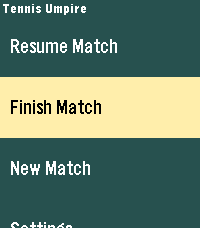
Focus on the match, not the math. The simplest way to keep track of your tennis score right from your wrist.

* Quick and intuitive score logging
* Tracks points, games, and sets
* Minimalist interface designed for quick glances
* No phone connection required during the match
 3
3chocoZAP_QR
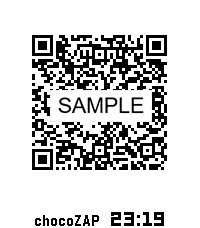
chocoZAP 入退QRコード表示アプリ

chocoZAPの入退館をよりスムーズにするためのPebble専用アプリです。
入館・退館のたびにスマートフォンを探したり、アプリを起動したりする手間を省き、手首のスマートウォッチだけで完結させることができます。

【主な特徴】
簡単操作 : アプリを起動したら、QRコードを瞬時に表示します。
自動更新 : QRコードの有効期限(30分間)が切れる前に、自動的にQRコードを更新します。
安心のセキュリティ設計: 重要な「Email」や「パスワード」を入力せずに、リフレッシュトークン(Refresh Token)のみでもQRコードを表示可能です。

【重要・注意事項】
本アプリは非公式アプリです : chocoZAP公式が提供しているアプリではありません。
スマートフォンの携行をお願いします : Pebbleだけを持って入館された場合、退館時にQRコードが失効し、ドアが開かなくなるリスクがあります。安全のため、必ずスマートフォンも一緒にご持参ください。

【制限事項】
以下のようなスマートフォンとPebble間のBluetooth通信機能が制限されている状態では、仕様上、QRコードの更新ができません。
・スマートフォン側のPebble Coreアプリが動作していない状態
・PebbleがStand-By Modeの状態

※ 「chocoZAP」はRIZAPグループ株式会社の登録商標です。
※ 「QRコード」は株式会社デンソーウェーブの登録商標です。