 78
78Galaxy Gunner
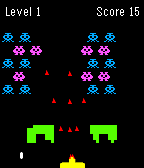
Galaxy Gunner is a space shooter game. Tilt left and right to move the auto-shooting gunner. The galaxy monsters will shoot bullets and gradually move down. Your goal is to destroy all of them before they reach you to move onto the next more difficult level. Shooting the red monster will give you a powerup.
 78
78Tic Tac Toe
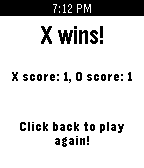
A local two player tic tac toe game for your pebble. Burn time by passing your watch and enjoying this classic game!
 77
77Yes-No-Button
Have kids? Do they love Bluey, or ask A LOT of "trifficult" questions?

NO WORRIES!

BEHOLD, THE YES NO BUTTON (For Real Life)!!!

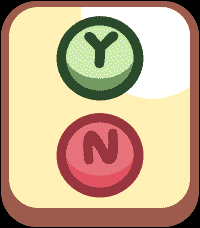
Answer your kids in style, or Co-Workers (it works on them too!), and save your time and energy for other things like using your Pebble Time 2 as a Calculator for all that adulty business stuff. Just tap the Yes or No button for the response you need and enjoy your time in your relaxy chair while you sip your drink from a coconut.

Use the side Top and Bottom buttons to control the volume, some situations require more volume... I mean we can't all be like the Magic Claw who has no kids who's days are free and easy (remember those days? Sigh).

This is way more funner than a touch enabled Calculator on your wrist, I mean that's a no brainer unless you're a Freak! (jk jk jk jk)
 77
77Block Breaker
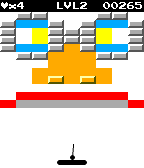
It all started when Steve Wozniak created Breakout, a single player version of Pong. Since then many games have been created with the same style (Arkanoid, Brick Breaker, etc.). Block Breaker brings all of the excitement and skill of the classic Breakout arcade game to the Pebble smartwatch.

Use the paddle to bounce the ball and break the bricks.
Collect power-ups and finish levels to collect points.
Compare high scores with your friends.

Available for the original Pebble and in glorious technicolour for the Pebble Time!

Hours of mindless fun!
Set high scores!
New levels are being created all the time!
 76
76Pebble Worms
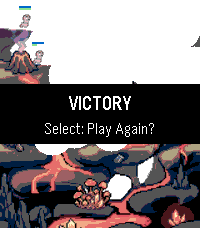
A rough but fun homage to the classic PC game Worms.

Move your minion with the up and down buttons, then bring up your bazooka with select. Aim with up and down, then hold select to fire (at different weights). Three random levels to play (for now).

Expect bugs (but Worms like bugs, right?). Have fun!
 75
75Doctor Badura Trailer
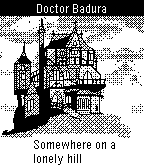
Trailer for Doctor Badura - a wrist adventure
 75
75BaDumTss
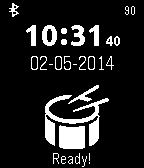
Just made an awesome joke?
Finish it with a BadUmTss sound!

Or that friend of you is whipped?
Let him know with the sound of whip!

Or swing around your lightsaber!

Switch the sounds with the up/down buttons.

Sounds are downloaded from the internet so you need an internet connection!
NOTE: Apple blocks playing of sounds so this does not work on iOS...
 75
75Tiny Life
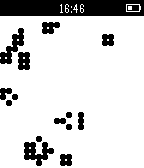
Tiny Life is an implementation of the zero-player classic Conway's Game of Life for the Pebble smartwatch. Choose from multiple cell sizes and generation speeds. Get your daily cellular automata fix watching a tiny grid stabilize or lean back and watch a single pixel ecosystem resolve for minutes on end.
 74
74Tiny Pilot
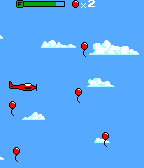
Tiny Pilot is a game where you fly a tiny plane and collect as many balloons as you can before you run out of fuel!

This is powered by the Pebble GBC Graphics engine, a library that allows you to render Game Boy Color graphics on your Pebble! Check out the Source Code URL for an in-depth tutorial!
 74
74WatchCraft
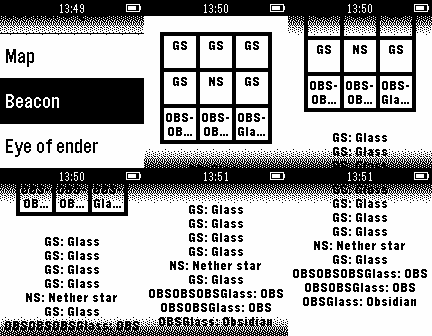
Get Minecraft crafting recipes on your watch! The menus make it simple to find recipes. The key makes it easy to understand the recipes. This is still buggy and not as pretty as it could be. If you're interested in helping, email us at [email protected]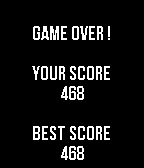 73
73Threes for Pebble
A port of the famous Threes game on the Pebble.

Features :
- Uses all four buttons (BACK for left, SELECT for right, UP for up, DOWN for down, long press SELECT to exit the app).
- The colored square in the bottom right indicates what the next kind of tile that will spawn is.
- Saves the progress when you exit and resumes any save when you launch the app again.
- Keeps track of your best score.

Don't hesitate to make any suggestion or criticism !

(Note : Do not use a long press on the back button to close the app, it will simply kill the app and won't save your progress. Instead, use the long press on the select button, this way your progress is saved and resumed when you start the app again.)
 73
73Neko
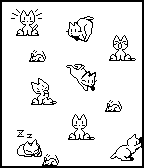
Neko, that lovable rascal, is back, and this time, she's on your wrist! Tilt the watch to move the mouse and Neko will chase after it. When she catches it, she gets bored and falls asleep. If the mouse moves, Neko will wake up to chase it, again!
 73
73PebbLoop
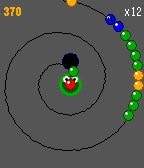
Ever wished being able to play Zuma or Puzz Loop on your color-screened Pebble? Now you can! Survive as long as you can in this addictive & fast-paced ball-shooting game! Shoot balls of the same color to eliminate them & collect precious points to beat your previous high score. But remember, aim carefully; every missed target will push you closer to defeat!

How to play? It’s so simple, fun & intuitive:
- UP: rotate shooter counterclockwise
- DOWN: rotate shooter clockwise
- CENTER: shoot current ball
- BACK ONCE: pause
- BACK TWICE: exit
- WRIST FLICK: swap current & next ball in the shooter

PebbLoop is fully Open Source; so you can fork it, mod it & make it even more fun! Touchscreen, Speaker & Round Screen support are planned for a later date. Claude was used, but the code was reviewed & debugged manually.

If you like PebbLoop, don’t forget to drop a heart & help me win on the Spring 2026 Pebble App Contest🙏
 73
73Rock Crusher
Rock Crusher is a match-three game for Pebble where you swap neighbouring rocks to get at least three of the same type in a row. The game ends when you have used all your lives and there are no valid moves left on the board.

CONTROLS
  * Move the cursor with the RIGHT and DOWN buttons, or TILT your wrist.
  * Enter SWAP mode by pressing the UP button.
  * In SWAP mode, choose the direction to swap with the UP, DOWN, LEFT or RIGHT button, or TILT your wrist.
  * When not in SWAP mode, press the LEFT button to save and exit.
  * You can also SWIPE to swap rocks on TOUCH SCREEN watches, though do note that the touch targets are very small.

SPECIALS
  * Match four rocks in a row to make a Pearl, which can match any colour of rock.
  * Match a rock in two directions to make Black Powder - careful, it's explosive.
  * Match five rocks in a row to blast that rock type.
 72
72Pebble Points
Pebble Points
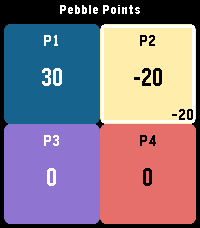
Pebble Points is a fast, button-first scorekeeping app for Pebble smartwatches. It is designed for in-the-moment tabletop, card, party, and casual competitive games where you need quick score changes without leaving gameplay.

What Pebble Points Does
Pebble Points lets you:

Track scores for 2 to 4 players with Customize player count and player names from phone settings
Switch the active player instantly
Increment or decrement scores with one click
Use negative scores when your game rules allow it
Keep up to 3 saved games and continue later
Replay a saved game using checkpoint playback
Toggle haptic feedback from phone settings
Set score step from watch settings (1, 5, or 10 points per click)
Reset only the active player to 0 with a long Select press

Core Features (Detailed)
1) Flexible Player Support
Supports 2, 3, or 4 players.

Layout adapts automatically:
2 players: vertical split
3 players: top full-width + two bottom panels
4 players: 2x2 grid
Active player is visually highlighted.

2) Fast, One-Handed Scoring
Up: add points to active player
Down: subtract points from active player
Select: rotate to next player
Long Select (~700ms): reset active player score to 0

3) Count-By Methods (Scoring Step)
Pebble Points supports multiple “count by” methods via score step:

Count by 1: +1 / -1
Count by 5: +5 / -5
Count by 10: +10 / -10
Set this from the app’s on-watch Settings menu.

4) Save and Continue Sessions
Keeps the 3 most recent games.
Stores creation and last-played timestamps.
Promotes a continued game to the newest slot automatically.
Preserves player names, scores, active player, and settings-backed behavior.

5) Phone Settings (Clay)
From companion settings you can configure:

Player count (2/3/4)
Player names (up to 15 chars each)
Haptic feedback on/off

6) Responsive Visual/Haptic Feedback
Haptic pulses for key scoring and selection actions (when enabled).
Score-delta indicator for recent change context.
Built-in animation scaffolding for pop/slash/confetti style effects.
How Pebble Points Differs from Typical Pebble Score Apps
Pebble Points focuses on speed + persistence + replay context rather than only raw counters:

Session-centric design instead of a single volatile scoreboard

You can keep multiple recent games and return later.
Replay-aware storage

Each saved game has a checkpoint track for playback.
Immediate replay-to-live handoff

You can watch a replay, then continue directly into live scoring.
Watch-first interaction model

Most core flow (new game, continue, step changes, scoring) works directly on watch.
Practical count-by control

Native score-step selection (1/5/10) enables faster game-specific scoring patterns.
Replay Feature: Big Overview
Replay in Pebble Points is a checkpoint replay system, not a full event-by-event log.

Replay Flow
Open Continue Game.
Pick a saved game.
Choose Replay (when checkpoints exist).
Watch checkpoint playback.
At end, press Select to continue directly into live game.

What Replay Can Do
Reconstruct score snapshots over time for a saved game.
Show progression of scores and active player across checkpoints.
Play checkpoints automatically on a timer (~300ms step).
Skip to replay end with Select while playback is running.
Restart replay after completion with Up.
Continue directly from replay end into active gameplay.

What Replay Cannot Do (Current Limits)
It is not a full tap-by-tap action history.
It does not store unlimited history (bounded checkpoint ring).
It does not allow editing while in replay mode (read-only replay view).
It does not branch/fork from arbitrary mid-replay checkpoints.
Replay availability depends on checkpoint data existing for that save.

Replay Data Model (Practical Constraints)
Up to 8 checkpoints per saved game.
Checkpoints are recorded from key moments (start, player switch, interval-based taps, larger deltas).
Data is bounded to stay lightweight on Pebble hardware.