 56
56Keystone
Keystone turns your Pebble into a fully button-driven hub. It looks like a watchface, but every button is yours.

Short press opens custom menus or widgets. Long press fires a Home Assistant webhook. Select cycles through info panels. All four buttons, all yours.

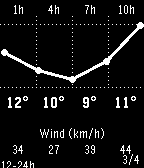
Includes a 48h weather forecast, 5-day daily view, stock tracker with sparkline charts, and built-in stopwatch, timer, and alarm that keep running in the background.

Everything is configured from a web page on your phone: button assignments, custom menus, webhook URLs, widgets, weather provider, and more.

Compatible with Pebble, Pebble Steel, Pebble Time, Pebble Time Steel, and Pebble 2. Strictly black and white by design.
 18
18hb MabelAI
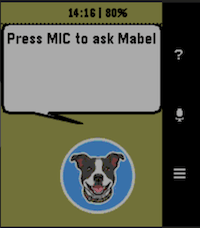
Your AI powered assistant on a Pebble Smartwatch. Speak questions to Mabel and she will fetch your answer from one of 3 configurable AI partners. Features: - Voice-to-text input using Pebble's built-in dictation (requires mic: Pebble Time, Time Round, Time Steel, 2/2HR) - Choice of AI provider: Claude, Gemini, or ChatGPT (API keys from each are required) - In-app settings UI for API keys, model, max tokens, and memory depth - Usage statistics per AI provider with reset option - Reminders, timers, and alarms set via AI and pinned to the Pebble timeline - Current weather conditions and 1-hour forecast (no API key required) - Token usage tracking per provider - Supports all Pebble platforms: basalt, chalk, diorite, emery, flint Note: A Rebble subscription is required for dictation. See https://help.rebble.io/subscription/ Issues, suggestions, etc, email: [email protected]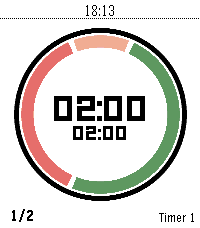 57
57Timer Core
"Your time. Your rules."

Timer Core is the personal interval timer for Pebble: clear at a glance, flexible enough for any routine, and always ready on your wrist.

A personal interval timer with four flexible segments, custom routines, and clear progress on every Pebble screen.

Build your rhythm with Timer Core, a flexible interval timer made for Pebble.

Create the routine that fits your day—from HIIT and Tabata workouts to Pomodoro focus, cooking, recovery, and everyday reminders. Configure up to four segments, choose when each one runs, set your rounds, and follow your progress through a clear circular display.

Timer Core keeps everything close to your wrist. Start, pause, reset, select, and edit timers directly on the watch. Segment transitions are announced with vibrations, while persistent settings keep your routines ready for the next session.

Highlights:

- Up to 20 named timer profiles
- Up to four configurable segments per timer
- Interval, round, and stopwatch modes
- Custom colors and backgrounds
- Per-segment control for first, repeated, and final rounds
- Vibration alerts at every transition
- Optional Pebble Health and activity information
- Optimized for round, rectangular, color, and monochrome displays

Whether you are training, focusing, cooking, or taking a break, Timer Core helps you stay in rhythm without reaching for your phone.

Made from "series timer" for core devices
 28
28Multi Weather
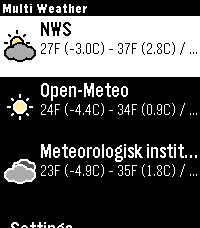
Multi Weather is a Pebble smartwatch app that lets you view weather information from multiple weather providers in one place. Quickly check current conditions, daily high and low temperatures, and detailed forecasts right from your wrist.

Unlike single-source weather apps, Multi Weather allows you to enable multiple providers and switch between them to compare data. You can reorder providers, disable ones you do not want, and customize what information is shown in the main menu.

Features:

* Support for multiple weather providers
* Enable or disable providers individually
* Reorder providers in the main menu
* Automatic GPS-based location
* Current temperature and conditions
* Daily high and low temperatures
* Automatic background refresh
* Customizable “Quick Glance” text using templates
* Menu theme that adapts to sunrise and sunset, or can be forced to light or dark

Available Weather Providers:

Free:

* National Weather Service (NWS) – USA only
* Open-Meteo
* MET Norway (Meteorologisk institutt)

Paid:

* OpenWeatherMap
  Requires an API key and a One Call API 3.0 subscription (free tier available, billing info required)

Controls are designed specifically for Pebble:

* Select a provider to view detailed weather information
* Long-press a provider to force a refresh
* Scroll down to access in-app settings
* Use buttons to switch between providers and view hourly breakdowns in graphs and lists

Settings can be configured directly on the watch or through the Pebble mobile app, including temperature units, speed units, provider order, quick glance content, custom templates, and API keys.

Multi Weather is fully open-source and designed to give Pebble users flexibility, transparency, and choice when it comes to weather data.
 30
30Out
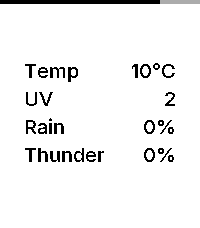
Out is an open source, minimalist weather dashboard for Pebble, giving you exactly what you need before you step out the door.

Features:

– Current Temperature: Displays real-time temperature in Celsius or Fahrenheit, matching your watch’s 24h/12h time format.
– 3-Hour Window: Shows the highest predicted risk of rain, thunder, and UV exposure for the next three hours.
– Inter Typography: Uses the Inter typeface for a modern, refined look.
– Zero Configuration: Automatically uses your phone’s geolocation. No settings or setup required.
– Battery Awareness: A subtle indicator along the edge of the screen shows your remaining charge.

Data Source:

Weather data is provided by MET Norway (The Norwegian Meteorological Institute). It provides high-quality, global forecasts used by services like Yr.
 9
9Energy Tariffs
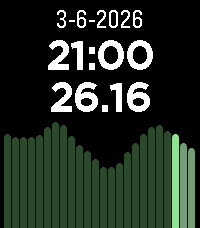
Displays dynamic energy tariffs on the Pebble watch. Currently, only Dutch tariffs are supported (like Zonneplan and Tibber) and only in hourly rates (I think the quarterly rates are only useful for usage in automations).
The tariffs are obtained from the website public.api.energyzero.nl. You can configure the "inkoopvergoeding" and inclusion of VAT and energy taxes, if you want to include any of them is the displayed tariffs.
 22
22FlashRead News
FlashRead News brings RSS feeds to your Pebble using RSVP (Rapid Serial Visual Presentation), a proven speed-reading technique that displays words one at a time, centered on the optimal recognition point.

Features:

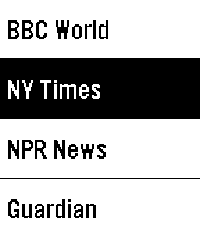
6 pre-configured news sources (BBC, NY Times, NPR, Guardian, Le Monde, Reuters)
Add unlimited custom RSS feeds via phone configuration
Adjustable reading speed from 100 to 600 WPM
Read headlines, then dive into full article descriptions
Optional backlight during reading
Navigate between articles with physical buttons
Perfect for the small Pebble screen. Free and open source.
 31
31Baby Watch app reborn
A revival of the Pebby (Baby watch) app - Baby tracking for Pebble smartwatches.

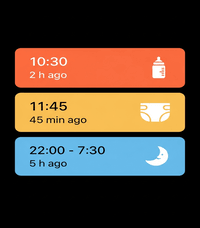
Track bottle feedings, diaper changes, and sleep sessions right from your wrist!
Each event will also be logged on your timeline for later consultation.
Colors have been added to the app to mirror the coloring option from the Huckleberry app.

The original Baby watch app has been my MVP app on my pebble for the past 3 months since becoming a parent.
I decided to add my twist on it as well.
 7
7Sports Simplified
A simple Pebble watchapp that pushes NHL game timeline pins for the Vancouver Canucks and Montreal Canadiens.
 34
34Instant Gram
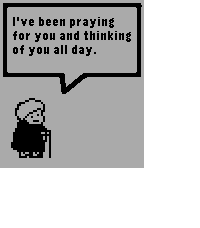
Instant Gram provides you with a small dose of heartwarming encouragement every time you open it!
 34
34mcbroken
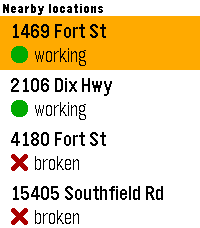
A mcbroken client for Pebble smartwatches. Now you can check if the ice cream machine is down on your wrist!

Nearby shows up to 5 McDonald's locations within a 5-mile (8.04 km) radius from your current location, sorted from closest to farthest, and Saved shows all of your saved locations (duh) that you've added in the app settings. You can save up to 5 locations.
 11
11Flipcards
Flashcards front-end to access Flipcards server.
 202
202Claude
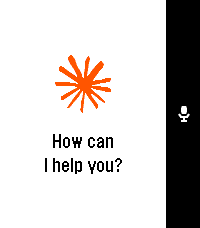
Talk to Claude AI directly from your Pebble smartwatch.

Use your watch's built-in dictation to ask questions and get streaming responses from Claude. Good for quick queries when your phone isn't handy, or when you just want to use your Pebble for something it was never meant to do.

What it does:
- Voice input using Pebble's dictation
- Your conversation stays in memory during the session
- Built-in web search tool support
- Remote MCPs
- Configure system prompts to change how Claude responds
- Advanced users can point it at custom API endpoints

You'll need a Claude API key from Anthropic. Configure it once in the app settings using your Pebble app.

This app is an independent third-party client and is not affiliated with, endorsed by, or officially connected to Anthropic. Claude is a trademark of Anthropic. You use this app with your own Anthropic API key and are responsible for any associated costs and usage.
 10
10Commuter
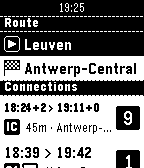
Quickly check SNCB/NMBS (Belgian Railways) train schedules from your wrist. Save favourite stations from your phone to quickly plot routes on your watch. Create "scheduled routes" to immediately see relevant trains whenever you open the app.

Not affiliated with SNCB/NMBS, powered by iRail. Made by Werknaam in Leuven
 16
16Weather Text US
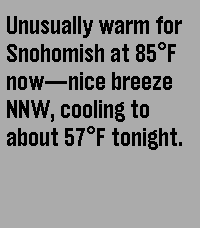
Weather Text is a Pebble watch app that uses AI-generated natural language to describe current weather conditions from the NOAA* directly on your wrist, delivering simple, readable forecasts without icons or clutter.

*United States only