 1
1Entur Departures
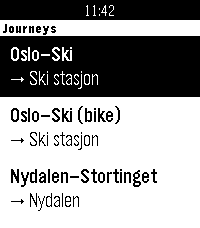
Glance at your wrist, see your next train, and see which way it's going. Entur Departures shows live public transport departures for up to four journeys you set up on your phone, such as Oslo S – Ski. You don't choose a direction: the app checks which end of the journey you're nearer and shows departures from there. Near Oslo S you get trains to Ski, and near Ski you get trains back. Each departure shows: • The realtime departure time and a countdown in minutes • The line (R21, RE20, bus 31, ...) • The boarding track and the arrival track ("Spor 12 > 1"), so you can choose between two trains leaving at nearly the same time Per-journey options: • Big text: the countdown is huge and the track is bold, so you can read it at a glance while walking or cycling • Bike-friendly trains: a bike symbol on departures with step-free doors and room for a bike. You choose which lines or train numbers count, and it defaults to the Type 75 lines on Oslo – Ski. Works for trains, metro, trams, buses and ferries anywhere in Norway. In settings, type a stop name like "Nydalen" or "Bergen stasjon", or paste an NSR:StopPlace id. Boards are fetched in the background as soon as the app opens, so they're usually ready before you pick a journey. Privacy: your location is only used on your phone to decide the direction. It's never sent anywhere. Entur only receives the stops you set up. Unofficial app, not made or endorsed by Entur. Departure data comes from Entur's open APIs (NLOD licence). Built for Pebble Time 2.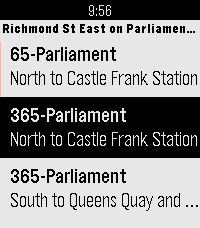 16
16TransSee Transit Time
Real-time transit arrival predictions for more than 200 transit agencies across Canada, US and around the world. See www.transsee.ca for the complete list.

Currently requires TransSee Premium which costs from CAN$2 for one week to CAN$40 for one year. You must enter your Tidbyt/TronByt Premium Id from your premium email in the settings to activate it.

Launching the app will show the stops within 500m. Select a stop for predictions for the next three vehicles. TransSee generates a prediction range based on past travel time for most agencies. Press down to see different branches and alert messages.

From the TransSee website settings you can check off “Show link to ‘Send to Watch’”, then you can select a stop from the website and it will appear first on the stop list on your watch no matter how far away it is.

Based on Toronto Transit Time by Chester.
 9
9Confuzzled 2026 Schedule
Unofficial Pebble app for the Confuzzled 2026 schedule

Shows currently happening events with locations
Pin events to your timeline that you don't want to miss
Should work offline so spotty Hilton Wi-Fi won't break the app
 0
0KasugaBus
Local buses for Minami-kasugaoka, Ibaraki, Osaka, Japan.

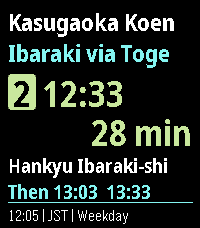
KasugaBus shows the next scheduled Kintetsu and Hankyu buses at eight stops around Minami-kasugaoka: Kasugaoka Koen, Toge, Midorigaoka, Handai Higashiguchi, Handai Igakubu Byoin-mae, Handai Igakubu-mae, Nihon Teien-mae and Handai Honbu-mae. The home screen shows your stop, direction, route, departure time, countdown and the next buses.

- Works offline; timetables update through your phone without reinstalling.
- Favourites, Nearby (approximate distance from your phone's location), departure board and full trip details.
- Leave-now reminders and a daily commute alarm.
- Configurable Up/Down buttons, three text sizes and four themes.
- Times follow the weekday, Saturday and Sunday/holiday timetables in Japan time.

Times are scheduled, not live arrivals. Coverage is local, not all of Osaka.
 1
1Super Eki
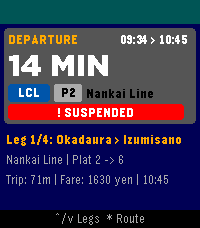
A Pebble Time 2 transit assistant that provides real-time and scheduled train departures, countdowns, and service alerts from Ekispert.
 5
5Tarot
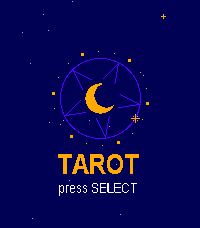
puts a full 78-card Rider-Waite deck on your wrist and lets the stars do the talking. Choose your reading: a Daily Card that stays yours all day, a quick Yes or No, Past, Present and Future, Mind, Body and Spirit, Love, Decision, or the five-card Cross. Or let the deck surprise you. Then focus on your question, cut the deck at the moment that feels right, and watch the cards flip over in a burst of sparkles while your watch gives a small pulse. Reversed cards spin upside down, and every card comes with its own message, typed out under a sky of twinkling stars. At the end you get a summary of the whole reading. It's beautifully illustrated in full colour on Pebble Time and crisp black and white on Classic.
 3
3Stocky
Stocky — track your investment portfolios right from your wrist.

Built for the Pebble Time and its compact display: the same app laid out across more, simpler screens, so every number stays clear and easy to read on the smaller screen.

On a Pebble Time 2? Look for "Stocky HD" instead — reworked for the larger, higher-resolution display, with bigger numbers and more information on every screen.

Features:
• Multiple portfolios and watchlists
• Today's and all-time profit/loss, per stock and per portfolio
• Multi-currency summaries
• Price alerts you can set right from the watch
• Historical price chart and news
• Daily briefing

Set up your holdings from the phone settings page. Powered by Yahoo Finance.
 12
12Trigalarm
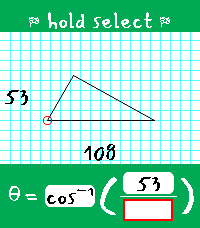
Trigalarm is a habit-correcting alarm for heavy sleepers that forces you to solve for theta in right triangles. It's the perfect amount of thought to activate your brain in the morning! ## The Pitch ### Simple The alarm setter is only one page. You can only set one alarm. There is no snooze, there is no weekly schedule, and there is no way to disable the alarm (you'll always have one set - every day - like it or not). ### Persistent The alarm goes off at least twice. The first time, you must solve a triangle to silence the alarm. The second time, you must do it again, but within a strict time limit (and no constant vibration). Fail to solve it within the time limit? The alarm is scheduled for a third time. This process continues until you solve within the time limit - this is to prove you managed to stay awake between alarms before allowing it to be fully disarmed. Even if you force-quit Trigalarm, it will shortly re-open to continue nagging you. ### Adaptable Trigalarm is meant to be adapted to your needs, and you should adjust its settings as you progress on your sleep journey. For example, as your trig skills improve, you may want to lower the time limit for the disarming alarm. You can also adjust the gap between alarms to account for how quickly you find yourself getting out of bed. Perhaps the most unique, Trigalarm features optional Pavlok API integration to punish you via minor electrocution if you fall back asleep, force-quit the app, or attempt to overwrite your active alarm cycle. ## Learn the Lingo - Main alarm - The first alarm that goes off; comes with continuous vibration and does not disarm Trigalarm when solved. If Pavlok integration is enabled, this alarm can zap the user after a configurable amount of time if they do not respond. Solving this alarm will schedule an awareness alarm. - Awareness alarm - Any subsequent alarm after the main alarm has been solved; comes with only one brief vibration to indicate to the user it has opened. It has a configurable time limit it must be solved within to disarm Trigalarm. If the time limit expires, it will begin vibrations (and optionally Pavlok zaps), and once solved, it will schedule another awareness alarm. ## Tips & Tricks - When you successfully disarm the alarm, you are prompted with the options to either exit and keep the same alarm time for tomorrow, or to select a new time. If choosing the latter, whatever time you select will assume you mean tomorrow. This avoids situations where you wake up at 6 on a Friday, set an alarm intended for 9 on Saturday, and end up with your wrist buzzing in three hours! - If you are stuck waiting for an awareness alarm or there is a bug that schedules an alarm incorrectly, there is a "Reset Alarm" button in the phone-side settings that will set your alarm to 00:00. 13
13PHM D2
Project Hail Mary Rocky Watch Face
 49
49Color Calendar Redux
Color Calendar Redux

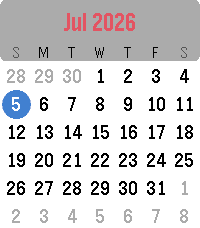
This is an update of the original Color Calendar app created by Kelby. A simple, easy-to-read calendar for your Pebble. Tap or Swipe Up and Down to scroll between months, Tap/Select returns to today, and long select press toggles between Sunday-first and Monday-first week layouts.

New in this version:
- Full support for Pebble Time 2 and Pebble Round 2, with a layout that scales to fill their larger displays (and it still runs great on Pebble Time and Pebble Time Round).
- Touchscreen controls on Pebble Time 2 and Pebble Round 2: swipe up or down to change months, tap to jump back to today.
- Simple calendar icon in the app menu
- The current date now appears in the launcher under the app name (e.g. "Thu, Jan
1st")

Based on the original Color Calendar by Kelby. Full credit to them, I just added some features and native scaling for the new watches.


About the Developer
- Comet Designs creates fun content for the Pebble platform
- Buy me a coffee https://ko-fi.com/cometdesigns
 23
23pendler2
Über diese Anwendung kannst du deine nächste Zugverbindung per Knopfdruck abrufen. Die App greift dabei auf offizielle und freie APIs der Deutschen Bahn zu.

Die Anwendung „pendler“ (2017) ist angelehnt an „myBahn“ von Frank Küpper (2016). „pendler2“ ist eine Neuentwicklung von „pendler“. Bei der Entwicklung habe ich diesmal auf die Unterstützung von „Claude Code“ und "gemini" zurückgegriffen.

# Bahnhöfe
Wähle zuerst den Startbahnhof aus. Klicke auf „Bahnhöfe“ > „hinzufügen“. Du kannst nun wählen, ob du den Bahnhof über den Service der Deutschen Bahn (Standard) oder über den Service des „VBB“ suchst. Für die meisten Bahnhöfe ist die Standard-Suche passend.

Sprich jetzt in das Mikrofon deiner Pebble den gesuchten Bahnhof. (Beispiel: Mainz, Frankfurt, Münster).
Wenn die Suche zu nur einem Ergebnis führt, wird der Bahnhof direkt übernommen und gespeichert. Wenn es mehrere Suchergebnisse gibt, musst du den passenden Bahnhof noch auswählen. Du kannst die so gewählten Bahnhöfe sowohl als Start- als auch als Zielbahnhof nutzen.

# Verbindungen
Klicke auf deiner Pebble auf den Menüpunkt „Verbindung“. Wähle zuerst einen Startbahnhof aus, den du im vorherigen Schritt bereits hinzugefügt hast.
Nach der Auswahl des Startbahnhofs musst du den Zielbahnhof bestimmen. Hier kannst du entweder direkt einen Namen diktieren oder einen anderen Bahnhof auswählen, den du ebenfalls bereits hinzugefügt hast.

Manchmal ist die Diktierfunktion hier unerlässlich, weil du bei der Verwaltung der Bahnhöfe immer einen konkreten Bahnhof auswählst. Der Frankfurter Hauptbahnhof z. B. hat aber mehrere EVA-Nummern (also mehrere „Unter-Bahnhöfe“). Wenn du hier einfach „Frankfurt“ diktierst, findet die Anwendung alle Verbindungen nach Frankfurt, unabhängig vom jeweiligen Unter-Bahnhof. Diese Option ist daher flexibler.

# Weiterfahren nach...
Wenn du eine konkrete Verbindung ausgewählt hast, kannst du durch einen Knopfdruck einen weiteren Bahnhof auswählen (Option „Weiterfahren nach...“). Dann wird der vorherige Zielbahnhof zum neuen Startbahnhof und du kannst einen neuen Zielbahnhof festlegen.
 2
2HanziWatch
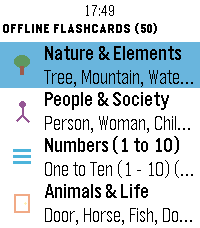
an interactive Chinese character flashcard app built specifically for Pebble watches. Learn essential Chinese characters on the go with high-contrast Hanzi glyphs, accurate Pinyin with tone marks, clean English translations, and native audio pronunciation.

Key Features:

50 Offline Core Flashcards: Includes 5 foundational decks (Nature, People, Numbers 1–10, Animals & Objects, Positions & Sizes) with mnemonic Chineasy-style art and native speaker audio played directly through the Pebble speaker.
337+ HSK 1 & HSK 2 Cards: Expanded vocabulary streamed instantly via Bluetooth with high-contrast 72×72 Chinese Hanzi glyphs, accented Pinyin, verified English translations directly under the character, and total stroke counts.
Flexible Navigation: Full touch support (Emery) with on-screen buttons and tap-to-advance, plus full physical hardware button support.
 7
7PoiBoi
A radar-like poi explorer. Point your hand at interesting things around you and PoiBoi will home in on the corresponding POI from OpenStreetMaps.
 4
4Metro VietNam
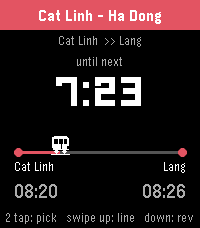
Track Hanoi & Ho Chi Minh City metro from your wrist.
Pick your trip A → B, watch the next train count down, get a buzz before it arrives.
 10
10Deen: Prayer Times & Qibla
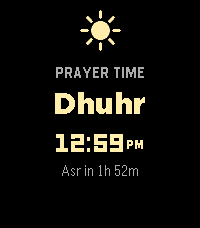
Deen keeps your five daily prayer times right on your watch, and reminds you when each one arrives.

Your prayer times stay accurate on their own — you don't need to open the app to keep them current. When it's time to pray, your watch gives a gentle buzz. Each prayer is shown with its own little icon, and the one you're in is highlighted so you always know where you are in the day.

Lost your direction? Open the qibla compass, hold your watch flat, and follow the arrow until it turns green — that's Mecca.

What you get:

- Your five daily prayer times, at a glance
- A gentle buzz at each prayer (turn any of them on or off)
- A qibla compass that points the way to Mecca
- The Islamic (Hijri) date
- Set your prayer calculation method, location, and more from your phone
- Works even without signal