vibration watch
appne
Watchapp

Description
This app shows the time by the vibration of up to 8 times.
No need to count the vibration and/or to learn the pattern.

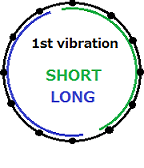
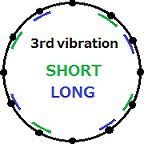
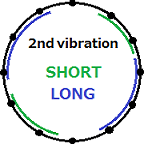
Short vibration indicates the first half, long vibration will show the second half.

Repeat this watchface division images the position of the hour hand.

example " . "=short vibration " - "=long vibration

" . " : (watchface first half top) 12
" - " : (watchface second half) 6
" .- " : (first half's second half) 3
" .-. " : (first half's second half's first half) 4

After short blank, it will show the minute hand position in the same way.
You got time in 5-minute increments.
It does not vibrate when 0 minutes as an exception.

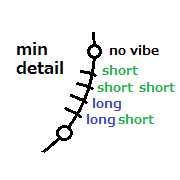
Last block shows detail minute.
+0min: no vibration
+1min: one short
+2min: two short
+3min: one long
+4min: one long and one short
(To save the vibration, slightly irregular:)

After a series of vibration, the application will automatically exit back to the previous state(your watchface or app launcher).
It recommended to set quck-lunch or placing at the bottom of the application-list.

in Japanese.
文字盤を見れないけど時刻を知りたい時のために最高8回の振動で時刻を知らせます

短い振動は前半、長い振動は後半の法則で、これを繰り返して文字盤を分割していくイメージで、
分割した一番早い箇所が示す時刻です

最初に時針の位置を示します
例えば0時は前半の先頭なので、短い振動1回
同様に6時は長い振動1回、3時は前半の後半なので短・長、11時は後半の後半の後半なので長・長・長です
全部書くと
0:短 1:短短短 2:短短長 3:短長 4:短長短 5:短長長
6:長 7:長短短 8:長短長 9:長長 10:長長短 11:長長長
ですが、パターンを憶えずに、振動を感じながら頭の中で文字盤を分割すると良いです

短い空白の後、同様に分針の5分刻みの位置を示します

最後に5分以内の分を知らせますが、振動を節約する為やや不規則です
+0分:振動無し
+1分:短
+2分:短短
+3分:長
+4分:長短
短:1分・長:3分と憶えたほうが早いかも

通知が終わるとアプリは自動的に終了し以前の状態(時計もしくはアプリケーションの一覧)に戻ります
クイックランチに設定するか、アプリケーション一覧の一番下に配置しておくと、目隠しの状態でも起動できて便利です
- Developerappne · Is this you? Claim your app ›
- CategoryTools & Utilities
- PlatformsOG Pebble, Steel, Time/Time Steel, Time Round, 2, 2 Duo, Time 2 (scaled), Round 2 (scaled)
- Updated2015-12-07
- Version1.1