Theta
BriWest
Watchface
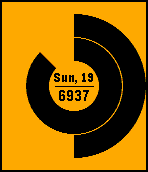
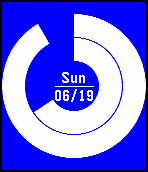

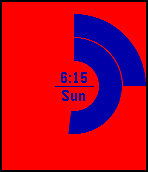
Description
Updated to use Pebble's Unobstructed Area API to show timeline Quick Views!

Theta is a clean and glancable watch face designed to make the most of your screen's real estate. The angle of the inner ring shows hours, while the angle of the outer ring shows minutes. The inner display has two complications, which can each be configured to display one of the following:

1. The time in digital format
2. The month
3. The day of the month
4. The day of the week
5. The date in US format (jan/01)
6. The date the way the rest of the world writes it (01/jan)
7. Weekday, date (ex. fri, 16)
8. Steps
9. Distance walked (km)
10. Distance walked (miles)
11. Calories burned

Colors can be set manually or to change randomly. Random colors change every hour, on the hour or whenever the watch face is closed and reopened.
*Because pulling random colors from Pebble's whole palette tends to create combinations with poor contrast, several smaller palettes have have been hand picked and added to the options. The dark and light settings have exceptionally good contrast.

Additionally, the center line can configured to indicate battery level. Theta can also be configured to vibrate and show a symbol when bluetooth has been disconnected.

The screenshots above show the following times:
1. 7:55
2. 10:30
3. 6:15
4. 6:50

As always, please feel free to email me with the 'Contact Developer' button for any issues, requests, recommendations, or for any other reason.
- DeveloperBriWest · Is this you? Claim your app ›
- CategoryFaces
- PlatformsOG Pebble, Steel, Time/Time Steel, Time Round, 2, 2 Duo, Time 2 (scaled), Round 2 (scaled)
- Updated2016-08-31
- Version1.2