Steps per minute
jdixl
Watchface
Description
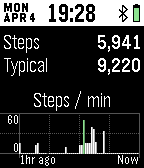
Ever since Pebble released their Health update for Pebble Time, I find my self checking my step count more than I'd like to admit over the course of day. Now you can view all that valuable step information as soon as it comes to hand, right from your watchface!

Highlights include:
* Current Steps (turns green when you are on par or ahead of your typical steps).
* Typical Steps
* A bar graph of the steps your Pebble Time has recorded for each minute of the last hour (minutes with the most steps are displayed in green).
* Current steps per minute when your Pebble Time reports that you are moving at over 30 steps per minute.

Download now and we'll even throw in:
* Day, Month and Day
* Current time
* Bluetooth connected symbol (vibrates on disconnect)
* Battery level

There are a few things you need to know:
* There may be up to a 15 minute delay in the data displayed in the bar graph of steps in the last hour. This is because Pebble only serves up this detailed information every 15 minutes (I'm guessing to preserve battery life).
* The current steps per minute is a guide only. You will see a white guide bar start to shrink each time a new current steps per minute is display to give you an indication as to how fresh the value is.

I think that's about it for now, there are a bunch of other things I'd like to do with this watchface in time, but rather than sit on it for another few months, I'd rather share it with my fellow Pebblers and hear first hand what people want.

Enjoy!
- Developerjdixl
- CategoryFaces
- PlatformsTime/Time Steel, Time 2 (scaled)
- Updated2016-04-04
- Version1.0