Step in Time
David Watson
Watchface
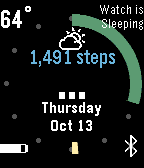
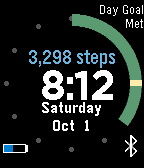
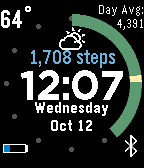
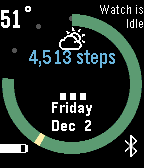
Description
All: Idle and Sleep are fixed and obey the settings as I replaced the builtin app_timer functionality.

This watchface is a reconstruction of the Strider watchface with some additional custom features.  I would love to have some help or your suggestions...shoot me an email from the support link.

-Set an mid day step goal as well as a day step goal, after you attain either of these goals your watch will buzz in a unique pattern and display which goal you met (top right of the screenshot).  The watchface will also buzz when you attain your average step goal for this day of the week over the last 4 weeks...ie the average daily steps of the last 4 Saturdays

-The watch can sleep with you and display "Watch is sleeping" with the time "..." and stop refreshing time/weather to save power .  Flick your wrist to wake the watch early, or you can disable this in the settings.

-The watch will go idle while you chill on the couch.  If it sees no significant movement for 45 minutes it will do the same thing as sleeping, flick your wrist to wake it up or just start walking.  Disable is available in options.

-The watchface is weather enabled and refreshes every 30 minutes.  Current weather data is available from Wunderground, Forcast.io, and OpenWeatherMap and you will need to sign up at https://www.wunderground.com/weather/api/d/docs, https://developer.forecast.io/, or http://openweathermap.org/appid to obtain a free API key.
- DeveloperDavid Watson · Is this you? Claim your app ›
- CategoryFaces
- PlatformsTime/Time Steel, Time 2 (scaled)
- Updated2016-12-02
- Version1.7