Percentages
Dr. Antonio Aguilera.
Watchface
Description
Percentages.

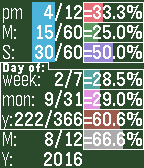
To quickly tell the time, just read the numbers inside the blue vertical rectangle at the top left.

Each row shows a time component as a fraction, as a colored bar, and as a percentage.
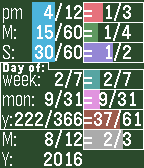
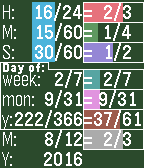
Tap or shake your Pebble to switch between percentages and simplified fractions.

This watchface handles 12hrs/24hrs format, the differences are in the title and denominator on the first row.

All four examples are at the exact same time.
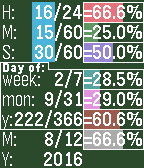
Examples 1 and 2 show 16:15:30 in 24 hrs format. The title for row 1 is "H:" (for "Hours:") and the denominator is 24. Thus, 16/24 is 66.6% or 2/3 of a day.

When the 12 hrs format is active, the title "H:" is replaced for "am" or "pm" accordingly. Also, the denominator is set to 12, which means that the fraction and the percentage are with respect to just the morning (if am); or just the afternoon-night (if pm).

Examples 3 and 4 show 4:15:30 pm, now, 4/12 represents 33.3% or 1/3 of the afternoon-nigh.

The 2nd row shows that 15 min out of 60 are 25.0% or 1/4 of the hour.
The 3rd row shows that 30 sec out of 60 are 50.0% or 1/2 of a minute.
The Day of week is 2/7, this is, tuesday.
The Day of month is 9/31, i.e., the 9th day of a month with 31 days.
The Day of year is 222/366, i.e., the 222nd day of a (leap) year.
The Month is 8/12, i.e., august (2/3 of a year)
Finally, the year (2016) is not compared to anything.

If you think about it, this is quite a lot of information, which I hope you find useful, or at least interesting.

Enjoy it :)
- DeveloperDr. Antonio Aguilera. · Is this you? Claim your app ›
- CategoryFaces
- PlatformsOG Pebble, Steel, Time/Time Steel, Time Round, 2, 2 Duo, Time 2 (scaled), Round 2 (scaled)
- Updated2016-08-09
- Version1.0