Morpheuz Reborn
Christian Sandmann
Watchapp
Description
Morpheuz Reborn is a sleep monitor with a smart alarm. It is a ground-up rebuild of the original Morpheuz by James Fowler (MIT licence), whose servers are gone: https://apps.rebble.io/application/52b20a9b05c04688bf000058 (source: https://github.com/JamesFowler42/morpheuz20). The idea is the same, the code is new, and everything that needed a web service is left out.

Morpheuz Reborn is an experiment to find out whether an app like this is still useful at all, now that Pebble has its own sleep tracking. Please treat it as an experiment.

How it works:
You start the app when you go to bed and leave it open. It counts the movement of your wrist with the accelerometer, one value for every 10 minutes of the night. You choose a wake window, for example 5:00 to 5:15. The alarm rings as soon as you move more than you usually do while asleep, which marks a moment of light sleep inside the window. If that never happens, it rings at the latest time.

Details:
- Splash screen at every fresh start (bed, sleeper, credit to the original Morpheuz); any key or tap skips it
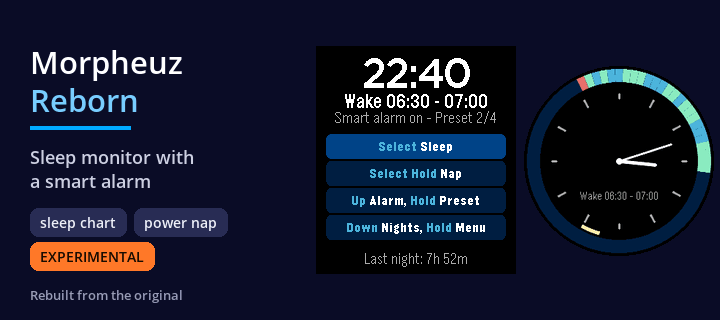
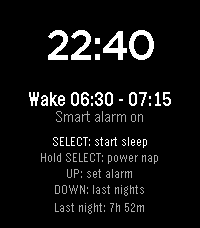
- Start screen: four rows that name the buttons to press: Select = sleep, Select Hold = 22 minute nap, Up = alarm (Hold = next preset), Down = nights (Hold = menu). The rows are touch buttons as well (touch can be switched off in the settings), and a line shows your last night
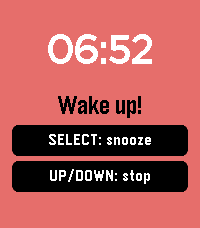
- Smart alarm inside your wake window, or a fixed alarm at the latest time. A progressive vibration, SELECT snoozes, UP or DOWN stops it. An alarm you do not answer rings again after the snooze time
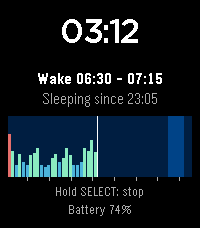
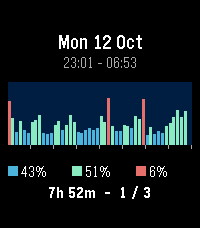
- Chart of the night, drawn while you sleep: one bar per 10 minutes, deep sleep, light sleep and restless. The wake window is shaded, hour ticks run along the bottom
- Two sleep screens: digital (clock, wake window and chart) or analogue (a 12 hour dial where the night appears as a colored ring at the clock positions it was recorded at, the wake window as a yellow arc, plus hands). Press UP or DOWN while sleeping to switch, or choose in the phone settings
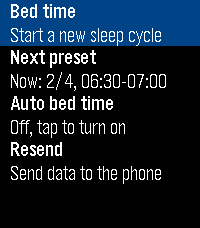
- Four saved wake windows (presets), for example weekdays and weekends. Hold UP in the start screen or choose "Next preset" in the menu to switch
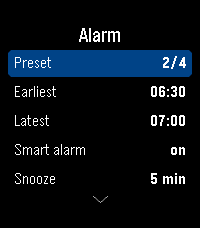
- Alarm Editor on the watch and in the phone settings.
- Enable / disable Touch in the alarm editor and in the phone settings; with touch off only the buttons work. Your settings are kept.
- History of the last 7 nights on the watch, with the share of deep, light and restless sleep, the duration and the number of snoozes
- Long history on the phone: every saved night is sent to the phone, which keeps the last 120. Open the settings in the Pebble app to see a chart for each night and the average of the last 7 nights
- Menu (hold DOWN or tap the clock in the start screen, SELECT while you sleep): bed time (start a new sleep cycle), automatic bed time (every day at the same time the app starts a sleep cycle by itself), ignore (skip the next 10 minutes of movement, for example when you are up for a moment), stop & quit, and resend the data to the phone
- Power nap: hold SELECT in the start screen. The alarm rings exactly 22 minutes later, the time to settle down included
- Safety net: if the app is closed during the night, it comes back by itself, and the alarm is also scheduled with the watch so that it still rings
- BACK is ignored while the night runs, so you cannot leave by accident. Hold SELECT to stop
- Battery level on the screen while you sleep

Set the alarm on the watch (UP in the start screen) or on the phone: earliest and latest wake time, smart alarm on or off, snooze time, automatic bed time, sleep screen, and touch input on or off (switch it off to use the buttons only). Both stay in sync. German and English, following the language of your watch.

For Pebble Time 2 and Pebble Round 2. Keep the watch charged for the night.
Nothing leaves your watch and your phone, there is no server.
Development supported by Claude and the skill for it.
- DeveloperChristian Sandmann
- CategoryHealth & Fitness
- PlatformsTime 2, Round 2
- Updated2026-10-13
- Version1.6.0