minim
Luke Arms
⚠️ This apps settings page may not work anymore
Watchface
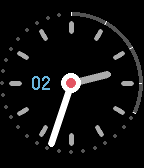
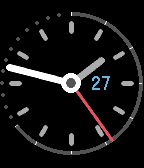
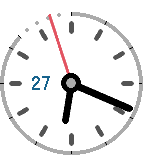
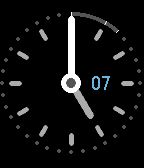
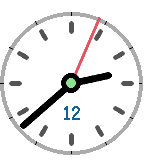
Description
(New in 1.3: theme selection. Light and dark themes available.)

Inspired by classic analog watches, minim embraces the power of Pebble without turning your wrist into a miniature control panel.

With Pebble Health enabled, the outer ring doubles as a progress bar for today's steps. Choose your target step count or let minim figure it out from your recent health data. When you complete the circle by reaching your target, the centre pin turns green.

The centre pin also provides battery level feedback. It turns red when Pebble's battery reaches 20% or below. (When charging, it flashes red. When fully charged, it flashes green.)

Speaking of batteries, you might want to enable "Battery saving mode". You'll lose the seconds hand but gain hours of battery life. Decisions, decisions!

(If you like seconds hands, all is not lost: battery saving mode turns on automatically when you're having a "deep sleep".)

And finally, because smart watches should be smart, today's date is never hidden. It moves clockwise as needed to stay clear of the hours and minutes hands.
- DeveloperLuke Arms · Is this you? Claim your app ›
- CategoryFaces
- PlatformsTime/Time Steel, Time Round, Time 2 (scaled), Round 2 (scaled)
- Updated2016-03-10
- Version1.3