JR Shinkansen
Jaybon
Watchface
Description
JR Shinkansen — Tōkaidō・Sanyō Shinkansen watchface
Version 1.0.0


DESCRIPTION

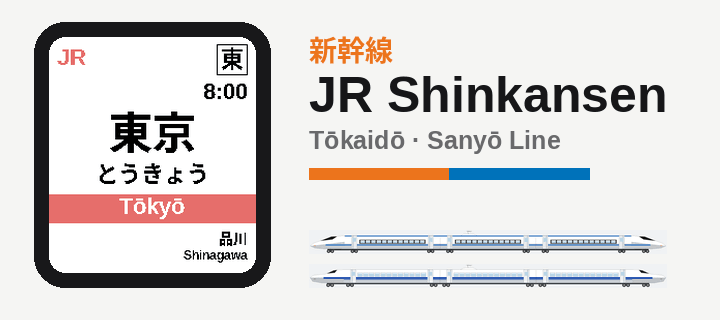
Your wrist becomes a Shinkansen platform nameboard — and the station tells the time.

This watchface puts you on the Tōkaidō・Sanyō Shinkansen, riding Tokyo ⇄ Hakata across all 35 stations. The line is the clock: one full run of the line takes one hour, and the train reverses direction every hour. At the top of an even hour you're at Tōkyō, rolling station-by-station toward Hakata and arriving by ~:58; odd hours run the line back, Hakata → Tōkyō. Which station is showing tells you the minute — and for the exact time, just read the platform clock, the way every Shinkansen platform has one.

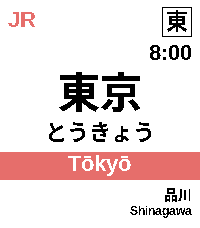
It's a real nameboard at every moment: the authentic station name in kanji, hiragana, and rōmaji, the boxed kanji station code, the JR wordmark, and a line-coloured strip carrying the rōmaji with the previous and next stops. The colour follows the operating company along the route — JR Central orange on the Tōkaidō, JR West blue on the Sanyō — and an optional direction chevron follows the way you're travelling. When the station changes, the board moves on like an arriving train.


FEATURES

• Authentic Shinkansen nameboard (新幹線駅名標) — cream board with the station name in kanji / hiragana / rōmaji, a boxed kanji station code, the JR wordmark, and a line-coloured strip with the real adjacent stations.

• Company-aware colours — Tōkaidō stations show JR Central orange, Sanyō stations show JR West blue.

• Travel-direction chevron (optional) — a ">" or "<" beside the station name, pointing the way the train runs: toward Hakata on even hours, back toward Tokyo on odd hours. Turn it on in Settings.

• Tells time by riding the line — one full traverse = one hour across all 35 stops, reversing direction every hour, anchored to Tōkyō on the even hours and Hakata on the odd.

• Platform clock for the precise time (12- or 24-hour).

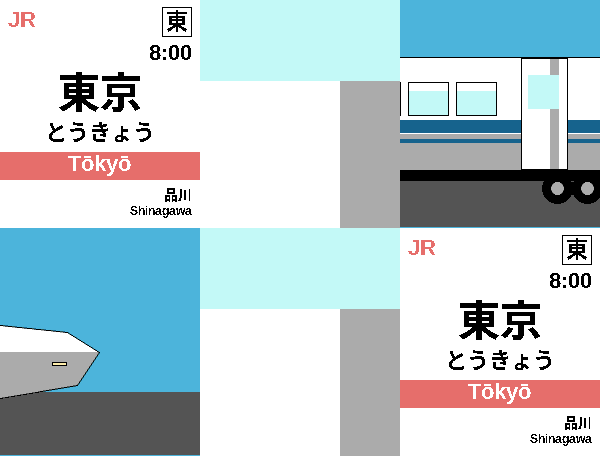
• Two selectable trains — the N700 series (duck-bill nose) or the 500 series (needle nose), single-door, shown in the cinematic transitions.

• Cinematic train transitions — choose Off (a quick sign slide), Cinematic Short (the same train rolls forward to the next car's door), or Cinematic Long (the whole train departs, a new one arrives, and its doors open onto the next station). Pick whether it plays on every station change or wrist-flick only.

• Tap or flick your wrist to peek — replays the transition on demand (and lights the screen).

• Two route lengths — ride the Full line (Tokyo ⇄ Hakata, 35 stops) or the Short Tōkaidō run (Tokyo ⇄ Shin-Ōsaka, 17 stops).

• Fits every Pebble screen — rectangular and round, colour and black-and-white, with adaptive layout so long names like Higashi-Hiroshima and Shin-Yamaguchi stay crisp. On round screens the JR wordmark mirrors the boxed station code, framing the board.


COMPATIBLE WATCHES

• Pebble Time 2 (primary)
• Pebble Round 2
• Pebble Time / Pebble Time Steel
• Pebble Time Round
• Pebble 2 (black & white)


SETTINGS

Open the Pebble app, then this watchface, then Settings:

• Route — Full (Tokyo ⇄ Hakata, 35 stops) or Short (Tokyo ⇄ Shin-Ōsaka, Tōkaidō only, 17 stops). Default: Full.

• Train — N700 series or 500 series. Default: N700.

• Cinematic train — the transition style: Off (quick sign slide), Cinematic Short, or Cinematic Long. Default: Cinematic Short.

• Play cinematic on — Every station change or Wrist-flick only. Default: Every station change.

• 24-hour time — switch the platform clock between 12- and 24-hour. Default: 12-hour.

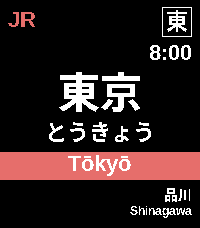
• Dark mode — flip to a black board with white text; the line strip keeps its company colour. Default: off.

• Direction arrow — show a travel-direction chevron beside the station name. Default: off.

• Peek on tap — turn the tap/flick-to-peek animation on or off. Default: on.

• Backlight on tap — turn the tap/flick-to-light-the-screen behaviour on or off. Default: on.
- DeveloperJaybon
- CategoryFaces
- PlatformsTime/Time Steel, Time Round, 2, 2 Duo, Time 2, Round 2
- Updated2026-06-11
- Version1.0.0