 28
28Time Flies!
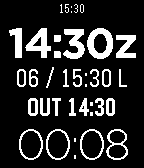
Tools & UtilitiesA timer app for pilots that displays Zulu time, a single button reset Elapsed timer, and memory function for "Out, Off, On, In" times. Full instructions are available here: http://goo.gl/jXeqe3 Zulu time is set manually by offset from the watch time. Hold the middle button for five seconds to change Zulu time, up and down buttons to change and middle button again to store.
 28
28TrainTime
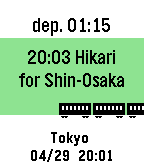
Tools & UtilitiesThis is train time table app. Please open setting page and input time table. After setting, network connection is unnecessary when using the app. You can change the Icon type to "Train, Bus, Ship, Plane". Sample is below. https://otoone-dev.github.io/docs/train_setting_sample.html Controlls [UP,DOWN] Change train. [SELECT] Change station (only 2 station) for Japanese... NextTrain 形式のテキストが使える場合があります。 多くの電車が出発する駅はサイズオーバーになる事がありますので、 その場合は曜日や時間を削る等の編集が必要です。 祝日には対応していません。 適用方法がわからない方はメールしてください。
 28
28Deep Space Mining Inc.
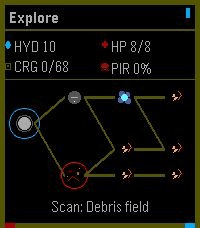
GamesThe outer systems are open, dangerous, and full of things humanity was probably meant to leave buried. You are an independent mining captain trying to survive the corporate frontier: scan unstable asteroid fields, crack valuable rocks, upgrade your ship, and push deeper into hostile space where pirates, alien signals, and something far worse wait in the dark. Deep Space Mining Inc. is a roguelite mining adventure where every expedition is a choice between greed and survival. Fill your cargo hold, survive the return trip, invest in better ships and equipment, then head back out for a deeper, riskier run. The further you go, the richer the rewards, but the frontier does not give anything back for free. Controls: Use **Up** and **Down** to navigate menus, adjust mining power, and steer during encounters. Press **Select** to confirm choices, toggle the mining laser, and fire ship guns. Press **Back** to return or pause. Hold **Back** to exit the app. Supported Devices: Deep Space Mining Inc. is best played on Pebble Time 2 and other higher-memory color Pebble watches. Black-and-white devices and lower-memory systems are supported where possible, but they run a visually reduced version with simpler rendering and fewer effects.
 28
28CountUpVibe Timer
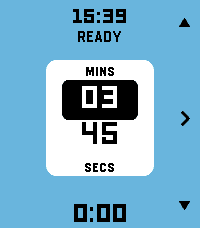
Tools & UtilitiesStay in the rhythm without watching the clock. Fire the timer first and then set time on-the-fly. Fastest way to launch a timer on Pebble. CountUpVibe Timer counts upward and taps your wrist at the interval you set — great for workouts, focus sprints, hydration nudges, posture checks, or any habit that needs a steady beat. It will give a gentle buzz on your wrist when a present time interval passes. Optimized for quick launch and fast adjustment with minimum key presses. Features: - ⏱ Quick-launch count-up timer. Once app is launched, timer immediately starts. Ideal to use with a Quick Launch button. - 🔔 Set vibration intervals while timer is running. Custom vibration interval (15s up to 99:59 — default 5 min) - 🌊 Draining water-fill shows the time to your next buzz at a glance. Change the water-color to your preference - ✏️ Launch the timer with one key press. Adjust later while timer is running - ⏯ Intuitive and minimal key presses to set the timer - 📿 Keeps reminding you in the background after you leave the app. Optimized operation for minimal battery usage - ⌚ Made for Pebble Time 2 and also runs on every Pebble (I only tested it on Pebble 2. Please give me a feedback if you try it on your Pebble) - Settings section in Pebble Smartphone part of CountUpVibe Timer let's you change the default settings/preferences and color palette. - Works with Quiet-Time (Silent Mode) in Pebble. If Quiet-Time is on, timer will run but watch won't vibrate. Set it once and let your wrist keep the beat. Operation Instructions: - Timer automatically starts counting the time upwards when you launch the app. It will buzz every 5 mins by default. App starts in Adjust mode. - Adjusting Vibration (Buzz) interval: In Adjust mode, Press Up and Down key to adjust minutes. Press Central key to highlight seconds adjustment (with UP and Down key). Press Central key again (or wait for 15 secs) to set the buzz time interval. Now you enter Run mode. - Run mode: Top key pauses/resumes timer. Bottom key resets/starts timer. Central key enters Adjust mode. - Timer will keep running in the background and it will keep buzzing/vibrating at the set interval. To stop it, press bottom (reset) key in Run mode. - The app is made to be used intuitively to rapidly launch a timer without too many key presses. - Settings menu in Pebble App changes the default settings/preferences and color palette. You can set the default vibration interval, minimum step of interval change and color of water-animation of you choice
 28
28Hive for Pebble
RemotesConnects and controls the Hive Heating system by British Gas Any problems don't hesitate to email and ask. The information you provide e.g username/password is stored on your phone and can only be accessed by Hivepebble.
 28
28Theremin
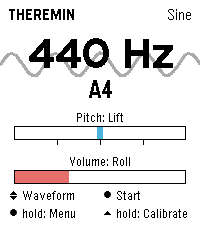
Tools & UtilitiesPlay a theremin on your wrist: raise your hand for pitch, twist it for volume. Theremin turns the Pebble Time 2 into an instrument you play without touching it. Just like the original, the position of your hand shapes the sound: raising and lowering your hand changes the pitch, twisting your wrist controls the volume. The tone is synthesized in real time and played through the watch's speaker. Features - Four waveforms: sine, triangle, square, sawtooth - Vibrato in three depths or driven by the tremble of your hand - Reverb in three room sizes - Up to four octaves of range, selectable lowest note - Snap to scales: chromatic, major, minor, pentatonic, or play continuously like a real theremin - Freely assignable control axes: lift, roll or compass, each invertible - Adjustable sensitivity, portamento and volume - Automatic calibration on launch: hold the watch still for a second and you're set - Live readout of frequency and note name, with the animated waveform in the background - Noise gate switches the speaker off during silence - Every setting available on the watch or conveniently in the Pebble phone app - Seven languages (EN, DE, FR, ES, IT, PT, NL) Controls - SELECT: sound on or off - UP and DOWN: waveform - Long SELECT: settings - Long UP: recalibrate the neutral position Tip: Keep the watch still for a moment when the app starts; that pose becomes the middle of the pitch range. Tilted towards you is loud, tilted away silent. Pebble Time 2 only (needs the speaker). Compass mode is experimental. Vibe coded from start to store. That is the only reason it exists alongside a full time job. The app is free and has no ads. If you enjoy it, a coffee is much appreciated: https://buymeacoffee.com/SIDEffects
 28
28MBTA Smart - Bus & Subway
DailyGet predictions for Boston subway, bus and commuter rail trains, all from your pebble watch. Firstly find your stop based on your GPS location, then it will be saved for quick look-up the next time you launch the app. The app was designed to make looking up your most-used stations/stops quick and easy. Daily commuters will love this.
 28
28eSolat
DailyThis app can tell prayer times for Klang Valley area in Malaysia. Sourced directly from the JAKIM website. Made by a Malaysian for Malaysians.
 28
28Expense Manager
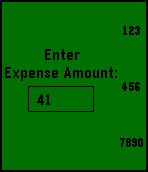
DailyEver wanted to monitor your monthly expenses to know where did all your savings went? I believe many had tried that through mobile apps but felt lazy or simply to troublesome to key in tons of information just to record a transaction of a dollar. Well, i am a lazy person but my app helps me to record all more transaction fast. It takes away the unnecessary information and store only how much you have spent and how much you have received. It provides a simple UI to allow you to monitor your monthly finances at a glance. At the end of the month, simply reset and you are ready for the challenge in the upcoming month. Come and try it now, since its free anyway. Instructions: Press and hold Up: Backspace; Press and hold Down: Clear Input; Press and hold Select: Enter
 28
28Pebble MA
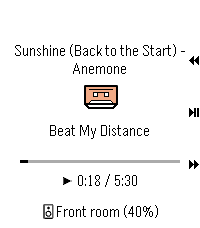
RemotesPebble Music Assistant client
 28
28PebPay
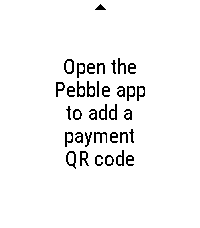
Tools & UtilitiesPebPay turns your Pebble into a payment receive screen. Save up to 8 of your favorite payment QR codes - Lightning addresses and LNURLs, Venmo, Cash App, or any payment URL - and scroll through them with the UP/DOWN buttons. Configure them once from the Pebble phone app, then just launch PebPay when someone wants to send you money. Your existing addresses, on your wrist.
 28
28SnapCounter
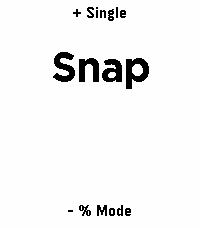
Tools & UtilitiesAn app to count things and calculate percentages using the Pebble buttons or finger motion (snapping/tapping)
 28
28Storefront
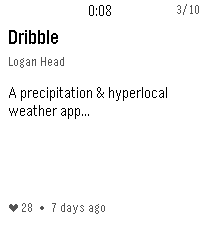
DailySee recently added apps at the Rebble Store.
 28
28BrewKinetics
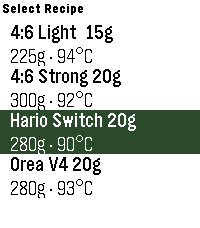
Tools & Utilities# BrewKinetics Step-by-step pour-over timer, right on your wrist. BrewKinetics guides you through specialty coffee brew methods with a hands-free countdown, haptic cues at each pour, and a visual progress indicator — no phone needed. # Features: - Create, edit, and delete your own recipes on the phone - New brew screen: runningpour weight, next-pour preview, timing checkpoints, and a last-5-second warning - Set any total water - every pour rescales to hit it exactly - Finished brews saved to your phone history - Built for Pebble Time 2
 28
28Reminders
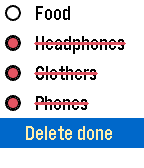
NotificationsThe list of reminders, shopping, or just what you need. Why take the phone in the store if you can look at the clock?