 1K
1KHatchi - A retro virtual pet
GamesHatchi is a retro-looking Pebble app sure to get the nostalgia burning for all those who cared for a virtual pet back in the 1990s when they were at the height of their popularity. Just as with the keychain-sized pets of the 90s, Pebble users now will feed, clean, play with and generally look after their pets to ensure they grow up to be healthy, happy little Hatchi. He needs YOU!
 979
979Rain
DailyGet a graph of the upcoming rain for your location for the next few moments. Ideal for checking if you need an umbrella or not when you're going out walking / cycling / hunting Pokémons with Pokémon go. USA / UK / Ireland Data-point every minute. Rain data provided by Apple WeatherKit Belgium / The Netherlands Data-point every 5 minutes. Rain data provided by buienradar.nl Germany Data-point every hour. Rain data by DWD. Scandinavia Data-point every hour. Data from MET Norway - yR Other countries Data-point every hour. Rain data provided by Apple WeatherKit As I'm spending a lot of my spare time developing this app I kindly ask you to buy me a drink ($1.99 excl VAT). In return you'll get a lot of extra features: - Multiple locations - Long-term forecasts - Vibrate as new data is fetched - Adjust the scale of the graph - More frequent auto-refresh options - Manually fetch new data - A happy me Give it a heart if you like it :)
 969
969LAST SIGNAL
GamesLAST SIGNAL is a realtime textadventure. Save Tom! Tom is in trouble and only YOU can help him! You are his last remaining connection. Help him with the right decisions and secure his survival! --------- This game is a PROTOTYPE. If you like it, give me a HEART. This motivate me to continue the work on the game. The game is not perfect. Please Let me know if you have found a mistake or if you have an idea.
 961
961My Steps
Health & FitnessMy Steps is a pedometer that counts your steps. Your arm can be in any position. It can count your steps in the background when you're using other apps. Daily and total counters. It's one of the most accurate pebble pedometer. It counts real steps and not virtual moves. Long press select button to reset the total counter. Use up/down buttons to adjust sensibility.
 883
883PebbCN
Notifications// 此项目停止维护,Pebble官方固件已支持中文,请升级您的手机端app和手表端固件到最新版本 Pebble中文提醒(Pebble Chinese Notification) 提供来电联系人、短信及其他第三方app通知提醒的中文推送,仅支持Android,不支持iOS。 请下载android客户端 http://resmx.com/pebble/cn
 870
870Ventoo - GPS sports tracker
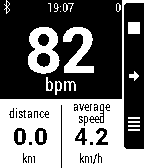
Health & Fitness(formerly known as Pebble Bike) Ventoo is a GPS sports tracker for your Pebble. It uses your phone's GPS to send speed, distance and altitude data to your Pebble. You can automatically upload your track to Strava or Runkeeper at the end of the track. If you got a Bluetooth LE Heart Rate Monitor (HRM) or Cycling Speed and Cadence (CSC), you can display heart rate (and zones with alarms) and cadence on your Pebble. Ventoo also has an innovative auto start feature which will auto start the bike computer on your watch when it detects you are riding a bike (it uses low battery technology, you can leave this switched on all day). Ventoo has a Live Tracking function that sends your position every 30 seconds to the internet. You can receive your friends'positions and display them with your own track, directly on your Pebble. Features: * GPS cycle computer (instant speed, average speed, distance, altitude, positive ascent, ascent rate, slope) * If available, use pressure sensor to improve altitude accuracy (Galaxy S3+, Nexus 4+...) * Tracks can be saved as GPX and exported to compatible services (Strava, Runkeeper...) * Multiple units (metric, imperial, nautical, pace...) * Bluetooth Smart (BLE) Heart Rate Monitor (classic bluetooth HRM are not supported) and Cycling Speed and Cadence (CSC) * Watchapp in english, german, spanish and french * Customizable screens with built-in configuration or with Canvas plugin * OruxMaps integration This app has no affiliation with the Swiss rights holder named Ventoo GmbH.
 847
847QR Generator
Tools & UtilitiesThis app is open source! If you like my apps heart them in the appstore and consider a donation (link is at the source link of this app). Displays your business card or any string as QR code on your watch! Simply set the string on the configuration page on the phone. The QR code is generated on your phone and sent to the watch. No companion app needed! Works without internet connection. - Long-press select to hide description - Shake to activate background for 10 seconds
 840
840Directions
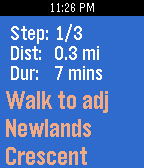
DailyGet google maps directions right on your wrist. No companion app required. Features : - Search for places around you - Save a place in your favourite and find it later - More than 25 different kind of places : Airport, Bar, Cafe, Hospitals, Dentist, Clothing store, Movie theater, Night clubs, Restaurant ... - Use any of the 4 modes from : Public Transport, Driving, Walking, Bicycling - Specify preferences : Bus, Tram, Rail, Subway, Fewer steps, Less walking ... - Choose from up to 10 different routes - Low battery life impact - No companion app required - Available in both kilometers and miles It is time for a better Directions for Pebble. If you like this app as much as I do and want to put it to the next level, join me here : https://directions.uservoice.com/ Post your ideas and I will make sure to implement the most popular ones. Are you a dev ? Directions is public on Github if you want to help. http://sncs.io/directionsOnGithub Google Maps charges me for the usage of the API. If you like the app please consider making a donation (website link bellow). Thank you :)
 833
833Swim.com
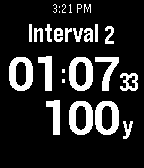
Health & FitnessSwim.com brings all the functionality of a smart swim watch onto Pebble with the most advanced swimming app available. The Swim.com app automatically records distance swum, lap times, pace, strokes and other key metrics to provide feedback about your swim. Workouts can be automatically synced to Swim.com using the companion app where you can track your progress, connect and compete. v2.1 INSTRUCTIONS: http://sw.im/how-to v2.1 BUTTON MAPPING: http://sw.im/buttons
 832
832Games for Pebble
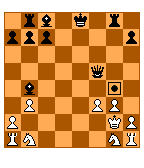
GamesThe best games app for Pebble! A collection of addicting games to waste a few minutes whenever you need to.
 816
816Pokémon GO Radar (BETA)
GamesThis app represents a collaborative proof-of-concept for a full Pokémon tracking app for Pokémon GO. Currently working: * Pokemon sprites * Distance/bearing * Real-time compass * Duplicate elimination * Splash/loading * Server maintenance check * Server error check * GPS status check * Bluetooth connectivity check * Data source config
 814
814Rosewright Chronograph
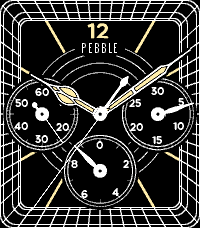
Tools & UtilitiesAn analog "Chronograph" three-subdial watchface. It's a fully functioning stopwatch with start/stop and lap buttons, and 0.1-second resolution. Like all Rosewright faces, it is extensively configurable including multiple face options, second hand, hour alert, bluetooth, battery, and day/date/month etc. in the language of your choice. Also see Rosewright C, which is a watchface with the same look as the Chronograph but lacking the actual chronograph functionality. It's meant for installing as a daily watchface if you like the look of Chronograph.
 806
806Pebtris
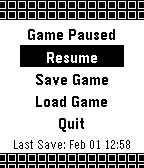
GamesPebtris 2 is here! Please Donate: http://bit.ly/tgdonate o Completely rewritten from the ground up o More options o Better code Instructions: Up - Move piece left Down - Move piece right Select - Rotate piece Hold Down - Drop piece down Back - Pause (In-Game Menu)
 775
775Muninn - Battery Wisdom
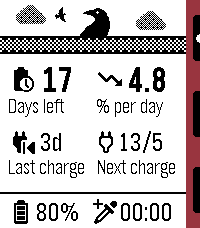
Tools & UtilitiesMuninn is an extremely lightweight battery tracking and prediction app. It uses the Wakeup API (every 6 hours) instead of the Background Worker to monitor trends and provide insight without negatively affecting battery life, using a moving average of readings over time to estimate days left, rate of discharge, next charge date, and more! Note: the Settings page is used for web stats, available after a few days of samples have been collected. Features: - Negligible battery impact - Days remaining and drain rate estimation - Last observed charge and predicted next charge date - Graph log of recent samples, up to 4 days - Sync up to 120 days of data to the phone for long-term insights - Upload and view all your data in web config page - Set an AppGlance to show estimate in the launcher menu - View general battery tips Options: - Custom low battery threshold notification (50%/20%/10%) - Timeline pin at noon on the last day remaining - High (above average) rate of drain notification - One day left notification - Auto-update of web config page stats (noon daily) Important notes: - If the watch is off at the next sample time, the app must be launched to allow wakeups to be resumed. - The initial estimate may be an overestimate but will smooth out soon after.
 764
764Twebble
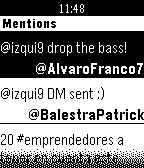
DailyTwebble is the first full-featured Twitter client for the Pebble. It works with SDK 2.0 and provides a unique way to check Twitter from your wrist. You can check your timeline, mentions and even your profile from the app. You can also take action by facing or retweeting tweets.